
Join the Conversation
- Find Answers
- :
- Using Splunk
- :
- Splunk Search
- :
- How to create table using nested json?
- Subscribe to RSS Feed
- Mark Topic as New
- Mark Topic as Read
- Float this Topic for Current User
- Bookmark Topic
- Subscribe to Topic
- Mute Topic
- Printer Friendly Page
- Mark as New
- Bookmark Message
- Subscribe to Message
- Mute Message
- Subscribe to RSS Feed
- Permalink
- Report Inappropriate Content
How to create table using nested json?

Hi All I have a nested JSON in my log event. On that basis, I have to create a dynamic table.
{status: FINISHED
data: [
{
duration: 123
status: A
}
{
duration: 456
status: B
}
{
duration: 678
status:C
}
]}
I need to create the table for this nested one
Table Structure :
| status | A | B | C |
| Finished | 123 | 456 | 678 |
Also, I have one more req. If in the future we get more values in the sub-part of JSON then can we add a column for that also
- Mark as New
- Bookmark Message
- Subscribe to Message
- Mute Message
- Subscribe to RSS Feed
- Permalink
- Report Inappropriate Content

- Mark as New
- Bookmark Message
- Subscribe to Message
- Mute Message
- Subscribe to RSS Feed
- Permalink
- Report Inappropriate Content
Hi, I have updated the duration name since it appears twice.
index=**** some search query |
| rename status as STATUS | spath path=data{} | mvexpand data{} | spath input=duration{} | chart values(duration) over STATUS by status
After running this query I am getting no result

- Mark as New
- Bookmark Message
- Subscribe to Message
- Mute Message
- Subscribe to RSS Feed
- Permalink
- Report Inappropriate Content
index=**** some search query |
| rename status as STATUS | spath path=data{} | mvexpand data{} | spath input=duration{} | chart values(duration) over STATUS by status
Sorry I didn't observe your sample data correctly. You are correct that the path to the array is data{}, not duration{}. As succh, in the next spath, input should also be data{}, not duration{}.
| rename status AS STATUS
| spath path=data{}
| mvexpand data{}
| spath input=data{}
| chart values(duration) over STATUS by status
(As a side: If you are posting sample JSON, make sure the format is conformant. I made the mistake when trying to correct the format.)
- Mark as New
- Bookmark Message
- Subscribe to Message
- Mute Message
- Subscribe to RSS Feed
- Permalink
- Report Inappropriate Content

I think a kvstore with json should do be what you want.. you can use collections.conf or the lookup file editor to define the non-json elements and type, and one for the array - then I would call them out explicitly in the transforms.conf file so you can play nicely with them using lookup and inputlookup>>>
The structure you settle on will depend on how you analyze this going forward, but I'd be tempted to start with this (you can view it in https://jsongrid.com/json-grid)
{
"status": "finished",
"duration_array": [
{
"status": "A",
"duration": 123
},
{
"status": "B",
"duration": 456
},
{
"status": "C",
"duration": 678
}
]
}
To use kvstore, you can define using the collections.conf, and lookup editor or the lookup file editor iin cloud
I prefer using the structure I have suggested as you can easily insert new status values,
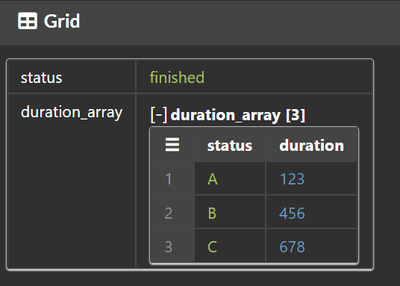
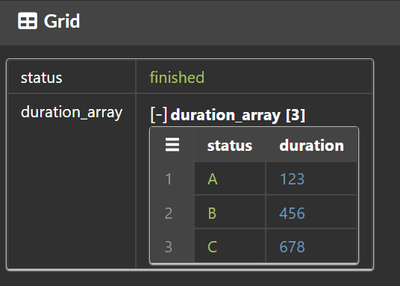
becomes
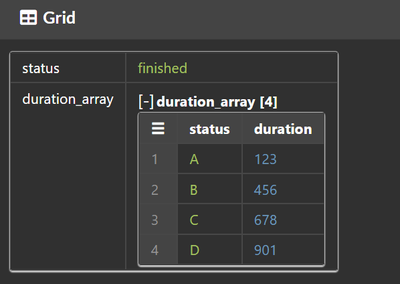
You should be able to refer to the data elements and do whatever you want - unless i'm missing the point
- Mark as New
- Bookmark Message
- Subscribe to Message
- Mute Message
- Subscribe to RSS Feed
- Permalink
- Report Inappropriate Content
I want splunk query for this

App Platform's 2025 Year in Review: A Year of Innovation, Growth, and Community
Operationalizing Entity Risk Score with Enterprise Security 8.3+
Unlock Database Monitoring with Splunk Observability Cloud
