
Join the Conversation
- Find Answers
- :
- Using Splunk
- :
- Splunk Search
- :
- How to create over lapping dashboard?
- Subscribe to RSS Feed
- Mark Topic as New
- Mark Topic as Read
- Float this Topic for Current User
- Bookmark Topic
- Subscribe to Topic
- Mute Topic
- Printer Friendly Page
- Mark as New
- Bookmark Message
- Subscribe to Message
- Mute Message
- Subscribe to RSS Feed
- Permalink
- Report Inappropriate Content
How to create over lapping dashboard?

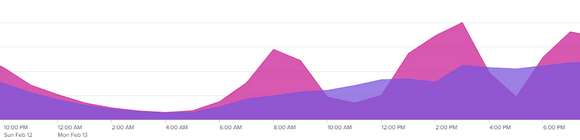
I am new to slunk, I have to create one dashboard and compare current day with same day of last week based on request ids count.
index="test" s_name="test-app*" earliest=-0d@d latest=now
| bucket span=1h _time
| stats dc(message.req_id) as tcount by _time
| eval ReportKey="today"
| append [search index="test" s_name="test-app*" earliest=-7d@d latest=-6d@d
        | bucket span=1h _time
        | stats dc(message.req_id) as week by _time
        | eval ReportKey="lweek"]
| timechart span=1h sum(week) as Lweek, sum(tcount) as Today by ReportKey
I want to create over lapping dashboard, like
Thanks in advance
- Mark as New
- Bookmark Message
- Subscribe to Message
- Mute Message
- Subscribe to RSS Feed
- Permalink
- Report Inappropriate Content


Hi @ssharma,
please try something like this:
index="test" cf_app_name="test-app*" ((earliest=-0d@d latest=now) OR (earliest=-7d@d latest=-6d@d))
| eval hour=strftime(_time, "%H"), week=if(now()-_time>86400,"Previous week","This week")
| chart dc(message.req_id) OVER hour BY week
Ciao.
Giuseppe
- Mark as New
- Bookmark Message
- Subscribe to Message
- Mute Message
- Subscribe to RSS Feed
- Permalink
- Report Inappropriate Content
@gcusello
Is that possible to create chart based on _time ??
- Mark as New
- Bookmark Message
- Subscribe to Message
- Mute Message
- Subscribe to RSS Feed
- Permalink
- Report Inappropriate Content
Hi @ssharma,
yes it's possible using timechart, but you want to overlap values of today's hours and one week ago, and this is one solution.
Ciao.
Giuseppe
- Mark as New
- Bookmark Message
- Subscribe to Message
- Mute Message
- Subscribe to RSS Feed
- Permalink
- Report Inappropriate Content
Hi @gcusello
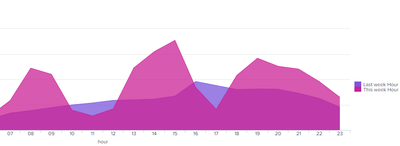
According to yr solution still I can see till 23 hour of yesterday in current week day but now its start new day,
can it possible to take current time to last 24 hours ??
- Mark as New
- Bookmark Message
- Subscribe to Message
- Mute Message
- Subscribe to RSS Feed
- Permalink
- Report Inappropriate Content
Hi @ssharma ,
let me better understand: what time period do you want to monitor?
I used the time frames of your search, if you want a different time frame put it in the search parameters.
If you want the todays values, you could use:
index="test" cf_app_name="test-app*" ((earliest=@d latest=now) OR (earliest=-7d@d latest=-6d@d))
| eval hour=strftime(_time, "%H"), week=if(now()-_time>86400,"Previous week","This week")
| chart dc(message.req_id) OVER hour BY week
Ciao.
Giuseppe

Join the Splunk Community Slack to learn, troubleshoot, and make connections with fellow Splunk practitioners in real time!
Join Splunk User Groups to connect and learn in-person by region or remotely by topic or industry.
[Puzzles] Solve, Learn, Repeat: Classic British Rock Bands
New to the Community? Join Us for an Exclusive Post .conf26 Welcome Session (Plus a ...
Accelerate Splunk App Development with AI
