
Join the Conversation
- Find Answers
- :
- Using Splunk
- :
- Splunk Search
- :
- Re: How to compare values on the same columns and...
- Subscribe to RSS Feed
- Mark Topic as New
- Mark Topic as Read
- Float this Topic for Current User
- Bookmark Topic
- Subscribe to Topic
- Mute Topic
- Printer Friendly Page
- Mark as New
- Bookmark Message
- Subscribe to Message
- Mute Message
- Subscribe to RSS Feed
- Permalink
- Report Inappropriate Content

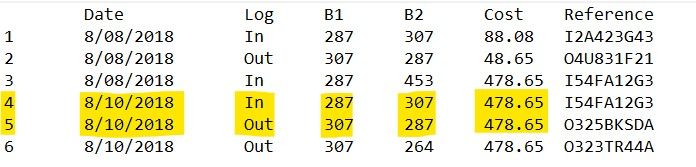
I have this table, and i just want to remove the rows that has the same cost on that date if the B1 of that row is on the B2 of another row. So basically, I just want to remove rows 4 and 5. Is there any way to do this? Thanks.

- Mark as New
- Bookmark Message
- Subscribe to Message
- Mute Message
- Subscribe to RSS Feed
- Permalink
- Report Inappropriate Content

Hi iancorrea,
I have a crazy search that works how you want it to, but you have to have the Line number field in there.
... [your search] ...

| sort Line

| streamstats current=f window=1 last(B2) as lastb2 last(B1) as lastb1 last(Cost) as lastcost last(Line) as lastline

| eval match = if(Cost == lastcost AND B1 == lastb2, 1, 0)

| eval removeline = case(match == 1, split(lastline . "," . Line, ","))

| eventstats values(removeline) as removeline

| where Line!=removeline

| table Line Date Log B1 B2 Cost Reference
Basically, it uses streamstats to compare to the previous event's values and then uses eventstats to provide a list of line numbers to remove using the where statement.
- Mark as New
- Bookmark Message
- Subscribe to Message
- Mute Message
- Subscribe to RSS Feed
- Permalink
- Report Inappropriate Content
Hi iancorrea,
I have a crazy search that works how you want it to, but you have to have the Line number field in there.
... [your search] ...

| sort Line

| streamstats current=f window=1 last(B2) as lastb2 last(B1) as lastb1 last(Cost) as lastcost last(Line) as lastline

| eval match = if(Cost == lastcost AND B1 == lastb2, 1, 0)

| eval removeline = case(match == 1, split(lastline . "," . Line, ","))

| eventstats values(removeline) as removeline

| where Line!=removeline

| table Line Date Log B1 B2 Cost Reference
Basically, it uses streamstats to compare to the previous event's values and then uses eventstats to provide a list of line numbers to remove using the where statement.
- Mark as New
- Bookmark Message
- Subscribe to Message
- Mute Message
- Subscribe to RSS Feed
- Permalink
- Report Inappropriate Content
Thanks for researching for a solution sir, I appreciate your effort 🙂 But i came up to another solution which I think the same concept as your answer. I made another field named "Comparison" and used eventstats to compare. This is what I've done,
1. ... [my search] ...
2. | eval Comparison=if(Log=="In", Date+"|"+B1+"|"+B2+"|"+Cost,Date+"|"+B2+"|"+B1+"|"+Cost)
3. | eventstats count as Status by Comparison
4. | eval Status=if(Status=="1","Failed","Passed")
5. | where Status="Failed"
- Mark as New
- Bookmark Message
- Subscribe to Message
- Mute Message
- Subscribe to RSS Feed
- Permalink
- Report Inappropriate Content

In that case, why is row 6 the one that stays? Is it because it's the latest one? How would we know that other than the ID?

Data Management Digest – December 2025
Index This | What is broken 80% of the time by February?
Unlock Faster Time-to-Value on Edge and Ingest Processor with New SPL2 Pipeline ...
