
Join the Conversation
- Find Answers
- :
- Using Splunk
- :
- Splunk Search
- :
- How to add a column to a stats table using rex
- Subscribe to RSS Feed
- Mark Topic as New
- Mark Topic as Read
- Float this Topic for Current User
- Bookmark Topic
- Subscribe to Topic
- Mute Topic
- Printer Friendly Page
- Mark as New
- Bookmark Message
- Subscribe to Message
- Mute Message
- Subscribe to RSS Feed
- Permalink
- Report Inappropriate Content
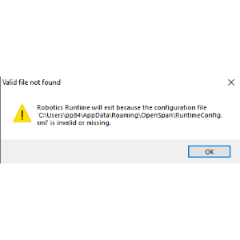
I'm fairly new to splunk and have just learned how to use the rex/regex. I am trying to add a column in my string search to a statistics table to display the name of the workstation. This is my current string.
- Mark as New
- Bookmark Message
- Subscribe to Message
- Mute Message
- Subscribe to RSS Feed
- Permalink
- Report Inappropriate Content


Hi harshparikhxlrd
if the field you want i ComputerName, probably you already have because Splunk recognize by itself the pair field=value.
Anyway the regex to extract Computername is:
| rex "(?ms)ComputerName\=(?<Computername>[^ ]*)Task"
that you can test at https://regex101.com/r/0n0rks/1
So your search will be (sorry I cannot rewrite your regex because I cannot see it, use Code Sample button to share regexes):
index=monitoring sourcetype=PEGA:WinEventLog:Application ( SourceName="RoboticLogging" OR SourceName="Application" ) ("Department=" "HRSS_STL") ("Type=" "Error")
| rex "Message : (?.+.?)"
| rex "(?ms)ComputerName\=(?<Computername>[^ ]*)Task"
| stats count by ex
| rename ex as Exception
Ciao.
Giuseppe
- Mark as New
- Bookmark Message
- Subscribe to Message
- Mute Message
- Subscribe to RSS Feed
- Permalink
- Report Inappropriate Content
Hi harshparikhxlrd
if the field you want i ComputerName, probably you already have because Splunk recognize by itself the pair field=value.
Anyway the regex to extract Computername is:
| rex "(?ms)ComputerName\=(?<Computername>[^ ]*)Task"
that you can test at https://regex101.com/r/0n0rks/1
So your search will be (sorry I cannot rewrite your regex because I cannot see it, use Code Sample button to share regexes):
index=monitoring sourcetype=PEGA:WinEventLog:Application ( SourceName="RoboticLogging" OR SourceName="Application" ) ("Department=" "HRSS_STL") ("Type=" "Error")
| rex "Message : (?.+.?)"
| rex "(?ms)ComputerName\=(?<Computername>[^ ]*)Task"
| stats count by ex
| rename ex as Exception
Ciao.
Giuseppe
- Mark as New
- Bookmark Message
- Subscribe to Message
- Mute Message
- Subscribe to RSS Feed
- Permalink
- Report Inappropriate Content
Hi harshparikhxlrd,
Try now:
index=monitoring sourcetype=PEGA:WinEventLog:Application ( SourceName="RoboticLogging" OR SourceName="Application" ) ("Department=" "HRSS_STL") ("Type=" "Error")
| rex "(?ms)ComputerName\=(?<Computername>[^ ]*)Task.*Message\=(?<Message>.*)"
| stats stats values(Message) As Message values(Computername) AS Computername count by ex
| rename ex as Exception
That you can test at https://regex101.com/r/0n0rks/2 .
Ciao.
Giuseppe
- Mark as New
- Bookmark Message
- Subscribe to Message
- Mute Message
- Subscribe to RSS Feed
- Permalink
- Report Inappropriate Content
Adding to previous post:
Message=

Index This | What is broken 80% of the time by February?
Unlock Faster Time-to-Value on Edge and Ingest Processor with New SPL2 Pipeline ...
Splunk MCP & Agentic AI: Machine Data Without Limits
