
Turn on suggestions
Auto-suggest helps you quickly narrow down your search results by suggesting possible matches as you type.
Splunk Search
×
Join the Conversation
Without signing in, you're just watching from the sidelines. Sign in or Register to connect, share, and be part of the Splunk Community.
- Find Answers
- :
- Using Splunk
- :
- Splunk Search
- :
- How to Extract Event Logs from SignalFX via API?
Options
- Subscribe to RSS Feed
- Mark Topic as New
- Mark Topic as Read
- Float this Topic for Current User
- Bookmark Topic
- Subscribe to Topic
- Mute Topic
- Printer Friendly Page
- Mark as New
- Bookmark Message
- Subscribe to Message
- Mute Message
- Subscribe to RSS Feed
- Permalink
- Report Inappropriate Content
How to Extract Event Logs from SignalFX via API?

rvillaflores
Loves-to-Learn
02-14-2023
01:14 AM
Hi,
I'm trying to extract logs via API using /v2/event/find Found here: Retrieve Events V2 | API Reference | Splunk Developer Program
However, the results I'm trying to get does not match with what I had in mind. (The results are similar to the examples in the link)
[ [-]
  { [-]
    id: "AddBYZrEFEF",
    metadata: { [-]
      ETS_key1: "detector",
      ETS_key2: false,
      ETS_key3: 1001
    },
    properties: { [-]
      is: "ok",
      sf_notificationWasSent: true,
      was: "anomalous"
    },
    sf_eventCategory: "USER_DEFINED",
    sf_eventType: "string",
    timestamp: 1554672630000,
    tsId: "XzZYApXCDCD"
  }
]
What I'm trying to get are raw messages from the Logs Observer in Splunk SignalFX (image below)
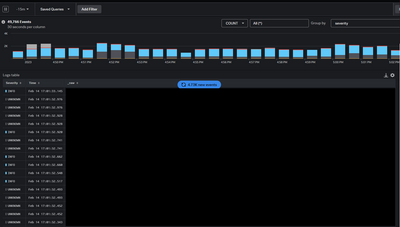
The json object I receive are just similar to the example, and not the messages we are ingesting. I need to extract a set with parameters/filters added. I'm expecting the result to be like this:
{
    "timestamp": "Feb 14 2023T12:00:00+0800",
    "message": "Error 404: /path/service/action",
    "severity": "ERROR",
    "service": "myApp-service"
}
How do I extract it?


Got questions? Get answers!
Join the Splunk Community Slack to learn, troubleshoot, and make connections with fellow Splunk practitioners in real time!
Meet up IRL or virtually!
Join Splunk User Groups to connect and learn in-person by region or remotely by topic or industry.
Get Updates on the Splunk Community!
Self-Healing Pipeline Is Now Generally Available: AI-Powered CIM Compliance
Maintaining data integrity across security and analytics pipelines is an ongoing challenge. Data ...
Meet Splunk Observability Studio: AI-Assisted OpenTelemetry Instrumentation Without ...
Instrumentation is usually the last step or even an afterthought when building out a project. The feature ...
Federated Search for Cisco Security and Analytics Logging (SAL) is now GA on Splunk ...
Federated Search for Cisco Security Analytics and Logging (SAL) is now generally available as part of the ...
