
Join the Conversation
- Find Answers
- :
- Using Splunk
- :
- Splunk Search
- :
- How do I add additional fields to my table?
- Subscribe to RSS Feed
- Mark Topic as New
- Mark Topic as Read
- Float this Topic for Current User
- Bookmark Topic
- Subscribe to Topic
- Mute Topic
- Printer Friendly Page
- Mark as New
- Bookmark Message
- Subscribe to Message
- Mute Message
- Subscribe to RSS Feed
- Permalink
- Report Inappropriate Content
How do I add additional fields to my table?

I have a simple table showing the dropped links on my switches:
this is generated by the following search:
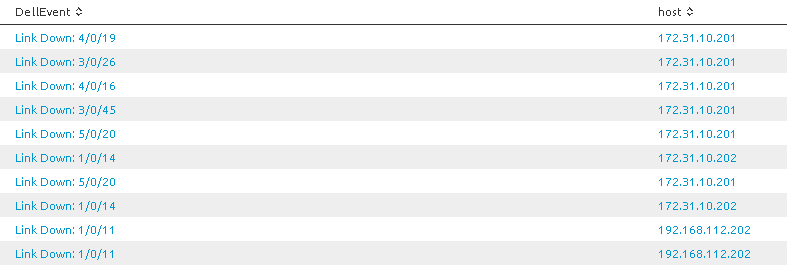
DellEvent="Link Down:*" | table DellEvent host
Now I want to show the top links that are down, which I can do with either of these searches:
DellEvent="Link Down:*" | top DellEvent

DellEvent="Link Down:*" | table DellEvent host | top DellEvent
Which provides this table:
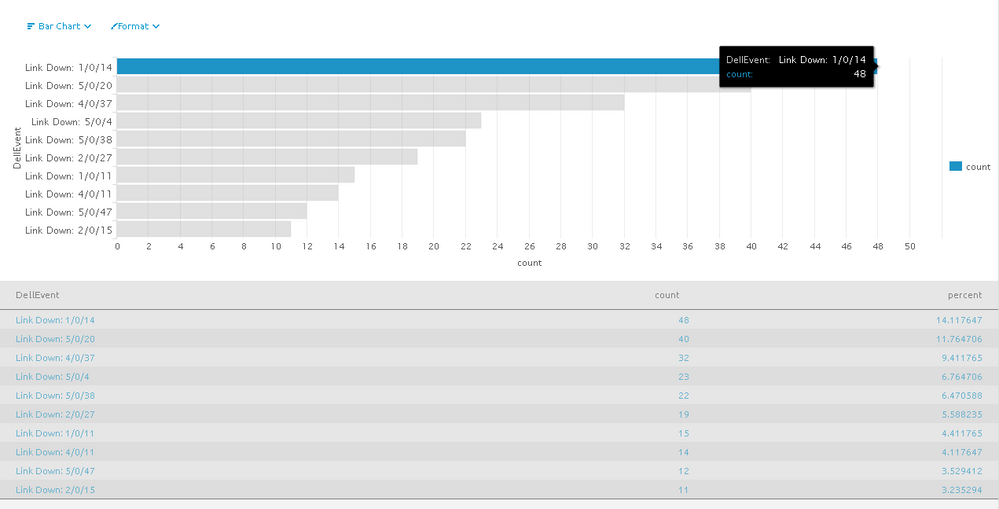
But I have a problem that I can't see the host. I need to learn how to add additional fields to the chart.
I've tried these searches (plus many more) and none of these provide me with what I need:
DellEvent="Link Down:*" | table DellEvent host | stats count by DellEvent
DellEvent="Link Down:*" | stats count by DellEvent
DellEvent="Link Down:*"| table DellEvent host | top DellEvent
I would like to know how to add the host field onto this chart.
1. One solution would be to concatenate the host with the event, and then simply count by that concatenated field. Can someone please provide a sample search that would concatenate these two fields and then count each values?
2. I would also like a non-concatenated solution.
Is there a way to include the host field in the information when I hover the mouse over the bar? Hovering currently displays the fields DellEvent and count as seen in the screenshot.
I'm brand new to Splunk and appreciate the help.
3. Is there an online cookbook of Splunk queries with numerous examples? I have a similar book for SQL queries that I can't live without! So far I have not found a great online Splunk query resource in an example-based format.
Thanks.
- Mark as New
- Bookmark Message
- Subscribe to Message
- Mute Message
- Subscribe to RSS Feed
- Permalink
- Report Inappropriate Content

Try this (use stacked bar chart)
DellEvent="Link Down:*" [search DellEvent="Link Down:*" | top DellEvent | table DellEvent ]| stats count by DellEvent host
- Mark as New
- Bookmark Message
- Subscribe to Message
- Mute Message
- Subscribe to RSS Feed
- Permalink
- Report Inappropriate Content

Try
DellEvent="Link Down:*" | top DellEvent host




Join the Splunk Community Slack to learn, troubleshoot, and make connections with fellow Splunk practitioners in real time!
Join Splunk User Groups to connect and learn in-person by region or remotely by topic or industry.
SOC4Kafka - New Kafka Connector Powered by OpenTelemetry
Rounding off the Splunk Dashboard Contest
A Four Part Event Series: AI + Observability: AI Agents, LLMs, Apps, & Infrastructure
