
Join the Conversation
- Find Answers
- :
- Using Splunk
- :
- Splunk Search
- :
- Help lookup command
- Subscribe to RSS Feed
- Mark Topic as New
- Mark Topic as Read
- Float this Topic for Current User
- Bookmark Topic
- Subscribe to Topic
- Mute Topic
- Printer Friendly Page
- Mark as New
- Bookmark Message
- Subscribe to Message
- Mute Message
- Subscribe to RSS Feed
- Permalink
- Report Inappropriate Content

Hello everyone
With some embarrassment I confess that I do not know how to use the lookup command and although I have read the documentation I have not been able to.
I have an index called antivirus and one of the fields is "application" from which I have obtained a list of all the programs installed on the users' computers.
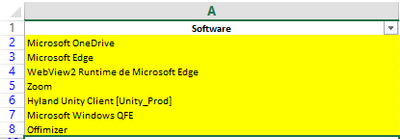
Now my client has returned a response with the list of programs that are authorized and I must add an exception to them.
this is the SPL code that I currently use
index=antivirus event=KLNAG_EV_INV_APP_INSTALLED

|search Aplicacion!="*teams*" Aplicacion!="*Adobe*" Aplicacion!="*java*" Aplicacion!="*skype*" Aplicacion!="*365*" Aplicacion!="*kaspersky*" Aplicacion!="*chrome*" Aplicacion!="*SAP*" Aplicacion!="*SQL*" Aplicacion!="*visual studio*" Aplicacion!="*office*" Aplicacion!="*Microsoft OneDrive*" Aplicacion!="Microsoft Edge" Aplicacion!="WebView2 Runtime de Microsoft Edge" Aplicacion!="zoom" Aplicacion!="Hyland Unity Client [Unity_Prod]" Aplicacion!="Microsoft Windows QFE" Aplicacion!="Offimizer"

(here i need use lookup command)

| stats count by Aplicacion IP message
|sort - count
now, I know that I have the lookup editor plugin, I suppose that from there I can upload the file, my question is if it can be in .xlsx or if it has to be .csv
and 100 more
- Mark as New
- Bookmark Message
- Subscribe to Message
- Mute Message
- Subscribe to RSS Feed
- Permalink
- Report Inappropriate Content


Hi @splunkcol,
I hint to read very carefully the documentation about lookup because it's a very importanat command,
Anyway, in the Splunk Editor Lookup and in every Splunk function, you have to always use csv format files, xls or xlsx files, becasuse Sples read only text files.
Then, in your case, you shouldn't use the lookup command but the inputlookup (https://docs.splunk.com/Documentation/SplunkCloud/8.2.2203/SearchReference/Inputlookup) , something like this:
index=antivirus event=KLNAG_EV_INV_APP_INSTALLED Aplicacion!="*teams*" Aplicacion!="*Adobe*" Aplicacion!="*java*" Aplicacion!="*skype*" Aplicacion!="*365*" Aplicacion!="*kaspersky*" Aplicacion!="*chrome*" Aplicacion!="*SAP*" Aplicacion!="*SQL*" Aplicacion!="*visual studio*" Aplicacion!="*office*" Aplicacion!="*Microsoft OneDrive*" Aplicacion!="Microsoft Edge" Aplicacion!="WebView2 Runtime de Microsoft Edge" Aplicacion!="zoom" Aplicacion!="Hyland Unity Client [Unity_Prod]" Aplicacion!="Microsoft Windows QFE" Aplicacion!="Offimizer" [ | inputlookup applications.csv | fields application ]
| stats count by applicacion IP message
| sort - count
beware the th field name in the subsearch and in the main search must be the same (it's case sensitive), I say this because you used in your description and in your search different names: the field name is "application" or "Application"?
In addition I hint to review the search you shared: you don't need to use the search command after the main search, you can (or better must!) put all the conditions in the main search.
If you use the search command after the main search you have slower searches, because: before you take all the results and then you filter them, instead of filtering them a the beginning.
Ciao.
Giuseppe
- Mark as New
- Bookmark Message
- Subscribe to Message
- Mute Message
- Subscribe to RSS Feed
- Permalink
- Report Inappropriate Content
Hi @splunkcol,
I hint to read very carefully the documentation about lookup because it's a very importanat command,
Anyway, in the Splunk Editor Lookup and in every Splunk function, you have to always use csv format files, xls or xlsx files, becasuse Sples read only text files.
Then, in your case, you shouldn't use the lookup command but the inputlookup (https://docs.splunk.com/Documentation/SplunkCloud/8.2.2203/SearchReference/Inputlookup) , something like this:
index=antivirus event=KLNAG_EV_INV_APP_INSTALLED Aplicacion!="*teams*" Aplicacion!="*Adobe*" Aplicacion!="*java*" Aplicacion!="*skype*" Aplicacion!="*365*" Aplicacion!="*kaspersky*" Aplicacion!="*chrome*" Aplicacion!="*SAP*" Aplicacion!="*SQL*" Aplicacion!="*visual studio*" Aplicacion!="*office*" Aplicacion!="*Microsoft OneDrive*" Aplicacion!="Microsoft Edge" Aplicacion!="WebView2 Runtime de Microsoft Edge" Aplicacion!="zoom" Aplicacion!="Hyland Unity Client [Unity_Prod]" Aplicacion!="Microsoft Windows QFE" Aplicacion!="Offimizer" [ | inputlookup applications.csv | fields application ]
| stats count by applicacion IP message
| sort - count
beware the th field name in the subsearch and in the main search must be the same (it's case sensitive), I say this because you used in your description and in your search different names: the field name is "application" or "Application"?
In addition I hint to review the search you shared: you don't need to use the search command after the main search, you can (or better must!) put all the conditions in the main search.
If you use the search command after the main search you have slower searches, because: before you take all the results and then you filter them, instead of filtering them a the beginning.
Ciao.
Giuseppe


Join the Splunk Community Slack to learn, troubleshoot, and make connections with fellow Splunk practitioners in real time!
Join Splunk User Groups to connect and learn in-person by region or remotely by topic or industry.
Self-Healing Pipeline Is Now Generally Available: AI-Powered CIM Compliance
Meet Splunk Observability Studio: AI-Assisted OpenTelemetry Instrumentation Without ...
Federated Search for Cisco Security and Analytics Logging (SAL) is now GA on Splunk ...
