
Join the Conversation
- Find Answers
- :
- Using Splunk
- :
- Splunk Search
- :
- Dynamic dashboard event handling
- Subscribe to RSS Feed
- Mark Topic as New
- Mark Topic as Read
- Float this Topic for Current User
- Bookmark Topic
- Subscribe to Topic
- Mute Topic
- Printer Friendly Page
- Mark as New
- Bookmark Message
- Subscribe to Message
- Mute Message
- Subscribe to RSS Feed
- Permalink
- Report Inappropriate Content
Dynamic dashboard event handling

Hello
I am new to Splunk. Would be great if you can help me with this.
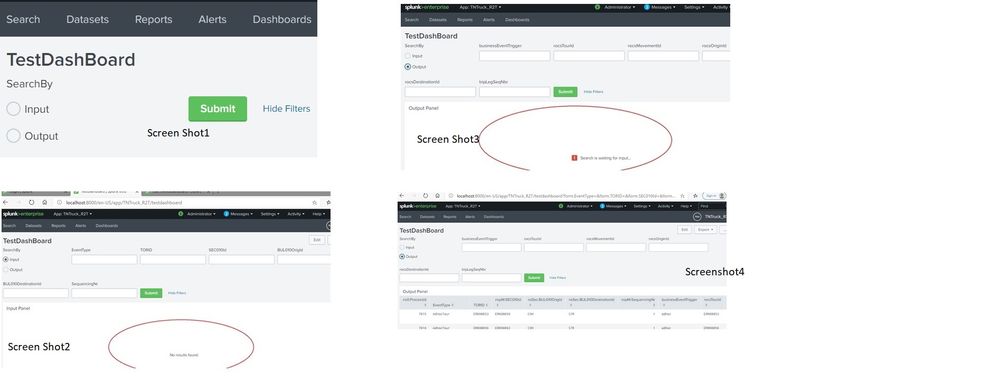
Once I open the dash board , it has couple of radio buttons (Input and Output) with submit button. Screen Shot1. Please refer the attached screen shots.
*Input Radio Button/Input Panel*
Once I click input radio button, Input Panel displayed with 6 text fields & submit button. Screen Shot2
1. All the text fields are optional. When I click submit button without any value, it’s not responding. It should be submitted and run the input search query.
2. Surprisingly, this submit button manual click is sent to output panel (displayed once I click radio button Output) and executes the output search query. It’s linked with 3rd point..
Output Radio Button/Output Panel
3. Input Panel / Submit button – In case, I had clicked the submit button during Input Panel activity, it’s getting submitted to output panel and search query is getting executed. Refer 2nd point
4. In case, I had NOT clicked the submit button during Input Panel activity; Once I click the output radio button, Output panel is getting loaded which is expected (before doing any other activity in the dashboard)
Also, I want to hide the submit button from screen shot1. i.e.) as soon as, I open the dashboard, want to hide the submit button. On click of radio button, I want to display.
enter code hereTest Dashboard
SearchBy Input Output true true EventType * TORID * SEC010Id * BUL010OrigId * BUL010DestinationId * SequencingNr * businessEventTrigger * rocsTourId * rocsMovementId * rocsOriginId * rocsDestinationId * tripLegSeqNbr *
  <label>Test Dashboard</label>
  <fieldset submitButton="true" autoRun="false">
    <input type="radio" token="searchBy">
      <label>SearchBy</label>
      <choice value="1">Input</choice>
      <choice value="2">Output</choice>
      <change>
        <condition value="1">
          <set token="tkninput">true</set>
          <unset token="tknoutput"></unset>
        </condition>
        <condition value="2">
          <set token="tknoutput">true</set>
          <unset token="tkninput"></unset>
        </condition>
      </change>
    </input>
    <input type="text" token="EventType" depends="$tkninput$">
      <label>EventType</label>
      <default></default>
      <change>
        <condition value="">
          <set token="EventType">*</set>
        </condition>
      </change>
    </input>
    <input type="text" token="TORID" depends="$tkninput$">
      <label>TORID</label>
      <default></default>
      <change>
        <condition value="">
          <set token="TORID">*</set>
        </condition>
      </change>
    </input>
    <input type="text" token="SEC010Id" depends="$tkninput$">
      <label>SEC010Id</label>
      <default></default>
      <change>
        <condition value="">
          <set token="SEC010Id">*</set>
        </condition>
      </change>
    </input>

    <input type="text" token="businessEventTrigger" depends="$tknoutput$">
      <label>businessEventTrigger</label>
      <default></default>
      <change>
        <condition value="">
          <set token="businessEventTrigger">*</set>
        </condition>
      </change>
    </input>
    <input type="text" token="rocsTourId" depends="$tknoutput$">
      <label>rocsTourId</label>
      <default></default>
      <change>
        <condition value="">
          <set token="rocsTourId">*</set>
        </condition>
      </change>
    </input>

  </fieldset>
  <row>
    <panel depends="$tkninput$">

      <title>Input Panel</title>
      <table>
        <title></title>
        <search>
          <query>
        index="demodashboard1" sourcetype="DemoDashBoard1" |  xmlkv maxinputs=10000 | rename "nspJ:TOR010Id" as TORID "nspMMM:EventType" as EventType | search ns0:ProcessId (EventType=$EventType$ OR businesseventtrigger) AND (TORID=$TORID$ OR rocsTourId=$TORID$) AND (nspM:SEC010Id=$SEC010Id$ OR rocsMovementId=$SEC010Id$) AND (nsSec:BUL010OrigId = $BUL010OrigId$ OR rocsOriginId=$BUL010OrigId$) AND (nsSec:BUL010DestinationId=$BUL010DestinationId$ OR rocsDestinationId=$BUL010DestinationId$) AND (nspM:SequencingNr=$SequencingNr$ OR tripLegSeqNbr) OR ((TORID=$TORID$ AND rocsTourId=$TORID$) AND (nspM:SEC010Id=$SEC010Id$ AND rocsMovementId=$SEC010Id$) AND (nsSec:BUL010OrigId=$BUL010OrigId$ AND rocsOriginId=$BUL010OrigId$) AND (nsSec:BUL010DestinationId=$BUL010DestinationId$ AND rocsDestinationId=$BUL010DestinationId$)) | table ns0:ProcessId EventType TORID nspM:SEC010Id nsSec:BUL010OrigId nsSec:BUL010DestinationId nspM:SequencingNr businessEventTrigger rocsTourId rocsMovementId rocsOriginId rocsDestinationId  tripLegSeqNbr  publishCd routeNm firstLegSchedDprtTmstp firstLegOrigin tripLegSeqNbr origin | dedup ns0:ProcessId
  </query>
        </search>
        <option name="count">20</option>
        <option name="dataOverlayMode">none</option>
        <option name="drilldown">none</option>
        <option name="percentagesRow">false</option>
        <option name="rowNumbers">false</option>
        <option name="totalsRow">false</option>
        <option name="wrap">true</option>
      </table>
    </panel>
    <panel depends="$tknoutput$">
      <title>Output Panel</title>
      <table>
        <title></title>
        <search>
          <query>
     host="WTC-981558-L1" sourcetype=Mar16 source="TNTTRUCK_R2T - Copy.2020-03-05" |  xmlkv maxinputs=10000 | rename "nspJ:TOR010Id" as TORID "nspMMM:EventType" as EventType | search ns0:ProcessId (EventType OR businessEventTrigger=$businessEventTrigger$) AND (TORID=$rocsTourId$ OR rocsTourId=$rocsTourId$) AND (nspM:SEC010Id=$rocsMovementId$ OR rocsMovementId = $rocsMovementId$) AND (nsSec:BUL010OrigId=$rocsOriginId$ OR rocsOriginId=$rocsOriginId$) AND (nsSec:BUL010DestinationId=$rocsDestinationId$ OR rocsDestinationId=$rocsDestinationId$) AND (nspM:SequencingNr OR tripLegSeqNbr=$tripLegSeqNbr$) OR ((TORID=$rocsTourId$ AND rocsTourId=$rocsTourId$) AND (nspM:SEC010Id=$rocsMovementId$ AND rocsMovementId = $rocsMovementId$) AND (nsSec:BUL010OrigId=$rocsOriginId$ AND rocsOriginId=$rocsOriginId$) AND (nsSec:BUL010DestinationId=$rocsDestinationId$ AND rocsDestinationId=$rocsDestinationId$))| table ns0:ProcessId EventType TORID nspM:SEC010Id nsSec:BUL010OrigId nsSec:BUL010DestinationId nspM:SequencingNr businessEventTrigger rocsTourId rocsMovementId rocsOriginId rocsDestinationId  tripLegSeqNbr  publishCd routeNm firstLegSchedDprtTmstp firstLegOrigin tripLegSeqNbr origin destination schedDprtTmstp
  | selfjoin  ns0:ProcessId
  | dedup ns0:ProcessId
  </query>
        </search>
        <option name="count">20</option>
        <option name="dataOverlayMode">none</option>
        <option name="drilldown">none</option>
        <option name="percentagesRow">false</option>
        <option name="rowNumbers">false</option>
        <option name="totalsRow">false</option>
        <option name="wrap">true</option>
      </table>
    </panel>
  </row>
</form>][1]


Join the Splunk Community Slack to learn, troubleshoot, and make connections with fellow Splunk practitioners in real time!
Join Splunk User Groups to connect and learn in-person by region or remotely by topic or industry.
[Puzzles] Solve, Learn, Reuse: Word-play
Tuning Edge Processor in Hybrid Mode: What Limits Each Data Path
Best Practices: Splunk auto adjust pipeline queue
