
Join the Conversation
- Find Answers
- :
- Using Splunk
- :
- Splunk Search
- :
- Duration between two events by day based on three ...
- Subscribe to RSS Feed
- Mark Topic as New
- Mark Topic as Read
- Float this Topic for Current User
- Bookmark Topic
- Subscribe to Topic
- Mute Topic
- Printer Friendly Page
- Mark as New
- Bookmark Message
- Subscribe to Message
- Mute Message
- Subscribe to RSS Feed
- Permalink
- Report Inappropriate Content
Duration between two events by day based on three or more fields?

Hello - I need to calculate the average duration between two status types for a user type in a location in a region. I have attached the sample data. For example, I need to calculate the average duration a given user type remains in "inactive" status. These user types are segregated into different locations in different regions.
Sample data:
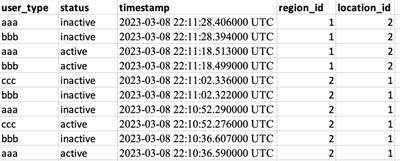
The result is want is like this (time is in seconds):
aaa bbb ccc
Day 1 30 40 10
Day 2 10 20 30
Day 3 20 10 10
and so on
I would appreciate any help.

- Mark as New
- Bookmark Message
- Subscribe to Message
- Mute Message
- Subscribe to RSS Feed
- Permalink
- Report Inappropriate Content

This is nearly one for one the same as https://community.splunk.com/t5/Splunk-Search/Calculate-total-time-for-a-specific-event-over-a-range...; the only difference is that you have consecutive time boundaries you want to calculate for while the other use case calculates for a single start-to-end interval.
| eval day = _time
| bin span=1d@d day ``` start of day of event ```
| addinfo ``` search end time is info_max_time ```
| eval duration = if(closed_txn == 1, duration,
 if(status == "active", _time - max(day, info_min_time),
 min(info_max_time, relative_time(day, "+1d")) - _time))
| stats sum(duration) as inactive by day user_type region_id location_id
- Mark as New
- Bookmark Message
- Subscribe to Message
- Mute Message
- Subscribe to RSS Feed
- Permalink
- Report Inappropriate Content

Your sample data show multiple inactive status for some users. Is this representative or will you only get one event when the state changes?

Accelerating Observability as Code with the Splunk AI Assistant
Integrating Splunk Search API and Quarto to Create Reproducible Investigation ...
Congratulations to the 2025-2026 SplunkTrust!
