
Turn on suggestions
Auto-suggest helps you quickly narrow down your search results by suggesting possible matches as you type.
Splunk Search
×
Join the Conversation
Without signing in, you're just watching from the sidelines. Sign in or Register to connect, share, and be part of the Splunk Community.
Turn on suggestions
Auto-suggest helps you quickly narrow down your search results by suggesting possible matches as you type.
- Find Answers
- :
- Using Splunk
- :
- Splunk Search
- :
- Count the number of api occurrence in 10 second
Options
- Subscribe to RSS Feed
- Mark Topic as New
- Mark Topic as Read
- Float this Topic for Current User
- Bookmark Topic
- Subscribe to Topic
- Mute Topic
- Printer Friendly Page
- Mark as New
- Bookmark Message
- Subscribe to Message
- Mute Message
- Subscribe to RSS Feed
- Permalink
- Report Inappropriate Content
Count the number of api occurrence in 10 second

JyotiP
Path Finder
09-27-2019
01:40 AM
I have the following API's, for which I need to count the occurrence of each in every 10 seconds for 1 hour time interval.
/api/login/v1/session
/api/data/v1/graphql
/api/order/v1/orders
/api/order/v1/states
/api/order/orderimporter/v1/importcsv
/api/order/orderimporter/v1/promote
/api/order/orderimporter/v1/stagingOrder
/api/order/v3/graphql
/api/order/desk/v2/quickSend
/api/order/v1/desk/Batch/sync
/api/order/v1/Orders/sync
I tried with
host=*localhost* Path=*** sourcetype=nginx
| where Path in ("/api/platform/v1/session" OR "/api/coredata/v1/graphql" OR "/api/trading/v1/orders")
| table Path
But getting Error in 'where' command: Typechecking failed. 'OR' only takes boolean arguments
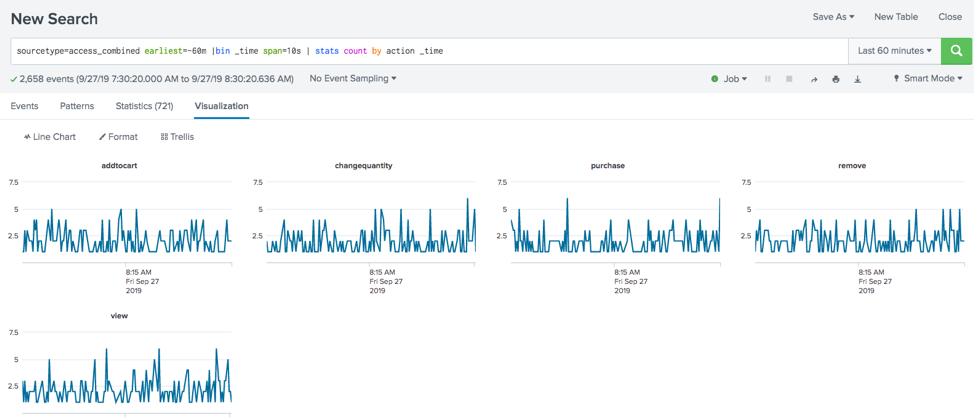
Basically I want the count of all the listed api in every 10 seconds for 1-hour interval.
- Mark as New
- Bookmark Message
- Subscribe to Message
- Mute Message
- Subscribe to RSS Feed
- Permalink
- Report Inappropriate Content

kmorris_splunk

Splunk Employee
09-27-2019
05:36 AM

- Mark as New
- Bookmark Message
- Subscribe to Message
- Mute Message
- Subscribe to RSS Feed
- Permalink
- Report Inappropriate Content

techiesid

SplunkTrust
09-27-2019
01:46 AM
It should be smething like below,
host=*localhost* Path=*** sourcetype=nginx
 | search Path IN  ("/api/platform/v1/session" ,"/api/coredata/v1/graphql" , "/api/trading/v1/orders")
 | table Path
| timechart count span=10s
Sid
- Mark as New
- Bookmark Message
- Subscribe to Message
- Mute Message
- Subscribe to RSS Feed
- Permalink
- Report Inappropriate Content
JyotiP
Path Finder
09-27-2019
02:13 AM
@techiesid this work fine without timechart count span=10s, when I use this no result is coming

Get Updates on the Splunk Community!
Data Management Digest – December 2025
Welcome to the December edition of Data Management Digest!
As we continue our journey of data innovation, the ...
Index This | What is broken 80% of the time by February?
December 2025 Edition
Hayyy Splunk Education Enthusiasts and the Eternally Curious!
We’re back with this ...
Unlock Faster Time-to-Value on Edge and Ingest Processor with New SPL2 Pipeline ...
Hello Splunk Community,
We're thrilled to share an exciting update that will help you manage your data more ...
