
Are you a member of the Splunk Community?
- Find Answers
- :
- Using Splunk
- :
- Splunk Search
- :
- Count events matching a specific string
- Subscribe to RSS Feed
- Mark Topic as New
- Mark Topic as Read
- Float this Topic for Current User
- Bookmark Topic
- Subscribe to Topic
- Mute Topic
- Printer Friendly Page
- Mark as New
- Bookmark Message
- Subscribe to Message
- Mute Message
- Subscribe to RSS Feed
- Permalink
- Report Inappropriate Content
Count events matching a specific string

From the logs, I need to get the count of events from the below msg field value which matches factType=COMMERCIAL and has filters.
secondly, extract the filter type used, like in the example below id and extract the string sorts={"sortOrders":[{"key":"id","order":"DESC"}]}.
Using the Splunk query with basic wildcard does not work efficiently. Could you please assist
cf_space_name=prod msg="*/facts?factType=COMMERCIAL&sourceSystem=ADMIN&sourceOwner=ABC&filters=*"
msg: abc.asia - [2021-08-23T00:27:08.152+0000] "GET /facts?factType=COMMERCIAL&sourceSystem=ADMIN&sourceOwner=ABC&filters=%257B%2522stringMatchFilters%2522:%255B%257B%2522key%2522:%2522BFEESCE((json_data-%253E%253E'isNotSearchable')::boolean,%2520false)%2522,%2522value%2522:%2522false%2522,%2522operator%2522:%2522EQ%2522%257D%255D,%2522multiStringMatchFilters%2522:%255B%257B%2522key%2522:%2522json_data-%253E%253E'id'%2522,%2522values%2522:%255B%25224970111%2522%255D%257D%255D,%2522containmentFilters%2522:%255B%255D,%2522nestedMultiStringMatchFilter%2522:%255B%255D,%2522nestedStringMatchFilters%2522:%255B%255D%257D&sorts=%257B%2522sortOrders%2522:%255B%257B%2522key%2522:%2522id%2522,%2522order%2522:%2522DESC%2522%257D%255D%257D&pagination=null
Thanks in advance.
- Mark as New
- Bookmark Message
- Subscribe to Message
- Mute Message
- Subscribe to RSS Feed
- Permalink
- Report Inappropriate Content


Just extract the appropriate fields from the URI and split the parameters into a multivalued field.
| makeresults
| eval _raw="msg: abc.asia - [2021-08-23T00:27:08.152+0000] \"GET /facts?factType=COMMERCIAL&sourceSystem=ADMIN&sourceOwner=ABC&filters=%257B%2522stringMatchFilters%2522:%255B%257B%2522key%2522:%2522BFEESCE((json_data-%253E%253E'isNotSearchable')::boolean,%2520false)%2522,%2522value%2522:%2522false%2522,%2522operator%2522:%2522EQ%2522%257D%255D,%2522multiStringMatchFilters%2522:%255B%257B%2522key%2522:%2522json_data-%253E%253E'id'%2522,%2522values%2522:%255B%25224970111%2522%255D%257D%255D,%2522containmentFilters%2522:%255B%255D,%2522nestedMultiStringMatchFilter%2522:%255B%255D,%2522nestedStringMatchFilters%2522:%255B%255D%257D&sorts=%257B%2522sortOrders%2522:%255B%257B%2522key%2522:%2522id%2522,%2522order%2522:%2522DESC%2522%257D%255D%257D&pagination=null\""
| rex "\"(?<req>\S+)\s(?<uri>\S+)\""
| eval uri=urldecode(uri)
| rex field=uri "(?<reqpath>.*)\?(?<query>.*)"
| makemv delim="&" query
| search query="factType=COMMERCIAL"
Then you can extract the "filters=something" value from the query field and process it apropriately (probably passing it through another urldecode()).
- Mark as New
- Bookmark Message
- Subscribe to Message
- Mute Message
- Subscribe to RSS Feed
- Permalink
- Report Inappropriate Content

NOTE: AS I FOUND SOME VALUES ARE DOUBLE ENCODED HENCE USED urldecode TWICE.
Can you please try this?
YOUR_SEARCH
| eval _raw = replace(_raw , "%25","%"),_raw = replace(_raw , "%25","%"),_raw = replace(_raw , "%22","\"")
,_raw = replace(_raw , "%5B","["),_raw = replace(_raw , "%5D","]")
,_raw = replace(_raw , "%7B","{"),_raw = replace(_raw , "%7D","}") | extract
| search factType="COMMERCIAL"
| table factType sorts
|rex field=sorts "\"key\":\"(?<key>[^\"]+)\",\"order\":\"(?<order>[^\"]+)\""
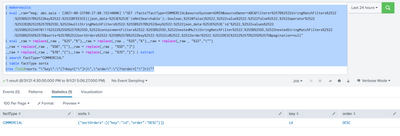
My Sample Search :
| makeresults
| eval _raw="msg: abc.asia - [2021-08-23T00:27:08.152+0000] \"GET /facts?factType=COMMERCIAL&sourceSystem=ADMIN&sourceOwner=ABC&filters=%257B%2522stringMatchFilters%2522:%255B%257B%2522key%2522:%2522BFEESCE((json_data-%253E%253E'isNotSearchable')::boolean,%2520false)%2522,%2522value%2522:%2522false%2522,%2522operator%2522:%2522EQ%2522%257D%255D,%2522multiStringMatchFilters%2522:%255B%257B%2522key%2522:%2522json_data-%253E%253E'id'%2522,%2522values%2522:%255B%25224970111%2522%255D%257D%255D,%2522containmentFilters%2522:%255B%255D,%2522nestedMultiStringMatchFilter%2522:%255B%255D,%2522nestedStringMatchFilters%2522:%255B%255D%257D&sorts=%257B%2522sortOrders%2522:%255B%257B%2522key%2522:%2522id%2522,%2522order%2522:%2522DESC%2522%257D%255D%257D&pagination=null"
| eval _raw = replace(_raw , "%25","%"),_raw = replace(_raw , "%25","%"),_raw = replace(_raw , "%22","\"")
,_raw = replace(_raw , "%5B","["),_raw = replace(_raw , "%5D","]")
,_raw = replace(_raw , "%7B","{"),_raw = replace(_raw , "%7D","}") | extract
| search factType="COMMERCIAL"
| table factType sorts
|rex field=sorts "\"key\":\"(?<key>[^\"]+)\",\"order\":\"(?<order>[^\"]+)\""
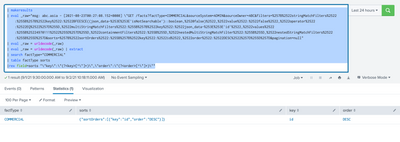
UPDATED ANSWER.
YOUR_SEARCH
| eval _raw = urldecode(_raw)
| eval _raw = urldecode(_raw) | extract
| search factType="COMMERCIAL"
| table factType sorts
|rex field=sorts "\"key\":\"(?<key>[^\"]+)\",\"order\":\"(?<order>[^\"]+)\""
| makeresults
| eval _raw="msg: abc.asia - [2021-08-23T00:27:08.152+0000] \"GET /facts?factType=COMMERCIAL&sourceSystem=ADMIN&sourceOwner=ABC&filters=%257B%2522stringMatchFilters%2522:%255B%257B%2522key%2522:%2522BFEESCE((json_data-%253E%253E'isNotSearchable')::boolean,%2520false)%2522,%2522value%2522:%2522false%2522,%2522operator%2522:%2522EQ%2522%257D%255D,%2522multiStringMatchFilters%2522:%255B%257B%2522key%2522:%2522json_data-%253E%253E'id'%2522,%2522values%2522:%255B%25224970111%2522%255D%257D%255D,%2522containmentFilters%2522:%255B%255D,%2522nestedMultiStringMatchFilter%2522:%255B%255D,%2522nestedStringMatchFilters%2522:%255B%255D%257D&sorts=%257B%2522sortOrders%2522:%255B%257B%2522key%2522:%2522id%2522,%2522order%2522:%2522DESC%2522%257D%255D%257D&pagination=null"
| eval _raw = urldecode(_raw)
| eval _raw = urldecode(_raw) | extract
| search factType="COMMERCIAL"
| table factType sorts
|rex field=sorts "\"key\":\"(?<key>[^\"]+)\",\"order\":\"(?<order>[^\"]+)\""
Thanks
KV
▄︻̷̿┻̿═━一
If any of my reply helps you to solve the problem Or gain knowledge, an upvote would be appreciated.

Index This | Why did the turkey cross the road?
Enter the Agentic Era with Splunk AI Assistant for SPL 1.4
Feel the Splunk Love: Real Stories from Real Customers
