
Join the Conversation
- Find Answers
- :
- Premium Solutions
- :
- Splunk Observability Cloud
- :
- Troubleshooting connection issues with Splunk Ente...
- Subscribe to RSS Feed
- Mark Topic as New
- Mark Topic as Read
- Float this Topic for Current User
- Bookmark Topic
- Subscribe to Topic
- Mute Topic
- Printer Friendly Page
- Mark as New
- Bookmark Message
- Subscribe to Message
- Mute Message
- Subscribe to RSS Feed
- Permalink
- Report Inappropriate Content
Troubleshooting connection issues with Splunk Enterprise and Log Observer Connect(Splunk Observability Cloud)?

I want to connect Splunk Enterprise configured in Azure VM and O11y Cloud through Log Observer Connect.
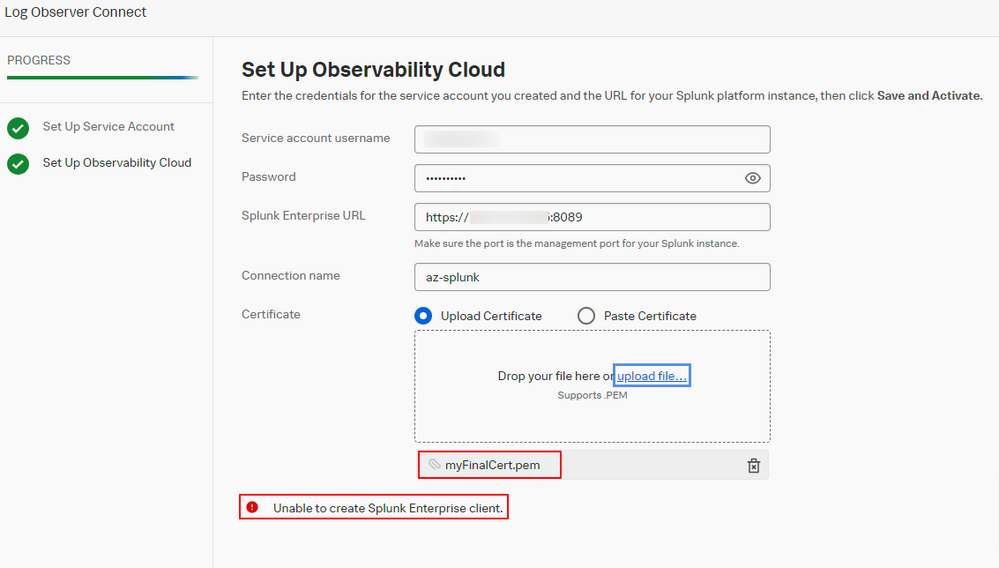
I tried Log Observer Connect connection, but it is not connected as shown in the attachment.
I applied all the information on the 'Set Up Service Account' page.
I created and reflected the Enterprise's own certificate by referring to the Splunk documentation.
The 8089 port InBound/OutBound policy is also reflected in the Azure VM.
I want to know how to solve it.
Please answer about my question.
- Mark as New
- Bookmark Message
- Subscribe to Message
- Mute Message
- Subscribe to RSS Feed
- Permalink
- Report Inappropriate Content

Hi,
Based on your screenshot, it looks like you may have uploaded the entire myFinalCert.pem file which contains multiple certificates and a key. You could try copying only the first certificate in that file and use the "paste certificate" option on that screen.

.conf25 technical session recap of Observability for Gen AI: Monitoring LLM ...
A Season of Skills: New Splunk Courses to Light Up Your Learning Journey
Announcing the Migration of the Splunk Add-on for Microsoft Azure Inputs to ...
