
Turn on suggestions
Auto-suggest helps you quickly narrow down your search results by suggesting possible matches as you type.
Splunk Enterprise
×
Join the Conversation
Without signing in, you're just watching from the sidelines. Sign in or Register to connect, share, and be part of the Splunk Community.
- Find Answers
- :
- Splunk Products
- :
- Splunk Enterprise
- :
- Splunk Stream: Dropping DNS events
Options
- Subscribe to RSS Feed
- Mark Topic as New
- Mark Topic as Read
- Float this Topic for Current User
- Bookmark Topic
- Subscribe to Topic
- Mute Topic
- Printer Friendly Page
- Mark as New
- Bookmark Message
- Subscribe to Message
- Mute Message
- Subscribe to RSS Feed
- Permalink
- Report Inappropriate Content
Splunk Stream: Dropping DNS events

a_kearney
Path Finder
11-29-2023
07:03 AM
Hi,
I am runing Splunk Stream to collect DNS data from Domain Controllers. On some of the busy DCs the Splunk_TA_stream is generating lots of the following errors:
ERROR [9412] (SplunkSenderModularInput.cpp:435) stream.SplunkSenderModularInput - Event queue overflow; dropping 10001 events
Looking at the Splunk Stream Admin-Network Metrics dashboard these seem to occur at the same the Active Network Flows seem to be hitting a limit:
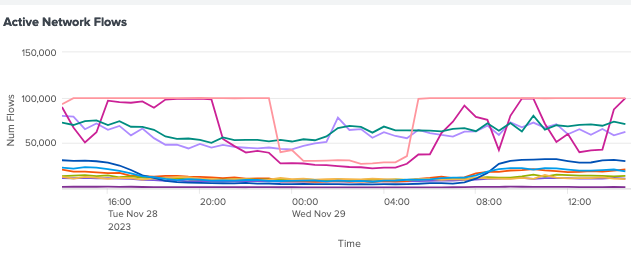
I would like to increase the number of network flows allowed in an attempt to stop the event queue overflows. Looking at the documentation I can see 2 configurations that seem relevant:
maxTcpSessionCount = <integer>
* Defines maximum number of concurrent TCP/UDP flows per processing thread.
processingThreads = <integer>
* Defines number of threads to use for processing network traffic.
Questions:
1) What is the default for maxTcpSessionCount and processingThreads?
2) Would parameter would it be better to increase?
Also are these the correct parameters to be looking to tune with the errors I am getting. If not what should I look at?

Got questions? Get answers!
Join the Splunk Community Slack to learn, troubleshoot, and make connections with fellow Splunk practitioners in real time!
Meet up IRL or virtually!
Join Splunk User Groups to connect and learn in-person by region or remotely by topic or industry.
Get Updates on the Splunk Community!
[Puzzles] Solve, Learn, Repeat: Character substitutions with Regular Expressions
This challenge was first posted on Slack #puzzles channelFor BORE at .conf23, we had a puzzle question which ...
Splunk Community Badges!
Hey everyone! Ready to earn some serious bragging rights in the community? Along with our existing badges ...
[Puzzles] Solve, Learn, Repeat: Matching cron expressions
This puzzle (first published here) is based on matching timestamps to cron expressions.All the timestamps ...
