
Join the Conversation
- Find Answers
- :
- Splunk Products
- :
- Splunk Enterprise
- :
- Re: sendemail using search results
- Subscribe to RSS Feed
- Mark Topic as New
- Mark Topic as Read
- Float this Topic for Current User
- Bookmark Topic
- Subscribe to Topic
- Mute Topic
- Printer Friendly Page
- Mark as New
- Bookmark Message
- Subscribe to Message
- Mute Message
- Subscribe to RSS Feed
- Permalink
- Report Inappropriate Content

Hello, I am using Splunk enterprise 7.3.5.
I would like to send an email, using the command sendemail, but I would like to create it based on a search result, so I am trying:
eventtype = myeventype | table message_subject, sender_address |sendemail sendresults=true inline=true from=$sender_address$ subject=$message_subject$ to=myemail
Where
message_subject and sender_address, are fields of the search.
But when I received the email, looks like- (see the attached image)
Basically, the parameters are not working, I received the email without any of those parameters set.
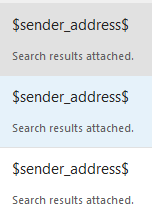
How can I fix that?
- Mark as New
- Bookmark Message
- Subscribe to Message
- Mute Message
- Subscribe to RSS Feed
- Permalink
- Report Inappropriate Content


Would likely be a good fit...
- Mark as New
- Bookmark Message
- Subscribe to Message
- Mute Message
- Subscribe to RSS Feed
- Permalink
- Report Inappropriate Content
Would likely be a good fit...
- Mark as New
- Bookmark Message
- Subscribe to Message
- Mute Message
- Subscribe to RSS Feed
- Permalink
- Report Inappropriate Content
Sendresults as I read don't have the feature to set parameters in the value - sender: The sender (from) address of the emails - requires quotes. Defaults to Splunk SMTP sender setting. The same sender is used for all emails sent and not customizable on a per-email basis. -
And I need to set that value as a parameter.
Thanks for your help.
- Mark as New
- Bookmark Message
- Subscribe to Message
- Mute Message
- Subscribe to RSS Feed
- Permalink
- Report Inappropriate Content
Quoting the details page of sendresults app from SplunkBase:
"The Search Command version of Sendresults supports the following syntax and optional arguments:
sendresults [sender=string] [subject=string] [body=string] [footer=string] [maxrcpts=int] [msgstyle=string] [format_columns=string] [bcc=string] [showresults=boolean] [showemail=boolean] [showsubj=boolean] [showbody=boolean] [showfooter=boolean]
sender: The sender (from) address of the emails - requires quotes. Defaults to Splunk SMTP sender setting. The same sender is used for all emails sent and not customizable on a per-email basis."
- Mark as New
- Bookmark Message
- Subscribe to Message
- Mute Message
- Subscribe to RSS Feed
- Permalink
- Report Inappropriate Content
I used the app sendresults, works pretty well, but I modify the sendresults.py to have the capability to use the sender as a parameter.
Code:
sender = event['sender']
And sent it as a parameter of sendemail function.
Thanks for the suggestion @gjanders

Join the Splunk Community Slack to learn, troubleshoot, and make connections with fellow Splunk practitioners in real time!
Join Splunk User Groups to connect and learn in-person by region or remotely by topic or industry.
Announcing Modern Navigation: A New Era of Splunk User Experience
Modernize your Splunk Apps – Introducing Python 3.13 in Splunk
Step into “Hunt the Insider: An Splunk ES Premier Mystery” to catch a cybercriminal ...
