
Join the Conversation
- Find Answers
- :
- Splunk Platform
- :
- Splunk Enterprise
- :
- Applying colorPalette expression on all cells in t...
- Subscribe to RSS Feed
- Mark Topic as New
- Mark Topic as Read
- Float this Topic for Current User
- Bookmark Topic
- Subscribe to Topic
- Mute Topic
- Printer Friendly Page
- Mark as New
- Bookmark Message
- Subscribe to Message
- Mute Message
- Subscribe to RSS Feed
- Permalink
- Report Inappropriate Content
Applying colorPalette expression on all cells in table

I have created a table that looks as follows:
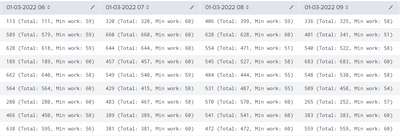
The colums are variable as they depend on the selected time frame. I want to apply a conditional format on each cell in the table based on the first numeric value in each cell. The cell should be colored red if the numeric value is lower than 400. Applying the following colorPalette expression doesn't seems to work:
<format type="color">
<colorPalette type="expression">if(tonumber(mvindex(split(value," "),0)) < 400,"#FF5733",null)</colorPalette>
</format>
While the following does:
<format type="color">
<colorPalette type="expression">if((substr(value,1,1)="1" OR substr(value,1,1)="2" OR substr(value,1,1)="3" OR substr(value,1,1)="0") AND substr(value,4,1)=" ","#FF5733",if(substr(value,3,1)=" ","#FF5733", null))</colorPalette>
</format>
However, the latter expression doesn't color cells with a numeric value of 0. In addition, it looks sloppy and is difficult to understand for my colleagues. Can someone explain why the first expression doesn't work and/or provide a solution?
Thank you.
- Mark as New
- Bookmark Message
- Subscribe to Message
- Mute Message
- Subscribe to RSS Feed
- Permalink
- Report Inappropriate Content


This sort of thing comes up quite regularly - essentially, if you create a multivalue field with the second value being an indicator to the colour you want to use, then you can use CSS to hide the second value but the colorPalette option still works. More details here https://community.splunk.com/t5/Splunk-Search/How-to-color-the-columns-based-on-previous-column-valu...

Data Management Digest – December 2025
Index This | What is broken 80% of the time by February?
Unlock Faster Time-to-Value on Edge and Ingest Processor with New SPL2 Pipeline ...
