
Join the Conversation
- Find Answers
- :
- Premium Solutions
- :
- Splunk Enterprise Security
- :
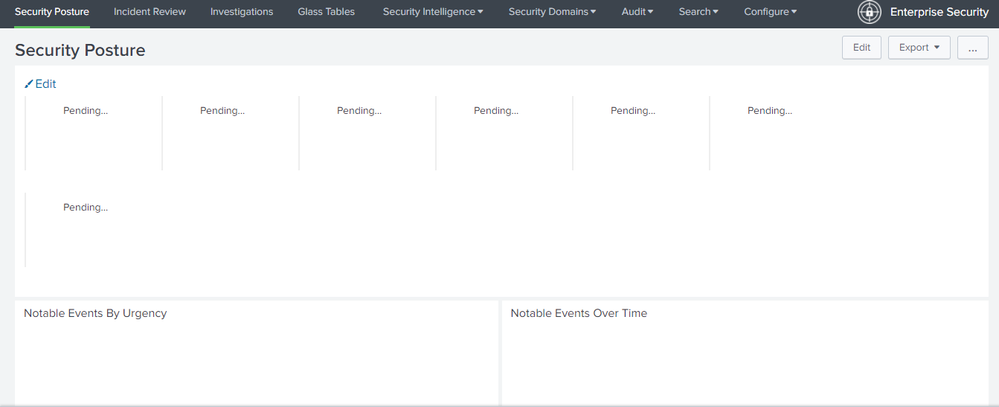
- Splunk entreprise security status "Pending..."
- Subscribe to RSS Feed
- Mark Topic as New
- Mark Topic as Read
- Float this Topic for Current User
- Bookmark Topic
- Subscribe to Topic
- Mute Topic
- Printer Friendly Page
- Mark as New
- Bookmark Message
- Subscribe to Message
- Mute Message
- Subscribe to RSS Feed
- Permalink
- Report Inappropriate Content
Splunk entreprise security status "Pending..."

- Mark as New
- Bookmark Message
- Subscribe to Message
- Mute Message
- Subscribe to RSS Feed
- Permalink
- Report Inappropriate Content


Hi....is this a new ES deployment?
is this problem re-occurred multiple times, how often? any browser problems?
Sekar
PS - If this or any post helped you in any way, pls consider upvoting, thanks for reading !
- Mark as New
- Bookmark Message
- Subscribe to Message
- Mute Message
- Subscribe to RSS Feed
- Permalink
- Report Inappropriate Content
Yes, it is new, the problem occurs at least once a week.
When the problem is present, no matter how hard I try to solve it, it finally fixes itself.
It seems like a queuing issue, what I have investigated is that the possible cause is that I have activated all the notable event functionalities
This process helped me not to have the problem so frequently, but it still happens https://splunkonbigdata.com/2020/07/21/concurrent-historical-searches-in-splunk/
There are other errors that I have pending to solve and I do not know if they are related

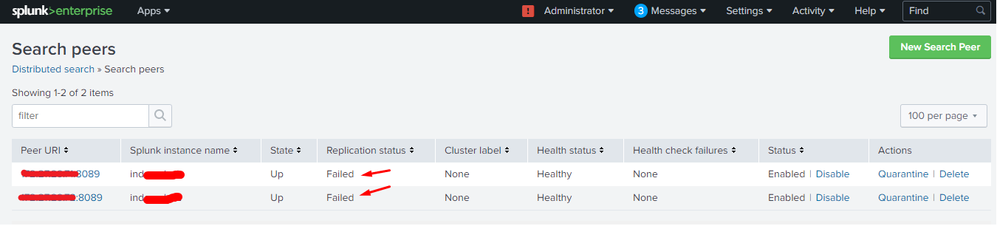
other times when the searches are not completed or the graphics are not loaded, an error appears that refers to loss of connection with the peer, that is, with the 2 indexers, after 2 min it normalizes, but it happens at least 5 times every 10 min
- Mark as New
- Bookmark Message
- Subscribe to Message
- Mute Message
- Subscribe to RSS Feed
- Permalink
- Report Inappropriate Content


1. This dashboard is fed by a KV Store Collection called "ess_notable_events"
2. The "ess_notable_events collection is fed by a Scheduled Search called " ESS - Notable Events"
3. In order for searches to be run from a SH, the indexing tier must have a "Common Knowledge Bundle" installed on ALL indexers. If you don't have a common baseline across all indexers the scheduler on the SH will quit running searches.
To me it sounds like you have some issues between your ES SH and your indexing tier, and I would start here for the trouble shooting process.
a. How big is your bundle on the SH in /opt/splunk/var/run/ *.bundle
b. Is your ES SH on the same network as your Indexers?
c. Are you system running with plenty of resources and no network connectivity issues between them.
d. you can increase settings like timeouts between the SH and indexers for 8089 communications, but if you are having to do this on a small splunk setup, then something above might be causing your issues.
e. are these physical systems or are you running on an over-subscribed virtualized hardware?
Lot of things to look at here, and most all of these are addressable. If you need further help you might start with a support ticket to help you diagnose the issue .

Accelerating Observability as Code with the Splunk AI Assistant
Integrating Splunk Search API and Quarto to Create Reproducible Investigation ...
Congratulations to the 2025-2026 SplunkTrust!
