
Join the Conversation
- Find Answers
- :
- Premium Solutions
- :
- Splunk Enterprise Security
- :
- ES: incident Review is not showing as expected
- Subscribe to RSS Feed
- Mark Topic as New
- Mark Topic as Read
- Float this Topic for Current User
- Bookmark Topic
- Subscribe to Topic
- Mute Topic
- Printer Friendly Page
- Mark as New
- Bookmark Message
- Subscribe to Message
- Mute Message
- Subscribe to RSS Feed
- Permalink
- Report Inappropriate Content
ES: incident Review is not showing as expected

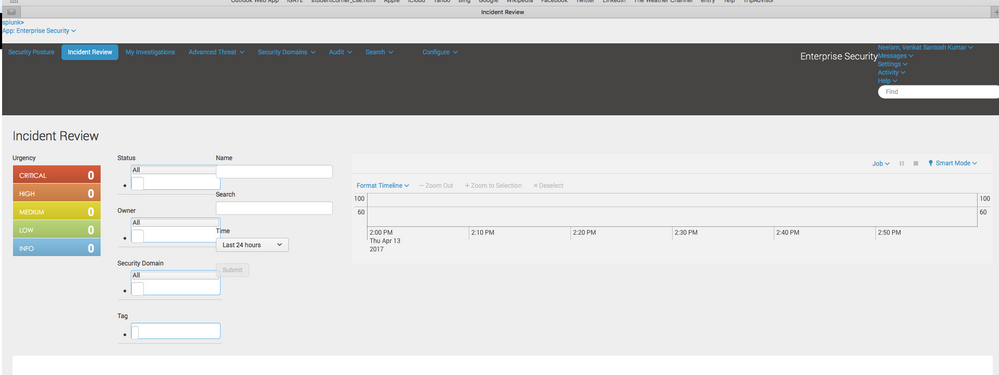
Our incident Review board has different view and not functioning as expected due to which we are unable to filter from the dropdown list
Chrome: up to date (Version 57.0.2987.133 (64-bit))
Splunk Enterprise : 6.5.2
Splunk ES: 4.1

- Mark as New
- Bookmark Message
- Subscribe to Message
- Mute Message
- Subscribe to RSS Feed
- Permalink
- Report Inappropriate Content
I believe this is known issue SOLNESS-10915. Enterprise Security 4.1 is
not compatible with version 6.5.x of Splunk. It is recommended to upgrade
your Enterprise Security as the workaround for this issue.
http://docs.splunk.com/Documentation/ES/4.1.1/RN/KnownIssues
- Mark as New
- Bookmark Message
- Subscribe to Message
- Mute Message
- Subscribe to RSS Feed
- Permalink
- Report Inappropriate Content

I agree with @smoir.
In case you are upgrading from earlier version of ES try to reload the IR page after clearing cache of your browser.
- Mark as New
- Bookmark Message
- Subscribe to Message
- Mute Message
- Subscribe to RSS Feed
- Permalink
- Report Inappropriate Content


Hello @neelamsantosh,
Make sure you are using a compatible version of Splunk Enterprise with Splunk Enterprise Security.
Check this table for your version of Enterprise Security: http://docs.splunk.com/Documentation/ES/4.6.0/Install/DeploymentPlanning#Splunk_Enterprise_system_re...
Thanks,
Sarah

.conf25 technical session recap of Observability for Gen AI: Monitoring LLM ...
A Season of Skills: New Splunk Courses to Light Up Your Learning Journey
Announcing the Migration of the Splunk Add-on for Microsoft Azure Inputs to ...
