
Turn on suggestions
Auto-suggest helps you quickly narrow down your search results by suggesting possible matches as you type.
Splunk Dev
×
Join the Conversation
Without signing in, you're just watching from the sidelines. Sign in or Register to connect, share, and be part of the Splunk Community.
Turn on suggestions
Auto-suggest helps you quickly narrow down your search results by suggesting possible matches as you type.
- Find Answers
- :
- Apps & Add-ons
- :
- Splunk Development
- :
- Splunk Dev
- :
- How to use custom platform request URI other than ...
Options
- Subscribe to RSS Feed
- Mark Topic as New
- Mark Topic as Read
- Float this Topic for Current User
- Bookmark Topic
- Subscribe to Topic
- Mute Topic
- Printer Friendly Page
- Mark as New
- Bookmark Message
- Subscribe to Message
- Mute Message
- Subscribe to RSS Feed
- Permalink
- Report Inappropriate Content
How to use custom platform request URI other than http:// or https:// ?

jeilcoo
New Member
03-15-2018
06:47 PM
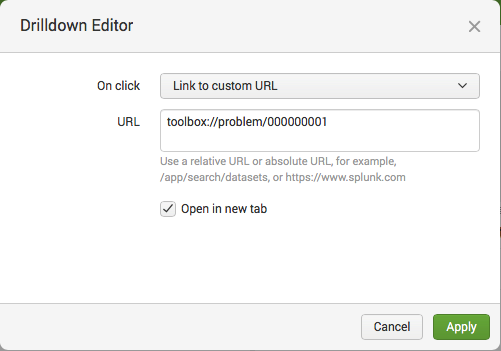
I have an app that takes a special platform request URL. Any web browser takes it and launch the app (toolbox).
<a href="toolbox://problem/000000001">ITEM</a>
When I set it as an external link from Splunk, it adds up default SPLUNK_URL b/c it does not find http:// or https:// in the url.
Expected:
toolbox://problem/000000001
Actual:
https://{{SPLUNK_URL}}/en-US/app/search/toolbox://problem/000000001
Is there a way to workaround this?

- Mark as New
- Bookmark Message
- Subscribe to Message
- Mute Message
- Subscribe to RSS Feed
- Permalink
- Report Inappropriate Content

niketn
Legend
03-15-2018
08:23 PM
@jeilcoo, I tried this and it worked fine for me in Splunk Enterprise 7.0.2
    <drilldown>
      <link target="_blank">toolbox://something/921340348</link>
    </drilldown>
Can you share the Simple XML you are using?
____________________________________________
| makeresults | eval message= "Happy Splunking!!!"
| makeresults | eval message= "Happy Splunking!!!"

Get Updates on the Splunk Community!
The OpenTelemetry Certified Associate (OTCA) Exam
What’s this OTCA exam?
The Linux Foundation offers the OpenTelemetry Certified Associate (OTCA) credential to ...
From Manual to Agentic: Level Up Your SOC at Cisco Live
Welcome to the Era of the Agentic SOC
Are you tired of being a manual alert responder? The security ...
Splunk Classroom Chronicles: Training Tales and Testimonials (Episode 4)
Welcome back to Splunk Classroom Chronicles, our ongoing series where we shine a light on what really happens ...
