
Join the Conversation
- Find Answers
- :
- Apps & Add-ons
- :
- Splunk Development
- :
- Splunk Dev
- :
- Can I not upload a private app in Splunk Cloud tri...
- Subscribe to RSS Feed
- Mark Topic as New
- Mark Topic as Read
- Float this Topic for Current User
- Bookmark Topic
- Subscribe to Topic
- Mute Topic
- Printer Friendly Page
- Mark as New
- Bookmark Message
- Subscribe to Message
- Mute Message
- Subscribe to RSS Feed
- Permalink
- Report Inappropriate Content
Can I not upload a private app in Splunk Cloud trial?

I have a trial version of Splunk Cloud (Classic Experience) and I tried to upload/install a private app, as described here: http://docs.splunk.com/Documentation/SplunkCloud/8.2.2202/Admin/PrivateApps.
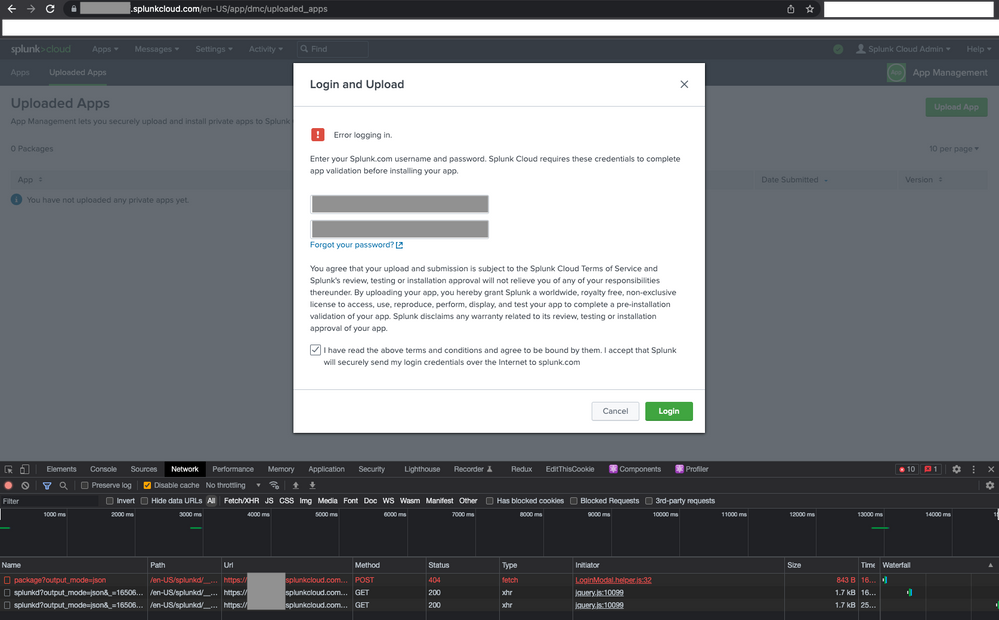
I went to "App Management" and clicked the "Upload App button". After I entered my splunk.com credentials, checked the T&C box and clicked the Login button, I see a POST call to https://<my-trial-instance>.splunkcloud.com/en-US/splunkd/__raw/services/uploaded-apps/package?output_mode=json but it returned a 404. I also saw an error message:
Error logging in.
Enter your Splunk.com username and password. Splunk Cloud requires these credentials to complete app validation before installing your app.
I'm not sure why I received a 404. It's not even checking my credentials, even though I entered them correctly. Any help would be appreciated.
Thanks,
Jason

Data Management Digest – December 2025
Index This | What is broken 80% of the time by February?
Unlock Faster Time-to-Value on Edge and Ingest Processor with New SPL2 Pipeline ...
