
Join the Conversation
- Find Answers
- :
- Splunk Administration
- :
- Admin Other
- :
- Security
- :
- SSL "obsolete key" warning in chrome browser
- Subscribe to RSS Feed
- Mark Topic as New
- Mark Topic as Read
- Float this Topic for Current User
- Bookmark Topic
- Subscribe to Topic
- Mute Topic
- Printer Friendly Page
- Mark as New
- Bookmark Message
- Subscribe to Message
- Mute Message
- Subscribe to RSS Feed
- Permalink
- Report Inappropriate Content

Has anyone been able to get Splunk Web settings that do not trigger these browser reports?
web.conf
[settings]
enableSplunkWebSSL = 1
cipherSuite = TLSv1.2:!eNULL:!aNULL:!SHA1
supportSSLV3Only = False
sslVersions = tls1.2
I still get this
Obsolete Connection Settings
The connection to this site uses a strong protocol (TLS 1.2), an obsolete key exchange (RSA), and a strong cipher (AES_128_GCM).
- Mark as New
- Bookmark Message
- Subscribe to Message
- Mute Message
- Subscribe to RSS Feed
- Permalink
- Report Inappropriate Content
Solved. No splunk settings were changed from the above to make this work.
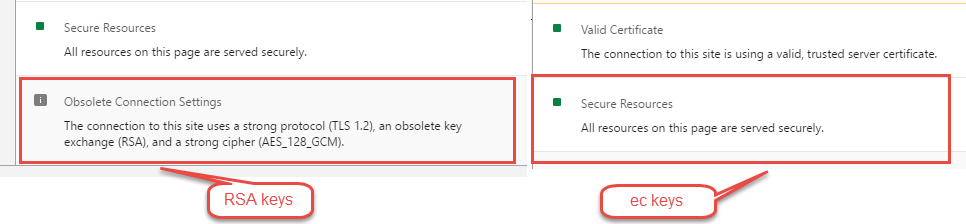
This warning can be removed by using ellipitcal curve cert keys.
Old blog post with examples here : http://blogs.splunk.com/2014/06/03/generate-elliptical-curve-certkeys-for-splunk/
The down side is that your CA needs to be signing EC certs. If they aren't then you can't use ec keys.

- Mark as New
- Bookmark Message
- Subscribe to Message
- Mute Message
- Subscribe to RSS Feed
- Permalink
- Report Inappropriate Content
Solved. No splunk settings were changed from the above to make this work.
This warning can be removed by using ellipitcal curve cert keys.
Old blog post with examples here : http://blogs.splunk.com/2014/06/03/generate-elliptical-curve-certkeys-for-splunk/
The down side is that your CA needs to be signing EC certs. If they aren't then you can't use ec keys.

Accelerating Observability as Code with the Splunk AI Assistant
Integrating Splunk Search API and Quarto to Create Reproducible Investigation ...
Congratulations to the 2025-2026 SplunkTrust!
