
Turn on suggestions
Auto-suggest helps you quickly narrow down your search results by suggesting possible matches as you type.
Other Usage
×
Join the Conversation
Without signing in, you're just watching from the sidelines. Sign in or Register to connect, share, and be part of the Splunk Community.
- Find Answers
- :
- Using Splunk
- :
- Other Using Splunk
- :
- Other Usage
- :
- How to convert multiple individual json objects in...
Options
- Subscribe to RSS Feed
- Mark Topic as New
- Mark Topic as Read
- Float this Topic for Current User
- Bookmark Topic
- Subscribe to Topic
- Mute Topic
- Printer Friendly Page
- Mark as New
- Bookmark Message
- Subscribe to Message
- Mute Message
- Subscribe to RSS Feed
- Permalink
- Report Inappropriate Content
How to convert multiple individual json objects into a nested json object ?

damode1
Path Finder
05-21-2023
04:10 PM
I want to convert some of the below individual json objects in the event into nested single json object like the second example
Current Format
{
    "ID": 1,
    "Timestamp": "2023-05-18T05:07:59.940594300Z",
    "FileVersion": "10.0.17134.1 (WinBuild.160101.0800)",
    "Company": "Microsoft Corporation",
    "TerminalSessionId": 0,
    "UtcTime": "2018-08-20 15:18:59.929",
    "Product": "Microsoft® Windows® Operating System",
}
Expected Format
{
    "ID": 1,
    "Timestamp": "2023-05-18T05:07:59.940594300Z",
    "EventData":{
        "FileVersion": "10.0.17134.1 (WinBuild.160101.0800)",
        "Company": "Microsoft Corporation",
        "TerminalSessionId": 0,
        "UtcTime": "2018-08-20 15:18:59.929",
        "Product": "Microsoft® Windows® Operating System",
    }
}
I have tried to playaround with json functions but unable to figure out how to achieve the above outcome.
Can someone please help ?
- Mark as New
- Bookmark Message
- Subscribe to Message
- Mute Message
- Subscribe to RSS Feed
- Permalink
- Report Inappropriate Content

kamlesh_vaghela

SplunkTrust
05-28-2023
11:49 PM
Can you please try this?
YOUR_SEARCH
| spath
| eval EventData = json_object("FileVersion", FileVersion,"Company",Company, "TerminalSessionId",TerminalSessionId, "UtcTime",UtcTime, "Product",Product)
| eval NewJson = json_object("ID",ID, "Timestamp", Timestamp,"EventData",json(EventData))
| table _raw NewJson
My Sample Search :
| makeresults
| eval _raw="{\"ID\": 1,\"Timestamp\": \"2023-05-18T05:07:59.940594300Z\",\"FileVersion\": \"10.0.17134.1 (WinBuild.160101.0800)\",\"Company\": \"Microsoft Corporation\",\"TerminalSessionId\": 0,\"UtcTime\": \"2018-08-20 15:18:59.929\",\"Product\": \"Microsoft® Windows® Operating System\",}"
| spath
| eval EventData = json_object("FileVersion", FileVersion,"Company",Company, "TerminalSessionId",TerminalSessionId, "UtcTime",UtcTime, "Product",Product)
| eval NewJson = json_object("ID",ID, "Timestamp", Timestamp,"EventData",json(EventData))
| table _raw NewJson
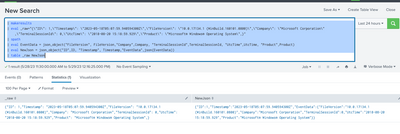
I hope this will help you.
Thanks
KV
If any of my replies help you to solve the problem Or gain knowledge, an upvote would be appreciated.


Got questions? Get answers!
Join the Splunk Community Slack to learn, troubleshoot, and make connections with fellow Splunk practitioners in real time!
Meet up IRL or virtually!
Join Splunk User Groups to connect and learn in-person by region or remotely by topic or industry.
Get Updates on the Splunk Community!
SOC4Kafka - New Kafka Connector Powered by OpenTelemetry
The new SOC4Kafka connector, built on OpenTelemetry, enables the collection of Kafka messages and forwards ...
Rounding off the Splunk Dashboard Contest
What does a contest-winning Splunk dashboard look like? In this case, it isn't in a browser tab at all. It ...
A Four Part Event Series: AI + Observability: AI Agents, LLMs, Apps, & Infrastructure
AI + Observability: AI Agents, LLMs, Apps, & Infrastructure
The rapid evolution of artificial intelligence ...
