
Join the Conversation
- Find Answers
- :
- Splunk Administration
- :
- Monitoring Splunk
- :
- What is the process "splunkd instrument-resource-u...
- Subscribe to RSS Feed
- Mark Topic as New
- Mark Topic as Read
- Float this Topic for Current User
- Bookmark Topic
- Subscribe to Topic
- Mute Topic
- Printer Friendly Page
- Mark as New
- Bookmark Message
- Subscribe to Message
- Mute Message
- Subscribe to RSS Feed
- Permalink
- Report Inappropriate Content
What is the process "splunkd instrument-resource-usage -p 8089 --with-kvstore" doing?

Hi ,
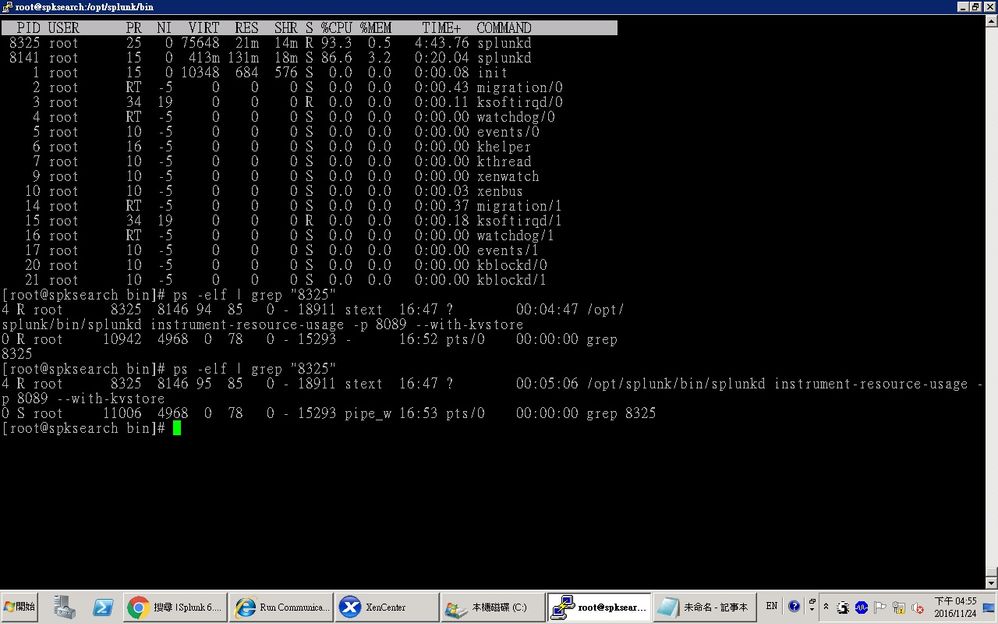
Our splunk servers has high CPU usage problem after upgrading to Splunk v6.5
It could related to my previous question :
https://answers.splunk.com/answers/475114/is-there-any-way-to-downgrade-from-65-to-63.html
And I noticed the abnormal high cpu-usage process is
"/opt/splunk/bin/splunkd instrument-resource-usage -p 8089 --with-kvstore"
It is usually use more than 90% CPU all of the time...
What is this process doing for ?
How could I deal with this situation ?

- Mark as New
- Bookmark Message
- Subscribe to Message
- Mute Message
- Subscribe to RSS Feed
- Permalink
- Report Inappropriate Content

Hi,
There is a bug introduced in 6.5:
SPL-133720 - splunkd instrument-resource-usage process uses one full CPU core after upgrade to 6.5.1 on Centos 5
To workaround the issue is 6.5.0, 6.5.1 and 6.5.2 you can disable introspection as per the following:
https://docs.splunk.com/Documentation/Splunk/6.5.2/Troubleshooting/ConfigurePIF
To disable: in $SPLUNK_HOME/etc/apps/introspection_generator_addon/local/app.conf, set:
[install]
state = disabled
This should be fixed in 6.5.3.
- Mark as New
- Bookmark Message
- Subscribe to Message
- Mute Message
- Subscribe to RSS Feed
- Permalink
- Report Inappropriate Content


this process instrument-resource-usage configures the logging on your splunk instance
If you've disabled this logging on your instance, you can still invoke the CLI command. To invoke, at the command line:
$ splunkd instrument-resource-usage [--debug] [--once] [--extra]
where the flags mean:
--debug: Set logging level to DEBUG (this can also be done via log-cmdline.cfg)
--once: Emit one set of introspection data, and then quit
--extra: This has the same effect as setting acquireExtra_i_data to true in the server.conf [introspection:generator:resource_usage] stanza. See "What gets logged" for which fields are not logged by default and require this flag.
http://docs.splunk.com/Documentation/Splunk/6.5.0/Troubleshooting/ConfigurePIF
Sekar
PS - If this or any post helped you in any way, pls consider upvoting, thanks for reading !

Upcoming Webinar: Unmasking Insider Threats with Slunk Enterprise Security’s UEBA
.conf25 technical session recap of Observability for Gen AI: Monitoring LLM ...
A Season of Skills: New Splunk Courses to Light Up Your Learning Journey
