
Join the Conversation
- Find Answers
- :
- Splunk Administration
- :
- Admin Other
- :
- Knowledge Management
- :
- Re: Update kvstore
- Subscribe to RSS Feed
- Mark Topic as New
- Mark Topic as Read
- Float this Topic for Current User
- Bookmark Topic
- Subscribe to Topic
- Mute Topic
- Printer Friendly Page
- Mark as New
- Bookmark Message
- Subscribe to Message
- Mute Message
- Subscribe to RSS Feed
- Permalink
- Report Inappropriate Content
Update kvstore

Good morning,
We are trying to use a kvstore to store data when performing a query to later query it in a dashboard.
The kvstore has the following data:
Subcontrols | Value1 | Value2
1.1 | 100 | 99
1.2 | 200 | 80
1.3 |99 | 98
Reviewing the documentation and following the examples we can enter a number manually in the query and change the value using a | eval :
| inputlookup ciskvstore | eval key=_key | where SubControls="1.1" | eval Value2=526 | outputlookup ciskvstore append=True
And the result would be the following:
Subcontrols | Value1 | Value2
1.1 | 100 | 526
1.2 | 200 | 80
1.3 |99 | 98
The problem appears when we try to update the Value2 field of a Subcontrol from another query:
EX:
| inputlookup ciskvstore append=true | where SubControls="1.1" | append [| search index=paloalto sourcetype="pan:threat" | stats count as Value2 ] | outputlookup ciskvstore append=true
The result in the kvstore would be the following:
Subcontrols | Value1 | Value2
1.1 | 100 | 526
1.2 | 200 | 80
1.3 |99 | 98
| 396
Could someone help me and tell me how to correctly perform the query so that from another query I can write the Value2 field of a specific Subcontrol please?
Thank you very much in advance,
- Mark as New
- Bookmark Message
- Subscribe to Message
- Mute Message
- Subscribe to RSS Feed
- Permalink
- Report Inappropriate Content
Good morning @kamlesh_vaghela
In a kv store we have 3 columns: Subcontrol, Value1 and Value2.
We are trying to calculate the percentage of Value1 and Value2 for each of the rows with a | eval and that creates new fields with the percentage, for example:
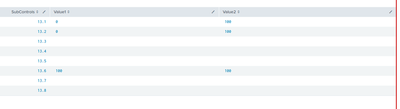
Expected result:
Subcontrol1%=0
Subcontrol2%=0
Subcontrol3%=100
Do you know how to perform the query to get the percentages in a new field for each row?
Greetings and thank you very much in advance.
- Mark as New
- Bookmark Message
- Subscribe to Message
- Mute Message
- Subscribe to RSS Feed
- Permalink
- Report Inappropriate Content


- Mark as New
- Bookmark Message
- Subscribe to Message
- Mute Message
- Subscribe to RSS Feed
- Permalink
- Report Inappropriate Content
Can you please try this?
index=paloalto sourcetype="pan:threat"
| stats count as Value2
| appendcols [| inputlookup ciskvstore
| eval key=_key
| where SubControls="1.1"] | outputlookup ciskvstore append=true key_field=key
Join the Splunk Community Slack to learn, troubleshoot, and make connections with fellow Splunk practitioners in real time!
Join Splunk User Groups to connect and learn in-person by region or remotely by topic or industry.
Meet the .conf26 AI Agent Buildathon Winners
Trusted Autonomy in the SOC: A Maturity Journey
Supercharging Windows Security Detection Performance: Introducing Hybrid Field ...
