
Join the Conversation
- Find Answers
- :
- Splunk Administration
- :
- Admin Other
- :
- Knowledge Management
- :
- Sending conditional alerts based on previous searc...
- Subscribe to RSS Feed
- Mark Topic as New
- Mark Topic as Read
- Float this Topic for Current User
- Bookmark Topic
- Subscribe to Topic
- Mute Topic
- Printer Friendly Page
- Mark as New
- Bookmark Message
- Subscribe to Message
- Mute Message
- Subscribe to RSS Feed
- Permalink
- Report Inappropriate Content

Following is the json log format being stored in Splunk.
{   data:[
     {
       "endpoint":"ep_1",
       "service":"service_1",
       "http_status_code":"500"
     },
     {
       "endpoint":"ep_2",
       "service":"service_1",
       "http_status_code":"500"
     },
     {
       "endpoint":"ep_3",
       "service":"service_2",
       "http_status_code":"503"
     }   ] }
Currently, an alert is setup to check once every 5 mins with the following search query and send an email if results>0.
host=something "data{}.http_status_code"= 5*| eval endpoint='data{}.endpoint' | Stats Count("data{}.http_status_code") as Count by endpoint | where Error_Count > 0
The generated result is :
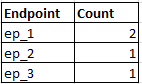
Now, the ask is, once an alert is generated (which contains a particular endpoin, say ep_1), in the next run, if the search result contains the same endpoint, it should NOT send an email for another hour.
So in this case, when the search query runs after 5 mins and contains ep_1 in the result, it should not send an email. So effectively, I need a condition for this endpoint's occurrence in the previously executed search result.
Is there a way this can be accomplished? Please help.

- Mark as New
- Bookmark Message
- Subscribe to Message
- Mute Message
- Subscribe to RSS Feed
- Permalink
- Report Inappropriate Content

The only way to accomplish this that I can think of is to save the results of your alerting search in a lookup file (using outputlookup) or the KVStore and use the contents of that lookup file/KVStore collection to filter out the unwanted endpoints (ie. all the ones in the lookup file from the last run). You'll have to include last alert timestamp per endpoint as a column in your lookup and make timestamp comparison part of your filter criteria.
- Mark as New
- Bookmark Message
- Subscribe to Message
- Mute Message
- Subscribe to RSS Feed
- Permalink
- Report Inappropriate Content
The only way to accomplish this that I can think of is to save the results of your alerting search in a lookup file (using outputlookup) or the KVStore and use the contents of that lookup file/KVStore collection to filter out the unwanted endpoints (ie. all the ones in the lookup file from the last run). You'll have to include last alert timestamp per endpoint as a column in your lookup and make timestamp comparison part of your filter criteria.
- Mark as New
- Bookmark Message
- Subscribe to Message
- Mute Message
- Subscribe to RSS Feed
- Permalink
- Report Inappropriate Content
Thanks. Trying this approach with a KVStore now.
For the above usecase, how do we compare the endpoint from the search results with the endpoint from the KVStore?
- Mark as New
- Bookmark Message
- Subscribe to Message
- Mute Message
- Subscribe to RSS Feed
- Permalink
- Report Inappropriate Content


You can try the alert throttling option -
https://www.splunk.com/blog/2010/06/01/alert-throttling.html
http://docs.splunk.com/Documentation/SplunkCloud/6.6.3/Alert/ThrottleAlerts

Join the Splunk Community Slack to learn, troubleshoot, and make connections with fellow Splunk practitioners in real time!
Join Splunk User Groups to connect and learn in-person by region or remotely by topic or industry.
[Puzzles] Solve, Learn, Repeat: Matching cron expressions
Design, Compete, Win: Submit Your Best Splunk Dashboards for a .conf26 Pass
May 2026 Splunk Expert Sessions: Security & Observability
