
Join the Conversation
- Find Answers
- :
- Splunk Administration
- :
- Admin Other
- :
- Knowledge Management
- :
- Reference a calculated field within another calcul...
- Subscribe to RSS Feed
- Mark Topic as New
- Mark Topic as Read
- Float this Topic for Current User
- Bookmark Topic
- Subscribe to Topic
- Mute Topic
- Printer Friendly Page
- Mark as New
- Bookmark Message
- Subscribe to Message
- Mute Message
- Subscribe to RSS Feed
- Permalink
- Report Inappropriate Content
Reference a calculated field within another calculated field

Is it possible to reference a calculated field within another calculated field?
My original search query was:
| eval SourceServer=substr(source, 11, 6)
| eval SourceInstance=case(
     SourceServer=="AAA001", "PROD",
     SourceServer=="AAA002", "PROD",
     SourceServer=="BBB001", "UAT",
     SourceServer=="BBB002", "UAT",
    1=1, "UNKNOWN")
My intention was to create two calculated fields. However, it doesn't look like SourceServer is processed before SourceInstance is, so all of the Events resolve to "UNKNOWN".
My alternative is to repeat the same logic for each option in the case statement which seems pretty inefficient.
SourceInstance
case(
     substr(source, 11, 6)=="AAA001", "PROD",
     substr(source, 11, 6)=="AAA002", "PROD",
     substr(source, 11, 6)=="BBB001", "UAT",
     substr(source, 11, 6)=="BBB002", "UAT",
    1=1, "UNKNOWN")
When I try to chain them together in a single field, like the simplified example below I get the error "Encountered the following error while trying to update: Unexpected token"
| eval foo=4 | eval bar=foo+4
Is there anyway to accomplish the logic of my original query without having to repeat the first query for every option of the case statement in the second query?
- Mark as New
- Bookmark Message
- Subscribe to Message
- Mute Message
- Subscribe to RSS Feed
- Permalink
- Report Inappropriate Content


Hi RWL01,
there must be something wrong somewhere else, because both examples work fine here:
First one:
| makeresults
| eval SourceServer=substr("ZZZZZZZZZZAAA001", 11, 6)
| eval SourceInstance=case(
    SourceServer=="AAA001", "PROD",
    SourceServer=="AAA002", "PROD",
    SourceServer=="BBB001", "UAT",
    SourceServer=="BBB002", "UAT",
    1=1, "UNKNOWN")
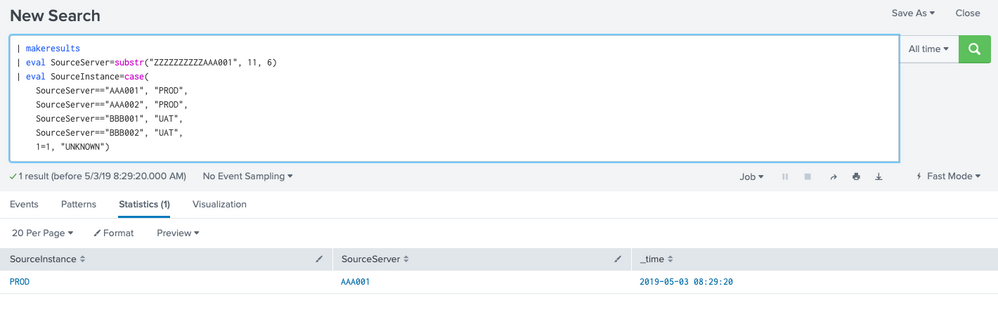
As well as the second one:
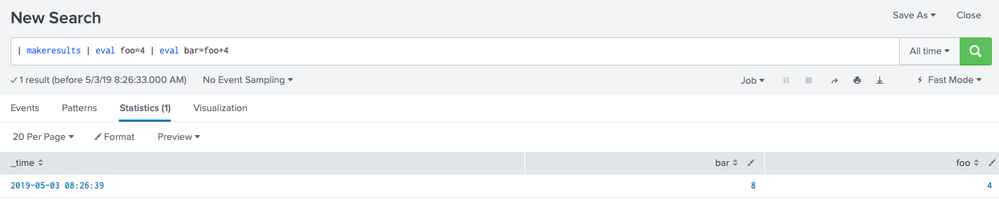
cheers, MuS




Join the Splunk Community Slack to learn, troubleshoot, and make connections with fellow Splunk practitioners in real time!
Join Splunk User Groups to connect and learn in-person by region or remotely by topic or industry.
Free Professional Services for .conf26 Attendees
Defend at Machine Speed: Your Guide to Security Sessions at .conf26
Where Innovation Takes Flight: The Splunk4Aviation Flight Sim Lands at .conf26
