
Join the Conversation
- Find Answers
- :
- Splunk Administration
- :
- Admin Other
- :
- Installation
- :
- Why is Splunk Search head is not getting restarted...
- Subscribe to RSS Feed
- Mark Topic as New
- Mark Topic as Read
- Float this Topic for Current User
- Bookmark Topic
- Subscribe to Topic
- Mute Topic
- Printer Friendly Page
- Mark as New
- Bookmark Message
- Subscribe to Message
- Mute Message
- Subscribe to RSS Feed
- Permalink
- Report Inappropriate Content

Hi Team,
I am unable to restart Splunk on my Search head. Earlier its working fine but now it's not working.
Due to this GUI of this Search head is also not able to access getting timed out.
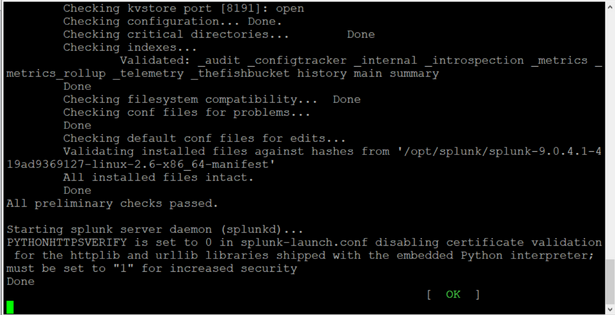
It's getting stopped here and no response I'm getting. I kept under observation up to 30min but no response.
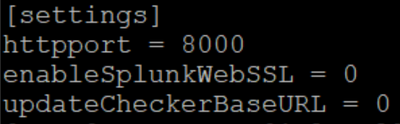
web.conf
- Mark as New
- Bookmark Message
- Subscribe to Message
- Mute Message
- Subscribe to RSS Feed
- Permalink
- Report Inappropriate Content


- Mark as New
- Bookmark Message
- Subscribe to Message
- Mute Message
- Subscribe to RSS Feed
- Permalink
- Report Inappropriate Content
Getting this Splunkd.log
07-24-2023 09:54:21.053 +0100 ERROR BTreeCP [2041288 indexerPipe] - checkpoint failed: removal of dir %s /opt/splunk/var/lib/splunk/fishbucket/splunk_private_db/snapshot.old: 1 errors occurred. Description for first 1: [{operation:"failed to remove directory", error:"Directory not empty", file:"/opt/splunk/var/lib/splunk/fishbucket/splunk_private_db/snapshot.old"}]
- Mark as New
- Bookmark Message
- Subscribe to Message
- Mute Message
- Subscribe to RSS Feed
- Permalink
- Report Inappropriate Content

Have you done any changes to the search head. Use GIT or some other to track your changes if you do not use that.
- Mark as New
- Bookmark Message
- Subscribe to Message
- Mute Message
- Subscribe to RSS Feed
- Permalink
- Report Inappropriate Content
No Its newly installed Splunk server
- Mark as New
- Bookmark Message
- Subscribe to Message
- Mute Message
- Subscribe to RSS Feed
- Permalink
- Report Inappropriate Content
Hi
have you anything in /opt/splunk/var/log/splunk/splunkd.log which could explain the reason why http service hasn’t started?
r. Ismo
- Mark as New
- Bookmark Message
- Subscribe to Message
- Mute Message
- Subscribe to RSS Feed
- Permalink
- Report Inappropriate Content
Getting this Splunkd.log
07-24-2023 09:54:21.053 +0100 ERROR BTreeCP [2041288 indexerPipe] - checkpoint failed: removal of dir. %s /opt/splunk/var/lib/splunk/fishbucket/splunk_private_db/snapshot.old: 1 error occurred. Description for first 1: [{operation:"failed to remove directory", error:"Directory not empty", file:"/opt/splunk/var/lib/splunk/fishbucket/splunk_private_db/snapshot.old"}]
- Mark as New
- Bookmark Message
- Subscribe to Message
- Mute Message
- Subscribe to RSS Feed
- Permalink
- Report Inappropriate Content
- Mark as New
- Bookmark Message
- Subscribe to Message
- Mute Message
- Subscribe to RSS Feed
- Permalink
- Report Inappropriate Content
I tried the same thing as you suggested then Issue got Resolved.
Thank you!!!

Enter the Agentic Era with Splunk AI Assistant for SPL 1.4
Stronger Security with Federated Search for S3, GCP SQL & Australian Threat ...
Accelerating Observability as Code with the Splunk AI Assistant
