
Join the Conversation
- Find Answers
- :
- Splunk Administration
- :
- Admin Other
- :
- Installation
- :
- Unable to access web UI
- Subscribe to RSS Feed
- Mark Topic as New
- Mark Topic as Read
- Float this Topic for Current User
- Bookmark Topic
- Subscribe to Topic
- Mute Topic
- Printer Friendly Page
- Mark as New
- Bookmark Message
- Subscribe to Message
- Mute Message
- Subscribe to RSS Feed
- Permalink
- Report Inappropriate Content


Hi all, I am new to splunk
When I start splunk, it does not show information regarding the web being available to access.
Normally at the end there is a meesage saying that the web interface is available at 127.0.0.0:8000
I just desapeared because I was able to earlier. I dont know if a misconfigured something
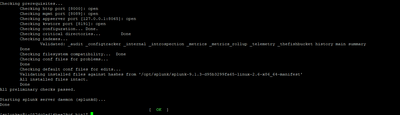
Appreciate the help
- Mark as New
- Bookmark Message
- Subscribe to Message
- Mute Message
- Subscribe to RSS Feed
- Permalink
- Report Inappropriate Content


Hi
you should check if you have disabled web server. See https://docs.splunk.com/Documentation/Splunk/latest/Security/DisableunnecessarySplunkcomponents
r. Ismo
- Mark as New
- Bookmark Message
- Subscribe to Message
- Mute Message
- Subscribe to RSS Feed
- Permalink
- Report Inappropriate Content

Hi @fromero ,
if you run "your_ip_address:8000" can you access the web GUI of your Splunk server?
If not there could be two issues:
- as @isoutamo said, the web interfaces could be disabled, if this is your firt installation it's very rare,
- you didn't disable the local firewall (iptables).
In the second case disable iptables and try again.
Ciao.
Giuseppe
- Mark as New
- Bookmark Message
- Subscribe to Message
- Mute Message
- Subscribe to RSS Feed
- Permalink
- Report Inappropriate Content
Based on screen shot the web server is disabled, so there shouldn’t be anything listening on port 8000. Unless it’s not disabled then you should found reason why it’s not try to start it from splunkd.log.
- Mark as New
- Bookmark Message
- Subscribe to Message
- Mute Message
- Subscribe to RSS Feed
- Permalink
- Report Inappropriate Content
Hi
you should check if you have disabled web server. See https://docs.splunk.com/Documentation/Splunk/latest/Security/DisableunnecessarySplunkcomponents
r. Ismo

Accelerating Observability as Code with the Splunk AI Assistant
Integrating Splunk Search API and Quarto to Create Reproducible Investigation ...
Congratulations to the 2025-2026 SplunkTrust!
