
Turn on suggestions
Auto-suggest helps you quickly narrow down your search results by suggesting possible matches as you type.
Installation
×
Join the Conversation
Without signing in, you're just watching from the sidelines. Sign in or Register to connect, share, and be part of the Splunk Community.
Turn on suggestions
Auto-suggest helps you quickly narrow down your search results by suggesting possible matches as you type.
- Find Answers
- :
- Splunk Administration
- :
- Admin Other
- :
- Installation
- :
- Install splunk forwarder via command prompt to run...
Options
- Subscribe to RSS Feed
- Mark Topic as New
- Mark Topic as Read
- Float this Topic for Current User
- Bookmark Topic
- Subscribe to Topic
- Mute Topic
- Printer Friendly Page
- Mark as New
- Bookmark Message
- Subscribe to Message
- Mute Message
- Subscribe to RSS Feed
- Permalink
- Report Inappropriate Content

macear
Engager
09-08-2020
10:10 PM
When installing Splunk Universal Forwarder on Windows via GUI we can specify to run splunk under virtual account.
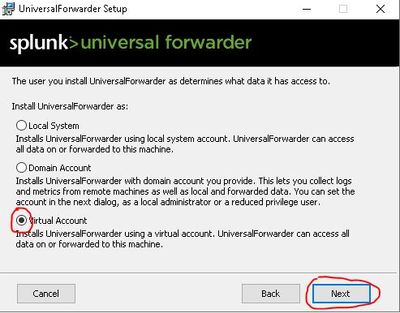
How can I specify the same when installing via command prompt?
I tried the following command in my batch script, but eventually splunk forwarder was installed under SYSTEM..
msiexec.exe /i splunkforwarder-8.0.6-152fb4b2bb96-x64-release.msi AGREETOLICENSE=yes SET_ADMIN_USER=0 SPLUNKUSERNAME=%user% SPLUNKPASSWORD=%password% LOGONUSERNAME="NT SERVICE\SplunkForwarder" /L*v %installation_log% /quiet
Is there this possibility?
1 Solution
- Mark as New
- Bookmark Message
- Subscribe to Message
- Mute Message
- Subscribe to RSS Feed
- Permalink
- Report Inappropriate Content

jho-splunk

Splunk Employee
09-10-2020
02:35 AM
- Mark as New
- Bookmark Message
- Subscribe to Message
- Mute Message
- Subscribe to RSS Feed
- Permalink
- Report Inappropriate Content
jho-splunk
Splunk Employee
09-10-2020
02:35 AM

Get Updates on the Splunk Community!
Data Management Digest – December 2025
Welcome to the December edition of Data Management Digest!
As we continue our journey of data innovation, the ...
Index This | What is broken 80% of the time by February?
December 2025 Edition
Hayyy Splunk Education Enthusiasts and the Eternally Curious!
We’re back with this ...
Unlock Faster Time-to-Value on Edge and Ingest Processor with New SPL2 Pipeline ...
Hello Splunk Community,
We're thrilled to share an exciting update that will help you manage your data more ...
