
Join the Conversation
- Find Answers
- :
- Splunk Administration
- :
- Getting Data In
- :
- indows Event Security login filter at source not w...
- Subscribe to RSS Feed
- Mark Topic as New
- Mark Topic as Read
- Float this Topic for Current User
- Bookmark Topic
- Subscribe to Topic
- Mute Topic
- Printer Friendly Page
- Mark as New
- Bookmark Message
- Subscribe to Message
- Mute Message
- Subscribe to RSS Feed
- Permalink
- Report Inappropriate Content
indows Event Security login filter at source not working for renderXml inputs

I am ingesting Windows Event Security login into Splunk using option “renderXml” and need to filter some EventCodes based on the Keywords.
For example my input stanza is like below
[WinEventLog://Security]
checkpointInterval = 5
current_only = 0
disabled = 0
start_from = oldest
blacklist1 = EventCode="4648" Keywords="0x8020000000000000"
blacklist2 = EventCode="4672" Keywords=0x8020000000000000
blacklist3 = EventCode="4904" Keywords="0x8020000000000000"
blacklist4 = EventCode="4905" Keywords="??8020000000000000"
renderXml = true
In my case following blacklist is working- but None of the other once are working. What am I missing
blacklist4 = EventCode="4905" Keywords="??8020000000000000" >>>>>Working
following Not working
blacklist1 = EventCode="4648" Keywords="0x8020000000000000" >>>>>Not Working
blacklist2 = EventCode="4672" Keywords=0x8020000000000000 >>>>>Not Working
blacklist3 = EventCode="4904" Keywords="0x8020000000000000" >>>>>Not Working
What am I missing strong text
- Mark as New
- Bookmark Message
- Subscribe to Message
- Mute Message
- Subscribe to RSS Feed
- Permalink
- Report Inappropriate Content
I performed some test and for following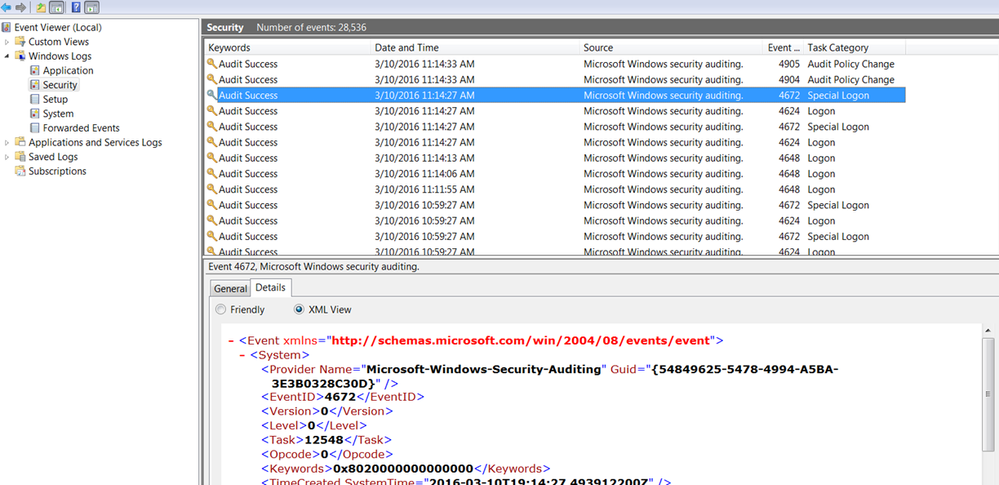
Below are the various blacklist
blacklist 1 = EventCode="4648" Keywords="0x8020000000000000" >>>> Not filtered
blacklist2 = EventCode="4672" Keywords="\b0x8020000000000000" >>>>Filtered
blacklist3 = EventCode="4904" Keywords=\b0x8020000000000000 >>>>Not filtered
blacklist4 = EventCode="4905" Keywords="??8020000000000000" >>>>Filtered
blacklist4 = EventCode="4905" Keywords="??8020000000000000" >>>>Filtered
Result View for Above Data From EventViewer:


Join the Splunk Community Slack to learn, troubleshoot, and make connections with fellow Splunk practitioners in real time!
Join Splunk User Groups to connect and learn in-person by region or remotely by topic or industry.
Make Your Machine Data AI-Ready in Splunk
Splunk Asynchronous Forwarding Explained
How to Monitor AI Agents with Splunk Agent Observability
