
Join the Conversation
- Find Answers
- :
- Splunk Administration
- :
- Getting Data In
- :
- Why am I unable to store more than 50,000 results ...
- Subscribe to RSS Feed
- Mark Topic as New
- Mark Topic as Read
- Float this Topic for Current User
- Bookmark Topic
- Subscribe to Topic
- Mute Topic
- Printer Friendly Page
- Mark as New
- Bookmark Message
- Subscribe to Message
- Mute Message
- Subscribe to RSS Feed
- Permalink
- Report Inappropriate Content

See title, I'm using a scheduled query to prune a set of results from a lookup table, this lookup table has over 2m results, but after the prune, it's truncated down to 50,000. This exclusively happens when I schedule the lookup table with the "replace" option. Append works perfectly.
Pruning script:
| inputlookup my_lookup.csv
| where _time > relative_time(now(),"-6m")
Pruning schedule options:
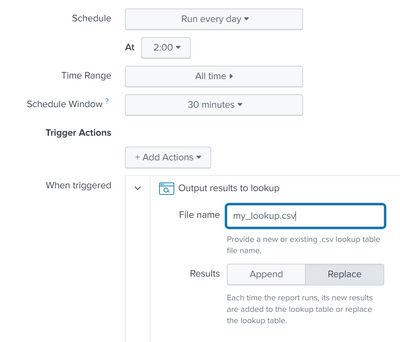
I've tried setting the output location to both my_lookup.csv and to other lookups. In both cases, 50,000 results seems to be the limit for the replaced lookup table.
Append schedule options:
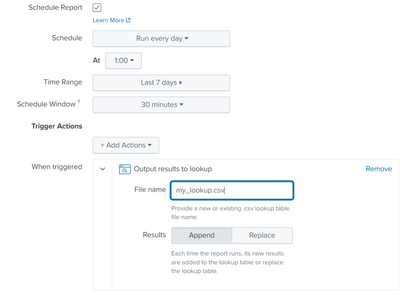
Any help is appreciated.
- Mark as New
- Bookmark Message
- Subscribe to Message
- Mute Message
- Subscribe to RSS Feed
- Permalink
- Report Inappropriate Content


Hi @Mr_person,
You are hitting the max_action_results on limits.conf which is default 50000. It is not a good idea to increase this limit to 2 million.
It seems your only option is using outputlookup in your search although it seems not safe.
limits.conf

[scheduler]
max_action_results = <integer>
* The maximum number of results to load when triggering an alert action.
* Default: 50000
- Mark as New
- Bookmark Message
- Subscribe to Message
- Mute Message
- Subscribe to RSS Feed
- Permalink
- Report Inappropriate Content
Hi @Mr_person,
You are hitting the max_action_results on limits.conf which is default 50000. It is not a good idea to increase this limit to 2 million.
It seems your only option is using outputlookup in your search although it seems not safe.
limits.conf

[scheduler]
max_action_results = <integer>
* The maximum number of results to load when triggering an alert action.
* Default: 50000
- Mark as New
- Bookmark Message
- Subscribe to Message
- Mute Message
- Subscribe to RSS Feed
- Permalink
- Report Inappropriate Content
Also, I'm aware of the fact that I could change the report to use the outputlookup command inside of the search string, but that makes the report unsafe for others to open. For those looking for a workaround:
| inputlookup my_lookup.csv
| where _time > relative_time(now(),"-6m")
| outputlookup my_lookup.csv append=false
Again this is unsafe and not ideal though.

Data Management Digest – December 2025
Index This | What is broken 80% of the time by February?
Unlock Faster Time-to-Value on Edge and Ingest Processor with New SPL2 Pipeline ...
