
Join the Conversation
- Find Answers
- :
- Splunk Administration
- :
- Getting Data In
- :
- No events ingested via HEC from Syslog Connector f...
- Subscribe to RSS Feed
- Mark Topic as New
- Mark Topic as Read
- Float this Topic for Current User
- Bookmark Topic
- Subscribe to Topic
- Mute Topic
- Printer Friendly Page
- Mark as New
- Bookmark Message
- Subscribe to Message
- Mute Message
- Subscribe to RSS Feed
- Permalink
- Report Inappropriate Content
No events ingested via HEC from Syslog Connector for Splunk (SC4S)

Hi,
I had Splunk 9.05 and Syslog Conector for Splunk (SC4S) 1.110 running and working for months. I just realized that there are not events ingested via HEC since two weeks ago.
Both servers are in the same subnet, no firewall in between.
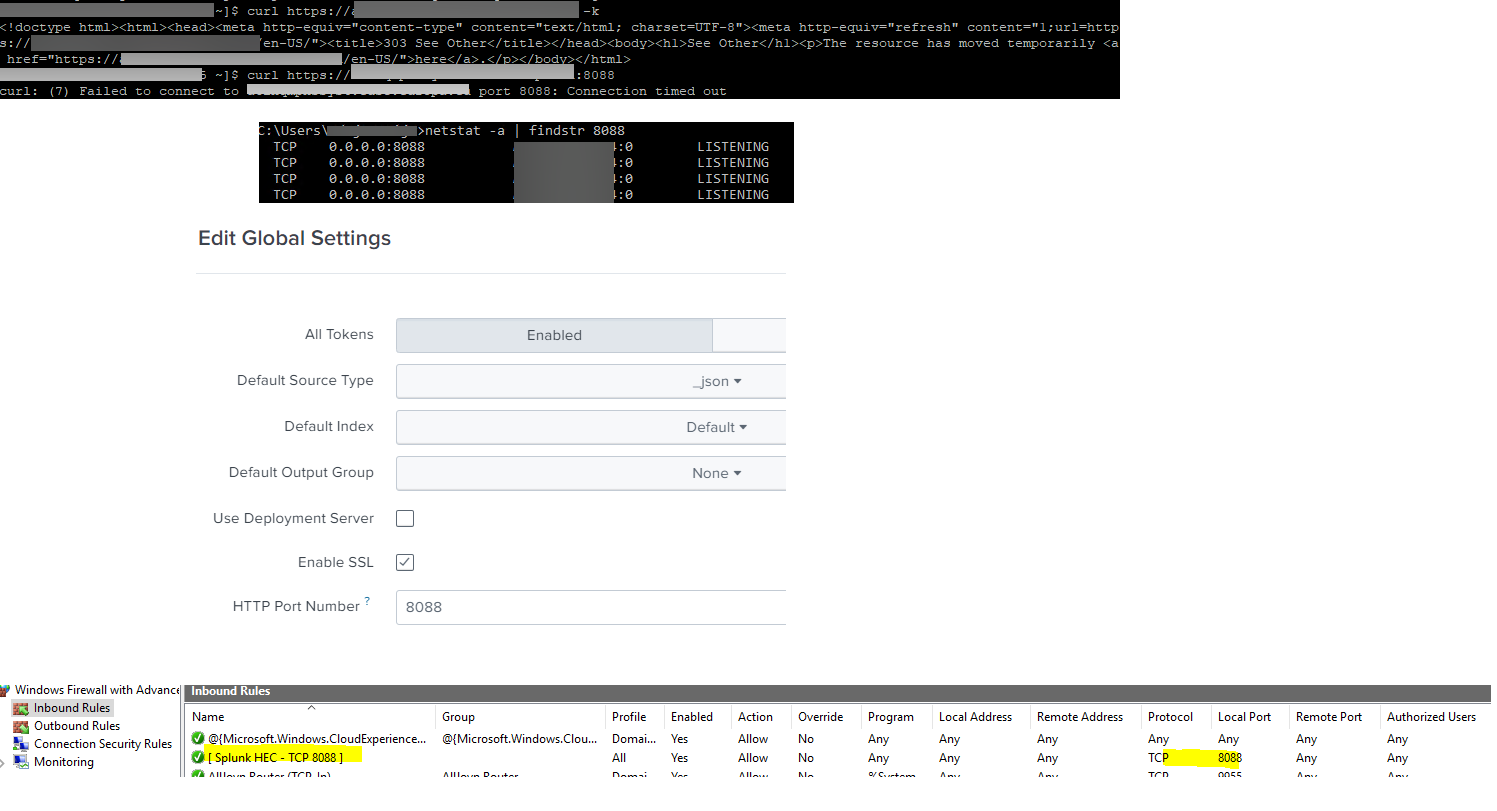
- Local firewall of the server has a rule for the incoming TCP 8088 traffic. (screenshot attached)
- HEC enabled (global settings screenshot attached)
- HEC token is correct. It is the same in the SC4S and Splunk.
- netstat in the Splunk server shows listening in the port 8088. (attached)
- ping from SC4S to Splunk and curl on port splunk:80 works fine, if I do port splunk:8088 it throws a timeout. (attached)
- local firewall in SC4S
firewall-cmd --list-all
drop (active)
target: DROP
icmp-block-inversion: yes
interfaces: eth0
sources:
services: ssh syslog syslog-tls
ports: 514/tcp 601/tcp
protocols:
forward: no
masquerade: no
forward-ports:
source-ports:
icmp-blocks: echo-reply echo-request port-unreachable time-exceeded
rich rules:
any idea what else I could check?
many thanks
- Mark as New
- Bookmark Message
- Subscribe to Message
- Mute Message
- Subscribe to RSS Feed
- Permalink
- Report Inappropriate Content
this is the output from the SC4S container. I created a new token to be sure, still the same issue.
/opt/sc4s$ docker logs SC4S
curl: (7) Failed to connect to splunk.xx.yy port 8088: Connection timed out
SC4S_ENV_CHECK_HEC: Invalid Splunk HEC URL, invalid token, or other HEC connectivity issue index=main. sourcetype=sc4s:fallback
Startup will continue to prevent data loss if this is a transient failure.
syslog-ng checking config
sc4s version=1.110.1
sc4s versions <2.0.0 are depreated please review and follow upgrade docs
starting goss
starting syslog-ng
- Mark as New
- Bookmark Message
- Subscribe to Message
- Mute Message
- Subscribe to RSS Feed
- Permalink
- Report Inappropriate Content

- Mark as New
- Bookmark Message
- Subscribe to Message
- Mute Message
- Subscribe to RSS Feed
- Permalink
- Report Inappropriate Content

Upcoming Webinar: Unmasking Insider Threats with Slunk Enterprise Security’s UEBA
.conf25 technical session recap of Observability for Gen AI: Monitoring LLM ...
A Season of Skills: New Splunk Courses to Light Up Your Learning Journey
