
Turn on suggestions
Auto-suggest helps you quickly narrow down your search results by suggesting possible matches as you type.
Getting Data In
×
Join the Conversation
Without signing in, you're just watching from the sidelines. Sign in or Register to connect, share, and be part of the Splunk Community.
- Find Answers
- :
- Splunk Administration
- :
- Getting Data In
- :
- Re: How would you create a table from json array w...
Options
- Subscribe to RSS Feed
- Mark Topic as New
- Mark Topic as Read
- Float this Topic for Current User
- Bookmark Topic
- Subscribe to Topic
- Mute Topic
- Printer Friendly Page
- Mark as New
- Bookmark Message
- Subscribe to Message
- Mute Message
- Subscribe to RSS Feed
- Permalink
- Report Inappropriate Content

topherbirth
Explorer
04-21-2020
04:53 PM
I have tried quite a few different ways to capture data within a json object and return it as separate events, but my break-down always occurs when attempting to access the data in the nested arrays.
{
    "Items": [
        {
            "CN": "AccountName",
            "CV": "AccountOne",
            "Props": [
                {
                    "PN": "PropOne",
                    "PV": "5"
                },
                {
                    "PN": "PropTwo",
                    "PV": "3"
                }
            ]
        },
        {
            "CN": "AccountName",
            "CV": "AccountOne",
            "Props": [
                {
                    "PN": "PropOne",
                    "PV": "5"
                }
            ]
        },
        {
            "CN": "AccountName",
            "CV": "AccountTwo",
            "Props": [
                {
                    "PN": "PropOne",
                    "PV": "5"
                },
                {
                    "PN": "PropThree",
                    "PV": "8"
                }
            ]
        },
        {
            "CN": "PersonName",
            "CV": "Bob",
            "Props": [
                {
                    "PN": "PropOne",
                    "PV": "5"
                },
                {
                    "PN": "PropThree",
                    "PV": "8"
                }
            ]
        },
        {
            "CN": "PersonName",
            "CV": "Bob",
            "Props": [
                {
                    "PN": "PropThree",
                    "PV": "8"
                }
            ]
        }
    ]
}
Prepared version for testing:
{ \"Items\": [ { \"CN\": \"AccountName\", \"CV\": \"AccountOne\", \"Props\": [ { \"PN\": \"PropOne\", \"PV\": \"5\" }, { \"PN\": \"PropTwo\", \"PV\": \"3\" } ] }, { \"CN\": \"AccountName\", \"CV\": \"AccountOne\", \"Props\": [ { \"PN\": \"PropOne\", \"PV\": \"5\" } ] }, { \"CN\": \"AccountName\", \"CV\": \"AccountTwo\", \"Props\": [ { \"PN\": \"PropOne\", \"PV\": \"5\" }, { \"PN\": \"PropThree\", \"PV\": \"8\" } ] }, { \"CN\": \"PersonName\", \"CV\": \"Bob\", \"Props\": [ { \"PN\": \"PropOne\", \"PV\": \"5\" }, { \"PN\": \"PropThree\", \"PV\": \"8\" } ] }, { \"CN\": \"PersonName\", \"CV\": \"Bob\", \"Props\": [ { \"PN\": \"PropThree\", \"PV\": \"8\" } ] } ] }
I would want this to result in something like:
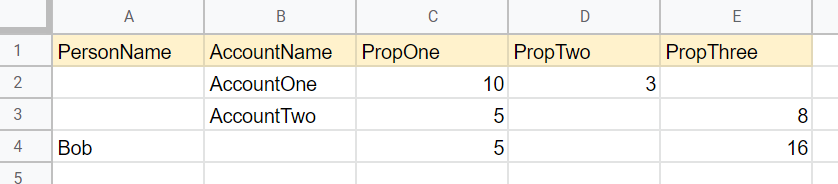
Thanks!
1 Solution
- Mark as New
- Bookmark Message
- Subscribe to Message
- Mute Message
- Subscribe to RSS Feed
- Permalink
- Report Inappropriate Content

to4kawa
Ultra Champion
04-21-2020
06:19 PM
| makeresults
| eval _raw="{ \"Items\": [ { \"CN\": \"AccountName\", \"CV\": \"AccountOne\", \"Props\": [ { \"PN\": \"PropOne\", \"PV\": \"5\" }, { \"PN\": \"PropTwo\", \"PV\": \"3\" } ] }, { \"CN\": \"AccountName\", \"CV\": \"AccountOne\", \"Props\": [ { \"PN\": \"PropOne\", \"PV\": \"5\" } ] }, { \"CN\": \"AccountName\", \"CV\": \"AccountTwo\", \"Props\": [ { \"PN\": \"PropOne\", \"PV\": \"5\" }, { \"PN\": \"PropThree\", \"PV\": \"8\" } ] }, { \"CN\": \"PersonName\", \"CV\": \"Bob\", \"Props\": [ { \"PN\": \"PropOne\", \"PV\": \"5\" }, { \"PN\": \"PropThree\", \"PV\": \"8\" } ] }, { \"CN\": \"PersonName\", \"CV\": \"Bob\", \"Props\": [ { \"PN\": \"PropThree\", \"PV\": \"8\" } ] } ] }"
| spath path=Items{} output=Items
| stats count by Items
| spath input=Items path=Props{} output=Props
| mvexpand Props
| spath input=Props
| spath input=Items
| fields - Items count Props*
| eval names=CN."_".CV
| stats sum(PV) as PV by names PN
| xyseries names PN PV
| rex field=names "AccountName_(?<AccountName>\w+)|PersonName_(?<PersonName>\w+)"
| table PersonName AccountName PropOne PropTwo PropThree
- Mark as New
- Bookmark Message
- Subscribe to Message
- Mute Message
- Subscribe to RSS Feed
- Permalink
- Report Inappropriate Content
to4kawa
Ultra Champion
04-21-2020
06:19 PM
| makeresults
| eval _raw="{ \"Items\": [ { \"CN\": \"AccountName\", \"CV\": \"AccountOne\", \"Props\": [ { \"PN\": \"PropOne\", \"PV\": \"5\" }, { \"PN\": \"PropTwo\", \"PV\": \"3\" } ] }, { \"CN\": \"AccountName\", \"CV\": \"AccountOne\", \"Props\": [ { \"PN\": \"PropOne\", \"PV\": \"5\" } ] }, { \"CN\": \"AccountName\", \"CV\": \"AccountTwo\", \"Props\": [ { \"PN\": \"PropOne\", \"PV\": \"5\" }, { \"PN\": \"PropThree\", \"PV\": \"8\" } ] }, { \"CN\": \"PersonName\", \"CV\": \"Bob\", \"Props\": [ { \"PN\": \"PropOne\", \"PV\": \"5\" }, { \"PN\": \"PropThree\", \"PV\": \"8\" } ] }, { \"CN\": \"PersonName\", \"CV\": \"Bob\", \"Props\": [ { \"PN\": \"PropThree\", \"PV\": \"8\" } ] } ] }"
| spath path=Items{} output=Items
| stats count by Items
| spath input=Items path=Props{} output=Props
| mvexpand Props
| spath input=Props
| spath input=Items
| fields - Items count Props*
| eval names=CN."_".CV
| stats sum(PV) as PV by names PN
| xyseries names PN PV
| rex field=names "AccountName_(?<AccountName>\w+)|PersonName_(?<PersonName>\w+)"
| table PersonName AccountName PropOne PropTwo PropThree
- Mark as New
- Bookmark Message
- Subscribe to Message
- Mute Message
- Subscribe to RSS Feed
- Permalink
- Report Inappropriate Content
topherbirth
Explorer
04-21-2020
07:04 PM
That works. Thanks!
Any chance we could get an explanation for how it works? I would like to learn from it, but it's hard for me to tell exactly whats happening.
- Mark as New
- Bookmark Message
- Subscribe to Message
- Mute Message
- Subscribe to RSS Feed
- Permalink
- Report Inappropriate Content
to4kawa
Ultra Champion
04-21-2020
07:29 PM
Try line by line and check result.
spath session:
- see reference: spath
- first
stats count byis to divide 5 Items mvexpandis to divide Props
xyseries session:
- see reference: xyseries
xyseriescan have many args. but it is hard to understand and handle over 4 args.- so, let' make only three fields(args).
| eval names=CN."_".CVthis is trick. - aggregate by
| stats sum(PV) as PV by names PN rexis to extract fields by REGEX.
Is this enough? happy Splunking.
- Mark as New
- Bookmark Message
- Subscribe to Message
- Mute Message
- Subscribe to RSS Feed
- Permalink
- Report Inappropriate Content
topherbirth
Explorer
04-21-2020
08:25 PM
Good deal! Thanks for the info and help.



Got questions? Get answers!
Join the Splunk Community Slack to learn, troubleshoot, and make connections with fellow Splunk practitioners in real time!
Meet up IRL or virtually!
Join Splunk User Groups to connect and learn in-person by region or remotely by topic or industry.
Get Updates on the Splunk Community!
A Four-Part Event Series: Full Stack Observability For the AI Era
As AI reshapes applications, infrastructure, and the way teams operate, the traditional boundaries of ...
SOC4Kafka - New Kafka Connector Powered by OpenTelemetry
The new SOC4Kafka connector, built on OpenTelemetry, enables the collection of Kafka messages and forwards ...
Event Series: Level up your SOC: Advancing with Splunk Enterprise Security
AI has fundamentally raised the stakes for security operations, and this three-part series is your guide to ...
