
Join the Conversation
- Find Answers
- :
- Apps & Add-ons
- :
- Splunk Development
- :
- Splunk Dev
- :
- Re: Textbox Character limitation
- Subscribe to RSS Feed
- Mark Topic as New
- Mark Topic as Read
- Float this Topic for Current User
- Bookmark Topic
- Subscribe to Topic
- Mute Topic
- Printer Friendly Page
- Mark as New
- Bookmark Message
- Subscribe to Message
- Mute Message
- Subscribe to RSS Feed
- Permalink
- Report Inappropriate Content
Textbox Character limitation

Couple OF Questions related to Text Box Prompt.
I have a a text box prompt which has the restriction to only accept numeric value up to 9 digits. The ask is to count the digits while user adding the entry to the text box so users would know how many digits has been added to the box. I am not able to get around it I know there might be a java script that I can use that can calculate the digits while it is being added to the text box and show the character count underneath the text box but cannot find the script online.
One other requirement to create a info popup when users puts less than 8 digits when submit button is clicked.
- Mark as New
- Bookmark Message
- Subscribe to Message
- Mute Message
- Subscribe to RSS Feed
- Permalink
- Report Inappropriate Content

@khumer If you want to handle validation of Text Input through its Change Event Handler (and using an independent search to perform complex validation as per your requirement), you should be able to get to your desired result directly through Simple XML without any JS. Please try the following run anywhere example.
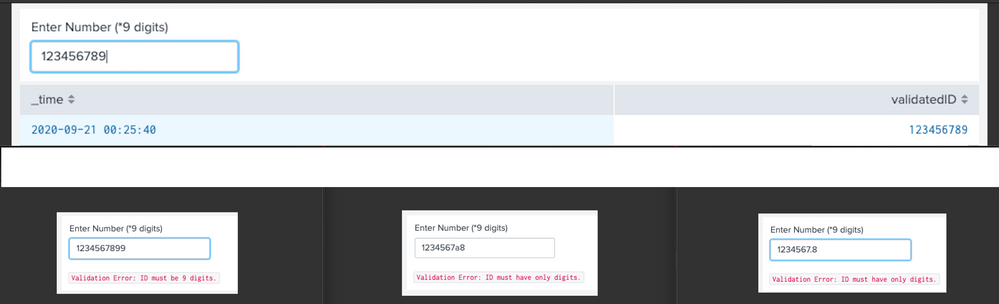
<form>
  <label>Text Box Input validation</label>
  <!-- Independent Search to perform strictly 9 digits input validation -->
  <search>
    <query>| makeresults
| fields - _time
| eval id="$id$"
| eval validationNumeric=case(isnum(id) AND NOT match(id,"\."),1,true(),0),
validationLength=case(len(id)=9,1,true(),0)
| eval validatedID=case(validationNumeric==1 AND validationLength==1,id,true(),"failed")
| eval validationMsg=case(validationNumeric==0 AND validationLength==0,"ID must be 9 digit number.",
                    validationNumeric==0,"ID must have only digits.",
                    validationLength==0,"ID must be 9 digits.",true(),"success")</query>
    <earliest>-1s</earliest>
    <latest>now</latest>
    <progress>
      <!-- Clear validation ID if input validation failes -->
      <eval token="validatedID">case($result.validatedID$!="failed",$result.validatedID$)</eval>
      <!-- Clear validation Msg if validation is successful -->
      <eval token="validationMsg">case($result.validationMsg$!="success",$result.validationMsg$)</eval>
    </progress>
  </search>
  <fieldset submitButton="false" autoRun="false"></fieldset>
  <!-- Show Error in case of Input 9 digit validation failure -->
  <row>
    <panel>
      <input type="text" token="id" searchWhenChanged="true">
        <label>Enter Number (*9 digits)</label>
        <change>
          <!-- Every Time Input changes Validation ID and Message will be re-evaluated using Independent search. -->
          <!-- So unset both -->
          <unset token="validatedID"></unset>
          <unset token="validationMsg"></unset>
        </change>
        <default>123456789</default>
      </input>
      <html depends="$validationMsg$">
        <div>
          <div>
            <code>Validation Error: $validationMsg$</code>
          </div>
        </div>
      </html>
    </panel>
  </row>
  <!-- Run search only if Valid 9 digits are keyed in as input -->
  <row depends="$validatedID$">
    <panel>
      <table>
        <search depends="$validatedID$">
          <query>| makeresults
          | eval validatedID=$validatedID$
          </query>
        </search>
      </table>
    </panel>
  </row>
</form>
| makeresults | eval message= "Happy Splunking!!!"
- Mark as New
- Bookmark Message
- Subscribe to Message
- Mute Message
- Subscribe to RSS Feed
- Permalink
- Report Inappropriate Content


would you be able post your simplexml and js.
If this helps, give a like below.

Join the Splunk Community Slack to learn, troubleshoot, and make connections with fellow Splunk practitioners in real time!
Join Splunk User Groups to connect and learn in-person by region or remotely by topic or industry.
Index This | What travels the world but is also stuck in place?
Discover New Use Cases: Unlock Greater Value from Your Existing Splunk Data
Continue Your Journey: Join Session 2 of the Data Management and Federation Bootcamp ...
