
Join the Conversation
- Find Answers
- :
- Using Splunk
- :
- Dashboards & Visualizations
- :
- Re: Why does a chart in a dashboard load at differ...
- Subscribe to RSS Feed
- Mark Topic as New
- Mark Topic as Read
- Float this Topic for Current User
- Bookmark Topic
- Subscribe to Topic
- Mute Topic
- Printer Friendly Page
- Mark as New
- Bookmark Message
- Subscribe to Message
- Mute Message
- Subscribe to RSS Feed
- Permalink
- Report Inappropriate Content
Why does a chart in a dashboard load at different speeds depending upon when it was added to the dashboard?

I have a report with the following search:
sourcetype="xxxxxxxx:xxxxxxxx" "GET /xxxxx" apiKey= | rex "(GET (?.))" | eval Page_Name=(mvindex(split(Page_String,"?"),0)) | bin _time span=1m | stats count AS Page_Requests BY _time | sort -_time | head 30
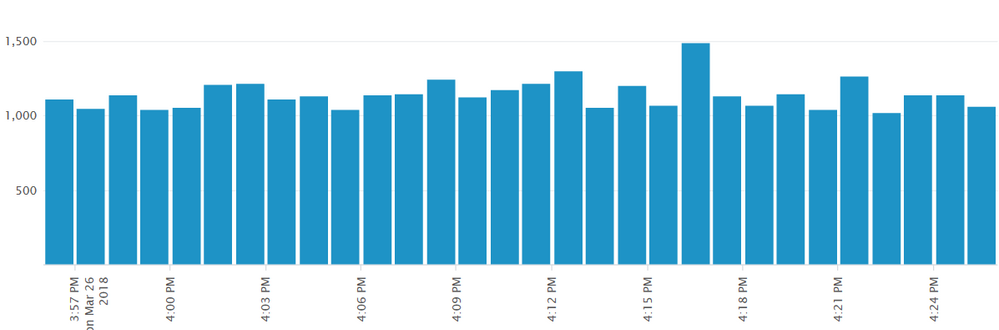
01) When I run the report, it shows a fully loaded graph in just a few seconds which includes a total of 30 1-minute span bars.
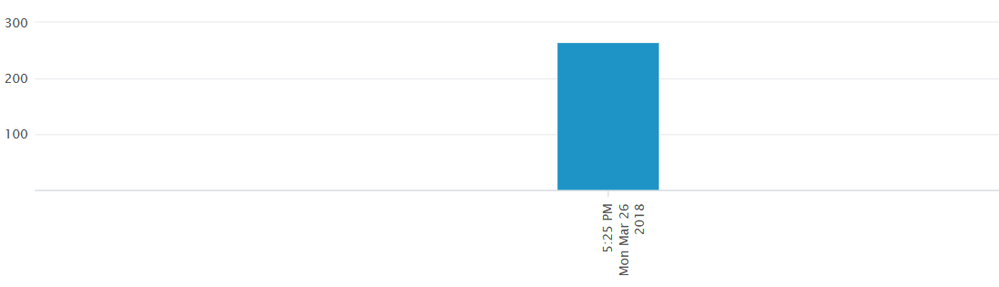
02) I added the report to the dashboard via the "+Add Panel" option on the dashboard. The dashboard chart starts loading slowly, displaying the most current minute as the first bar. The graph continues loading in this fashion, one bar/minute at a time, until all 30 bars (minutes) are populated from the data as it is generated instead of fetching the data for the prior 29 minutes.
03) If I am in the report and I add it via "Save As", then "Dashboard Panel" , "Existing", "Inline Search", the dashboard chart loads as fast as the report search does (01).
04) If I am in the report and I add it via "Save As", then "Dashboard Panel", "Existing", "Report", the dashboard chart loads slowly, behaving like (02).
Why is there a difference in behavior of the chart based on how it is added to the dashboard?
Should I always add a component from the actual report search instead of selecting the report via the dashboard option to add a panel?
Thank you.


- Mark as New
- Bookmark Message
- Subscribe to Message
- Mute Message
- Subscribe to RSS Feed
- Permalink
- Report Inappropriate Content

This sounds to me like approaches #2 and #4 are using different time windows (maybe realtime?) than #1 and #3. Just a guess, though.

Join the Splunk Community Slack to learn, troubleshoot, and make connections with fellow Splunk practitioners in real time!
Join Splunk User Groups to connect and learn in-person by region or remotely by topic or industry.
[Puzzles] Solve, Learn, Repeat: Matching cron expressions
Design, Compete, Win: Submit Your Best Splunk Dashboards for a .conf26 Pass
May 2026 Splunk Expert Sessions: Security & Observability
