
Join the Conversation
- Find Answers
- :
- Using Splunk
- :
- Dashboards & Visualizations
- :
- Using EventHandler with MultiSelectInput
- Subscribe to RSS Feed
- Mark Topic as New
- Mark Topic as Read
- Float this Topic for Current User
- Bookmark Topic
- Subscribe to Topic
- Mute Topic
- Printer Friendly Page
- Mark as New
- Bookmark Message
- Subscribe to Message
- Mute Message
- Subscribe to RSS Feed
- Permalink
- Report Inappropriate Content
Using EventHandler with MultiSelectInput

I have a multiselect input and i want to create a couple tokens from a single multiselect. This works with single value inputs but for Multiselects inputs it fails.
Here's the scenario: I have a table like this,
name| state | city
tom| CA | SF
mike|CA |TAHOE
mark|AZ | Phoenix
In the multi select you can select from a list of names and the token will be the states. BUT I also want to create a token for the city at the same time. I tried this:
    var input2 = new MultiSelectInput({
        "id": "input2",
        "delimiter": " ",
        "labelField": "name",
        "searchWhenChanged": true,
        "valueField": "state",
        "value": "$form.multi_select2$",
        "managerid": "search5",
        "el": $('#input2')
    }, {tokens: true}).render();

    input2.on("change", function(newValue) {
        FormUtils.handleValueChange(input2);
    });


   input2.on("valueChange", function(e) {
       if (e.value !== undefined) {
           EventHandler.setToken("field2.cityMultiSelect", "$row.city$", {}, e.data);
       }
   });
When I try the above code it will only populate the $field2.cityMultiSelect$ with one city value, even though the user may have selected multiple names. Is there any what to make $field2.cityMultiSelect$ a multi value token as well?
- Mark as New
- Bookmark Message
- Subscribe to Message
- Mute Message
- Subscribe to RSS Feed
- Permalink
- Report Inappropriate Content

@tdiestel, Since the multiselect value just assigns the first selected value as token and ignores the remaining selected multivalues.
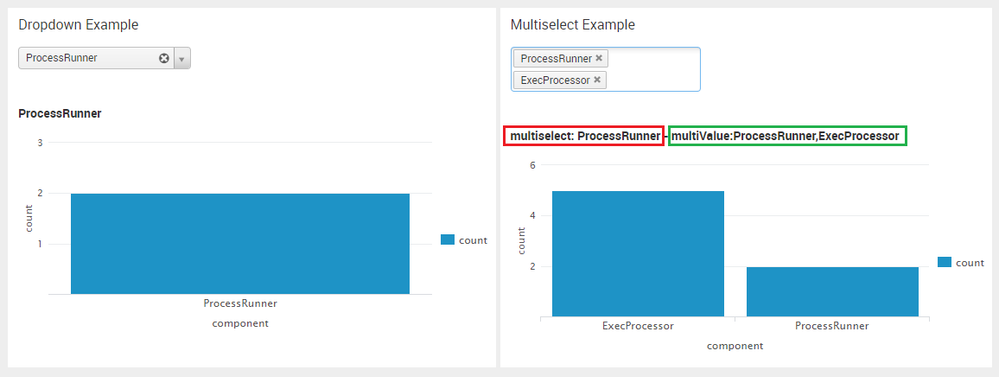
Following JavaScript can be used to iterate through the multi values and return selected comma separated values.
PS: The example is from HTML Dashboard, but the same can be modified for SplunkJS as well.
    input2.on("valueChange", function(e) {
        var loopCounter;
        for(loopCounter=0;loopCounter<e.data.length;loopCounter++)
        {
            var tmpMultiValue;
            if (e.value[loopCounter] !== undefined) {
                if(tmpMultiValue == undefined){
                    // First time initialize temporary multivalued data
                    tmpMultiValue=e.value[loopCounter];
                }else{
                    // Prepare comma separated multivalued data
                    tmpMultiValue=tmpMultiValue+","+e.value[loopCounter];
                    // Original code untouched.
                    // Sets first value. If iterated over data objects (cumulative) this might populate multivalued data.
                    EventHandler.setToken("multiSelect", "$value$", {}, e.data);
                }
          }
        }
        // Custom multi valued token multiValue set using SplunkJS Token Handler.
        // May need to change from default to submitted Token handler as required.
        var tokens = mvc.Components.get("default");
        tokens.set("multiValue", tmpMultiValue);
    });
Once multiValue token is populated the same can be passed to a dummy Splunk Search to iterate and split as multi valued using comma and then expanded as single value results.
| makeresults | eval message= "Happy Splunking!!!"
- Mark as New
- Bookmark Message
- Subscribe to Message
- Mute Message
- Subscribe to RSS Feed
- Permalink
- Report Inappropriate Content
The change event is not available for multiselect input refer to the documentation: http://docs.splunk.com/Documentation/Splunk/latest/Viz/EventHandlerReference
I wish there was an enhancement to multiselect input to handle change.
| makeresults | eval message= "Happy Splunking!!!"
- Mark as New
- Bookmark Message
- Subscribe to Message
- Mute Message
- Subscribe to RSS Feed
- Permalink
- Report Inappropriate Content
This is very helpful. One thing I don't understand is why would it not be available for the multiselect, but available for the check box, where you can have several options?
I'll test this out and see if it works as i would expect the multiselect to work. Thank you again.
UPDATE: Just tested out the check box input and same results as the multiselect, which is it doesn't work.



Join the Splunk Community Slack to learn, troubleshoot, and make connections with fellow Splunk practitioners in real time!
Join Splunk User Groups to connect and learn in-person by region or remotely by topic or industry.
SOC4Kafka - New Kafka Connector Powered by OpenTelemetry
Rounding off the Splunk Dashboard Contest
A Four Part Event Series: AI + Observability: AI Agents, LLMs, Apps, & Infrastructure
