
Join the Conversation
- Find Answers
- :
- Using Splunk
- :
- Dashboards & Visualizations
- :
- Re: Time format XML Multiple lines
- Subscribe to RSS Feed
- Mark Topic as New
- Mark Topic as Read
- Float this Topic for Current User
- Bookmark Topic
- Subscribe to Topic
- Mute Topic
- Printer Friendly Page
- Mark as New
- Bookmark Message
- Subscribe to Message
- Mute Message
- Subscribe to RSS Feed
- Permalink
- Report Inappropriate Content

I don't know what to specify in the time_format so that it captures the date (<ActionDate>) and time (<ActionTime>), whose data is separated into separate lines.
XML file
<Interceptor>
		<AttackCoords>-80.33100097073213,25.10742916222947</AttackCoords>
		<Outcome>Interdiction</Outcome>
		<Infiltrators>23</Infiltrators>
		<Enforcer>Ironwood</Enforcer>
		<ActionDate>2013-04-24</ActionDate>
		<ActionTime>00:07:00</ActionTime>
		<RecordNotes></RecordNotes>
		<NumEscaped>0</NumEscaped>
		<LaunchCoords>-80.23429525620114,24.08680387475695</LaunchCoords>
		<AttackVessel>Rustic</AttackVessel>
	</Interceptor>
This is the configuration that I have in my props.conf
BREAK_ONLY_BEFORE_DATE =
DATETIME_CONFIG =
LINE_BREAKER = </Interceptor>([\r\n]+)
NO_BINARY_CHECK = true
SHOULD_LINEMERGE = false
category =
disabled = false
pulldown_type = true
TIME_FORMAT = %Y-%m-%d %H:%M:%S
TIME_PREFIX = <ActionDate>
The TIME_FORMAT part is what I have to correct. I tried to put this in, but it didn't work.
TIME_FORMAT= %Y-%m-%d</ActionDate>%n<ActionTime>%H:%M:%SAny ideas
- Mark as New
- Bookmark Message
- Subscribe to Message
- Mute Message
- Subscribe to RSS Feed
- Permalink
- Report Inappropriate Content

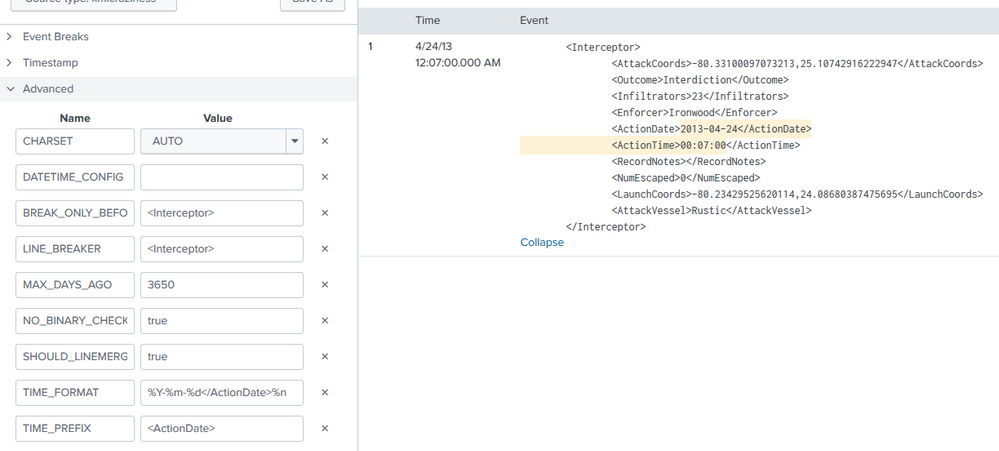
If you do have data from 2013 you can add MAX_DAYS_AGO to make it work:
- Mark as New
- Bookmark Message
- Subscribe to Message
- Mute Message
- Subscribe to RSS Feed
- Permalink
- Report Inappropriate Content
Based on a previous answer: https://community.splunk.com/t5/Getting-Data-In/How-to-set-date-time-stamps-across-two-lines-in-xml-... it appears as if you can ignore the line break so it would be something like this:
TIME_FORMAT= %Y-%m-%d</ActionDate><ActionTime>%H:%M:%S- Mark as New
- Bookmark Message
- Subscribe to Message
- Mute Message
- Subscribe to RSS Feed
- Permalink
- Report Inappropriate Content
I played with your example and adjusted the date of it so I wouldn't have to mess with max lookbehind:
	<Interceptor>
		<AttackCoords>-80.33100097073213,25.10742916222947</AttackCoords>
		<Outcome>Interdiction</Outcome>
		<Infiltrators>23</Infiltrators>
		<Enforcer>Ironwood</Enforcer>
		<ActionDate>2020-05-24</ActionDate>
		<ActionTime>00:07:00</ActionTime>
		<RecordNotes></RecordNotes>
		<NumEscaped>0</NumEscaped>
		<LaunchCoords>-80.23429525620114,24.08680387475695</LaunchCoords>
		<AttackVessel>Rustic</AttackVessel>
	</Interceptor>
I got the date/time to pull correctly with the below parameters:
TIME_PREFIX = <ActionDate>
TIME_FORMAT = %Y-%m-%d</ActionDate>%n		<ActionTime>%H:%M:%S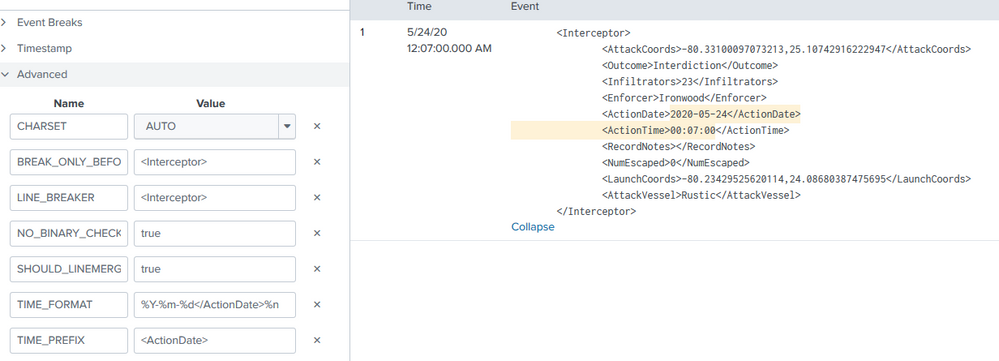
- Mark as New
- Bookmark Message
- Subscribe to Message
- Mute Message
- Subscribe to RSS Feed
- Permalink
- Report Inappropriate Content
If you do have data from 2013 you can add MAX_DAYS_AGO to make it work:
- Mark as New
- Bookmark Message
- Subscribe to Message
- Mute Message
- Subscribe to RSS Feed
- Permalink
- Report Inappropriate Content
Thank you!
I finally used MAX_DAYS_AGO to make it work.
BREAK_ONLY_BEFORE_DATE =
DATETIME_CONFIG =
LINE_BREAKER = </Interceptor>([\r\n]+)
NO_BINARY_CHECK = true
SHOULD_LINEMERGE = false
category =
disabled = false
pulldown_type = true
TIME_FORMAT = %Y-%m-%d</ActionDate>%n<ActionTime>%H:%M:%S
TIME_PREFIX = <ActionDate>
MAX_DAYS_AGO = 3650- Mark as New
- Bookmark Message
- Subscribe to Message
- Mute Message
- Subscribe to RSS Feed
- Permalink
- Report Inappropriate Content
I got this error message.

Is the time_prefix I used okay?


Join the Splunk Community Slack to learn, troubleshoot, and make connections with fellow Splunk practitioners in real time!
Join Splunk User Groups to connect and learn in-person by region or remotely by topic or industry.
Data Management Digest – September 2026
Federated Search for CloudWatch Unified Data Store Is Generally Available
Announcing Modern Navigation: A New Era of Splunk User Experience
