
Join the Conversation
- Find Answers
- :
- Using Splunk
- :
- Dashboards & Visualizations
- :
- Splunk Dashboard - <eval>
- Subscribe to RSS Feed
- Mark Topic as New
- Mark Topic as Read
- Float this Topic for Current User
- Bookmark Topic
- Subscribe to Topic
- Mute Topic
- Printer Friendly Page
- Mark as New
- Bookmark Message
- Subscribe to Message
- Mute Message
- Subscribe to RSS Feed
- Permalink
- Report Inappropriate Content
Splunk Dashboard - <eval>

Hello there!
I'm trying to use <change> and <eval> inside of my time input to create a token that takes in $time.earliest$ and converts it to a unix timestamp, however, my <eval> is not working how I expect.
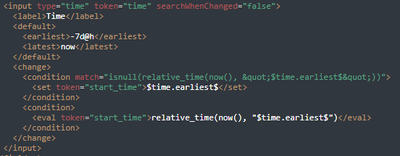
When I use $start_time$ in my dashboard panels, I get a literal copy/paste of the "relative_time(now() ..." statement (i.e., it's not actually evaluating). I've seen multiple examples in Splunk documentation and it seems like <eval> is supposed to evaluate the function you're trying to use.
Help me, Splunk Community. You're my only hope.
- Mark as New
- Bookmark Message
- Subscribe to Message
- Mute Message
- Subscribe to RSS Feed
- Permalink
- Report Inappropriate Content


There doesn't appear to be anything wrong with what you are doing (apart from I don't think you need the quotes around the token in the relative_time function, and the condition is probably superfluous); the issue may be to do with the version of Splunk you are using as there have been issues with this before iirc. Which version are you using?
- Mark as New
- Bookmark Message
- Subscribe to Message
- Mute Message
- Subscribe to RSS Feed
- Permalink
- Report Inappropriate Content
I'm on Splunk Cloud version 9.0.2305.201.
Don't I need the quotes in the relative_time function? If $time.earliest$ is a relative time modifier (e.g., -7d@h), it needs quotes, right?
- Mark as New
- Bookmark Message
- Subscribe to Message
- Mute Message
- Subscribe to RSS Feed
- Permalink
- Report Inappropriate Content
I am using enterprise and it works without quotes with -7d@h

Join the Splunk Community Slack to learn, troubleshoot, and make connections with fellow Splunk practitioners in real time!
Join Splunk User Groups to connect and learn in-person by region or remotely by topic or industry.
Agent Mode Engaged! Enchaining Agentic Operations with Splunk AI Assistant 2.0
Announcing Modern Navigation: A New Era of Splunk User Experience
Modernize your Splunk Apps – Introducing Python 3.13 in Splunk
