
Join the Conversation
- Find Answers
- :
- Using Splunk
- :
- Dashboards & Visualizations
- :
- How to prevent automatic translation of input labe...
- Subscribe to RSS Feed
- Mark Topic as New
- Mark Topic as Read
- Float this Topic for Current User
- Bookmark Topic
- Subscribe to Topic
- Mute Topic
- Printer Friendly Page
- Mark as New
- Bookmark Message
- Subscribe to Message
- Mute Message
- Subscribe to RSS Feed
- Permalink
- Report Inappropriate Content
How to prevent automatic translation of input labels?

Hello,
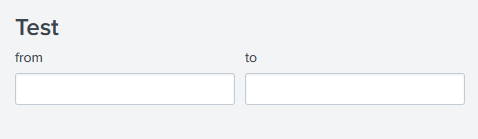
I noticed that Splunk automatically translates input labels based on the user's locale. Dashboards with English labels are translated to German when the user locale is de-DE.
Here is an example:
<form version="1.1">
  <label>Test</label>
  <fieldset submitButton="false">
    <input type="text" token="From">
      <label>From</label>
    </input>
    <input type="text" token="To">
      <label>To</label>
    </input>
  </fieldset>
</form>
en-US:
de-DE:
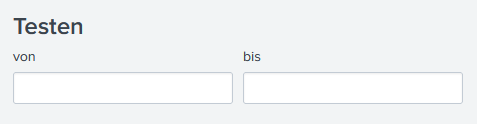
Not only is the translation unwanted, the translation is also wrong. (In this context, "to" should be translated to "für" or "an".)
Is it possible to disable this kind of behavior?
I found two other posts. The solutions were 1) change each input field individually (https://community.splunk.com/t5/Dashboards-Visualizations/How-to-prevent-translation-of-labels-and-i...) and 2) change the user locale to English (https://community.splunk.com/t5/Dashboards-Visualizations/How-to-avoid-translation-on-input-field-in...). However, I would prefer a global setting to disable automatic translations.

Upcoming Webinar: Unmasking Insider Threats with Slunk Enterprise Security’s UEBA
.conf25 technical session recap of Observability for Gen AI: Monitoring LLM ...
A Season of Skills: New Splunk Courses to Light Up Your Learning Journey
