
Join the Conversation
- Find Answers
- :
- Using Splunk
- :
- Dashboards & Visualizations
- :
- How to populate one time picker based on the selec...
- Subscribe to RSS Feed
- Mark Topic as New
- Mark Topic as Read
- Float this Topic for Current User
- Bookmark Topic
- Subscribe to Topic
- Mute Topic
- Printer Friendly Page
- Mark as New
- Bookmark Message
- Subscribe to Message
- Mute Message
- Subscribe to RSS Feed
- Permalink
- Report Inappropriate Content

Hello,
I've a requirement to populate the "Time2" time picker to be updated automatically based on the selection of "Time1" time picker. The "Time2" time picker should be = Time1- 1 day. for example, if I choose Today in Time1 then Time2 should be automatically populated as "Last 1 day". If I choose Yesterday in Time1 then Time2 should be automatically populated as "Last 2 days" (starting from 12:00 AM day before yesterday till end of yesterday.)

- Mark as New
- Bookmark Message
- Subscribe to Message
- Mute Message
- Subscribe to RSS Feed
- Permalink
- Report Inappropriate Content


Try something like this
    <input type="time" token="timepicker" searchWhenChanged="true">
      <label></label>
      <default>
        <earliest>-24h@h</earliest>
        <latest>now</latest>
      </default>
      <change>
        <condition>
          <eval token="earliestdaybefore">relative_time(relative_time(now(),$timepicker.earliest$),"-1d")</eval>
          <eval token="latestdaybefore">relative_time(relative_time(now(),$timepicker.latest$),"-1d")</eval>
        </condition>
      </change>
</input>- Mark as New
- Bookmark Message
- Subscribe to Message
- Mute Message
- Subscribe to RSS Feed
- Permalink
- Report Inappropriate Content
How can I achieve that using change handler of timer1? Please share the code so that I can understand.
- Mark as New
- Bookmark Message
- Subscribe to Message
- Mute Message
- Subscribe to RSS Feed
- Permalink
- Report Inappropriate Content
Try something like this
    <input type="time" token="timepicker" searchWhenChanged="true">
      <label></label>
      <default>
        <earliest>-24h@h</earliest>
        <latest>now</latest>
      </default>
      <change>
        <condition>
          <eval token="earliestdaybefore">relative_time(relative_time(now(),$timepicker.earliest$),"-1d")</eval>
          <eval token="latestdaybefore">relative_time(relative_time(now(),$timepicker.latest$),"-1d")</eval>
        </condition>
      </change>
</input>- Mark as New
- Bookmark Message
- Subscribe to Message
- Mute Message
- Subscribe to RSS Feed
- Permalink
- Report Inappropriate Content
Thanks mate. It helped me.
- Mark as New
- Bookmark Message
- Subscribe to Message
- Mute Message
- Subscribe to RSS Feed
- Permalink
- Report Inappropriate Content
If you need a second pair of earliest and latest tokens, why not create this in the change handler of timer1?
- Mark as New
- Bookmark Message
- Subscribe to Message
- Mute Message
- Subscribe to RSS Feed
- Permalink
- Report Inappropriate Content
Hello,
I tried to set a default time on page load but I am getting below error:
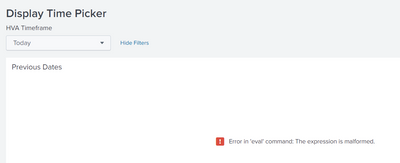
Dashboard XML:
<form>
<label>Display Time Picker</label>
<init>
<set token="earliestdaybefore">-1d@d</set>
<set token="latestdaybefore">@d</set>
</init>
<fieldset submitButton="false">
<input type="time" token="time" searchWhenChanged="true">
<label>HVA Timeframe</label>
<default>
<earliest>@d</earliest>
<latest>now</latest>
</default>
<change>
<condition>
<eval token="earliestdaybefore">relative_time(relative_time(now(),$time.earliest$),"-1d")</eval>
<eval token="latestdaybefore">relative_time(relative_time(now(),$time.latest$),"-1d")</eval>
</condition>
</change>
</input>
</fieldset>
<row>
<panel>
<title>Previous Dates</title>
<table>
<search>
<query>| makeresults
| eval earliestdaybefore= $earliestdaybefore$,
latestdaybefore=$latestdaybefore$
| eval earliest_time=strftime(earliestdaybefore,"%Y-%m-%dT%H:%M:%S"),
latest_time=strftime(latestdaybefore,"%Y-%m-%dT%H:%M:%S")
| table earliest_time, latest_time, earliestdaybefore, latestdaybefore
| fields - _time</query>
<earliest>$earliestdaybefore$</earliest>
<latest>$latestdaybefore$</latest>
</search>
<option name="drilldown">none</option>
<option name="refresh.display">progressbar</option>
</table>
</panel>
</row>
</form>
- Mark as New
- Bookmark Message
- Subscribe to Message
- Mute Message
- Subscribe to RSS Feed
- Permalink
- Report Inappropriate Content
Change the token initialisation
<init>
<eval token="earliestdaybefore">relative_time(now(),"-1d@d")</eval>
<eval token="latestdaybefore">relative_time(now(),"@d")</eval>
</init>- Mark as New
- Bookmark Message
- Subscribe to Message
- Mute Message
- Subscribe to RSS Feed
- Permalink
- Report Inappropriate Content
Thanks, It works 🙂
@ITWhisperer
- Mark as New
- Bookmark Message
- Subscribe to Message
- Mute Message
- Subscribe to RSS Feed
- Permalink
- Report Inappropriate Content
Hello,
The solution you provided to me is working well over my local environment (time zone is IST). I am successfully able to get the previous date wrt what is selected in the time picker.

But over my production environment (time zone is EST), it's not showing me the correct timestamp.

Please suggest.

Upcoming Webinar: Unmasking Insider Threats with Slunk Enterprise Security’s UEBA
.conf25 technical session recap of Observability for Gen AI: Monitoring LLM ...
A Season of Skills: New Splunk Courses to Light Up Your Learning Journey
