
Join the Conversation
- Find Answers
- :
- Using Splunk
- :
- Dashboards & Visualizations
- :
- How to parse XML Output with the Splunk Python SDK...
- Subscribe to RSS Feed
- Mark Topic as New
- Mark Topic as Read
- Float this Topic for Current User
- Bookmark Topic
- Subscribe to Topic
- Mute Topic
- Printer Friendly Page
- Mark as New
- Bookmark Message
- Subscribe to Message
- Mute Message
- Subscribe to RSS Feed
- Permalink
- Report Inappropriate Content
How to parse XML Output with the Splunk Python SDK into a structure that I can use to insert into another system?

import splunklib.client as client

HOST = "XXXXS"
PORT = XXXX
USERNAME = "admin"
PASSWORD = "XXXXXX"


service = client.connect(
    host=HOST,
    port=PORT,
    username=USERNAME,
    password=PASSWORD)


for app in service.apps:
    print (app.name)
kwargs_export = {"search_mode": "normal"}
searchquery_export = "search sourcetype=db| stats count by

Priority"
exportsearch_results = service.jobs.export(searchquery_export,

**kwargs_export)
 # Get the results and display them using the ResultsReader
print (exportsearch_results.read())
#yield {'Priority': exportsearch_results.read()}
Output:
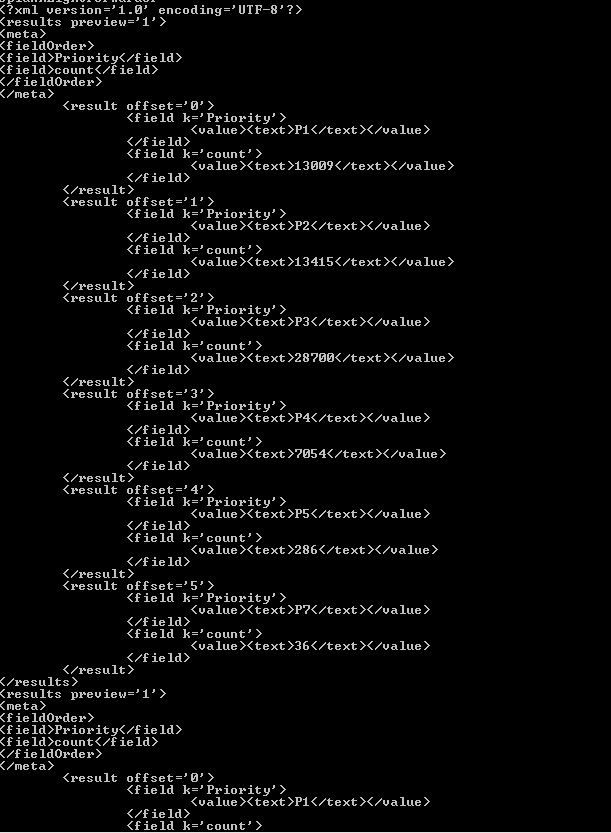
I have attempted to parse the XML output into a structure so that I can use to insert into another system.
I need a structured output with columns of Priority and its corresponding count value.
Is there any way to access values with python?
- Mark as New
- Bookmark Message
- Subscribe to Message
- Mute Message
- Subscribe to RSS Feed
- Permalink
- Report Inappropriate Content
Have a look at the search/jobs/export endpoint documentation:
http://docs.splunk.com/Documentation/Splunk/6.5.0/RESTREF/RESTsearch#search.2Fjobs.2Fexport
You could use the GET request parameter "output_mode" and set the output mode to json or csv, which both are - in my opinion - way easier to parse into Python-useable structures than XML.
Other than that, you can use one of the many available XML libraries for Python e.g. those mentioned in this Stackoverflow question/answers:
http://stackoverflow.com/questions/1912434/how-do-i-parse-xml-in-python



Join the Splunk Community Slack to learn, troubleshoot, and make connections with fellow Splunk practitioners in real time!
Join Splunk User Groups to connect and learn in-person by region or remotely by topic or industry.
A Four-Part Event Series: Full Stack Observability For the AI Era
SOC4Kafka - New Kafka Connector Powered by OpenTelemetry
Event Series: Level up your SOC: Advancing with Splunk Enterprise Security
