
Are you a member of the Splunk Community?
- Find Answers
- :
- Using Splunk
- :
- Dashboards & Visualizations
- :
- How to hide columns with "0"
- Subscribe to RSS Feed
- Mark Topic as New
- Mark Topic as Read
- Float this Topic for Current User
- Bookmark Topic
- Subscribe to Topic
- Mute Topic
- Printer Friendly Page
- Mark as New
- Bookmark Message
- Subscribe to Message
- Mute Message
- Subscribe to RSS Feed
- Permalink
- Report Inappropriate Content

Hey Splunkers!
I'm very new to Splunk and I really need your help, because I couldn't find a proper solution searching through the topics.
I determine the TotalCount of events containing Field1="Wirecheck" with all Results="Pass", "Reject", "Warn". The percentage of the events with the result "Pass" is determined, as well.
index="IndexTest" Field1="Wirecheck" | stats count as "TotalCountWirecheckField2" by Field2 | appendcols [search index="IndexTest" Field1="Wirecheck" Result="Pass" | stats count as "ResultCountPassWirecheckField2" by field2] | eval percent=(ResultCountPassWirecheckField2/TotalCountWirecheckField2)*100 | eval RoundIntegerWirecheckField2 = round(percent, 1)
I would like to visualize the "Pass"-events using column charts. Next to the height of the columns, which is represented by the TotalCountPass, I'd like to show a range represented by the color of the column. Therefore I have seperated new fields depending on the pass-percentage:
...| eval FieldColorDetectionWirecheckGreen = if(RoundIntegerWirecheckField2>=95, ResultCountPassWirecheckField2, 0)
| eval FieldColorDetectionWirecheckYellow = if(RoundIntegerWirecheckField2<95 AND RoundIntegerWirecheckField2>=85, ResultCountPassWirecheckField2, 0)
| eval FieldColorDetectionWirecheckRed = if(RoundIntegerWirecheckField2<85 AND RoundIntegerWirecheckField2>=0, ResultCountPassWirecheckField2, 0)
| stats values(FieldColorDetectionWirecheckGreen) values(FieldColorDetectionWirecheckYellow) values(FieldColorDetectionWirecheckRed) by Field2
Depending on the percentage, the according column is set equal to the TotalCountPass.
<option name="charting.fieldColors">{"values(FieldColorDetectionWirecheckGreen)":0x009900, "values(FieldColorDetectionWirecheckYellow)":0xFF9900, "values(FieldColorDetectionWirecheckRed)":0xFF0000}</option>
I'm not satisfied with my solution, because the width of "zero"-columns is still visible.
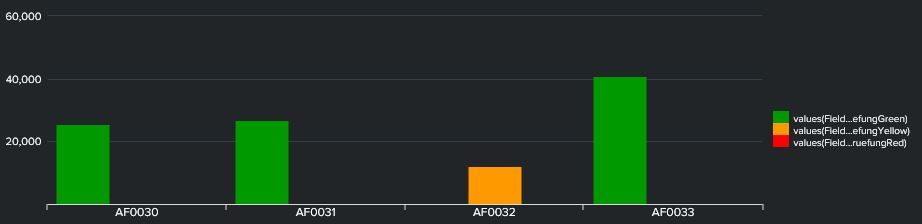
Question 1a: Is there a possibility to remove the columns of the value="0"?
Question 1b: Or do you know a solution to improve my search that avoids this problem?
Question 2: Is there a possibility to add the value(RoundIntegerWirecheckField2) in the information Box (I don't know the explicit name for the popup-field)?
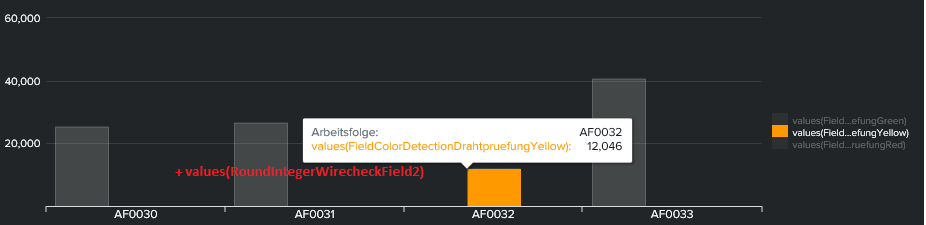
I hope you could understand the explanation of my problem 🙂 Thanks in advance ❤️
Nanosam
- Mark as New
- Bookmark Message
- Subscribe to Message
- Mute Message
- Subscribe to RSS Feed
- Permalink
- Report Inappropriate Content
Hi everybody,
I've found a simple way, without changing my query. I chose stacked up column charts. The 0-values aren't visible anymore.
<option name="charting.chart.stackMode">stacked</option>Result:

Think outside the box! 😵
- Mark as New
- Bookmark Message
- Subscribe to Message
- Mute Message
- Subscribe to RSS Feed
- Permalink
- Report Inappropriate Content
Hi everybody,
I've found a simple way, without changing my query. I chose stacked up column charts. The 0-values aren't visible anymore.
<option name="charting.chart.stackMode">stacked</option>Result:
Think outside the box! 😵

Index This | Why did the turkey cross the road?
Enter the Agentic Era with Splunk AI Assistant for SPL 1.4
Feel the Splunk Love: Real Stories from Real Customers
