
Join the Conversation
- Find Answers
- :
- Using Splunk
- :
- Dashboards & Visualizations
- :
- How to expand and collapse table rows using javasc...
- Subscribe to RSS Feed
- Mark Topic as New
- Mark Topic as Read
- Float this Topic for Current User
- Bookmark Topic
- Subscribe to Topic
- Mute Topic
- Printer Friendly Page
- Mark as New
- Bookmark Message
- Subscribe to Message
- Mute Message
- Subscribe to RSS Feed
- Permalink
- Report Inappropriate Content
How to expand and collapse table rows using javascript?

I have seen one example of expanding table row and chart is displayed . I am not much familiar with javascript code
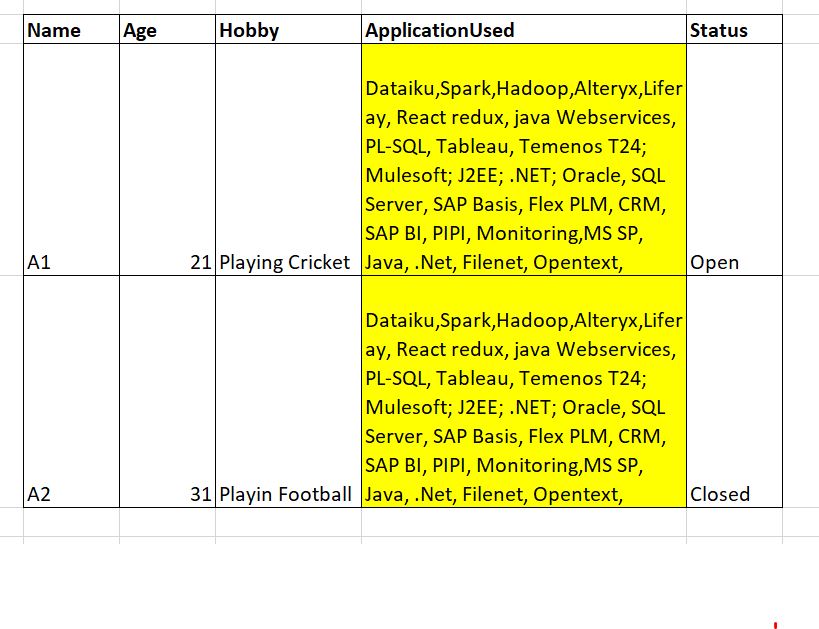
My table currently has these values :

Want these "application used" row values to be displayed in an expanded row .
The reason is because currently in a table view in Splunk dashboard there are more than 100 rows and even after displaying 5 rows in a table due to such values of more than 500 strings scrolling becomes tedious .
Is it possible to do a table row expand of this column so that while expanding the values from application used field get displayed.
My Splunk query is :
|loadjob savedsearch=admin:applist:apptest | table Name Age Hobby ApplicationUsed Status
Any help would be very much useful is it possible to do such a view ?
- Mark as New
- Bookmark Message
- Subscribe to Message
- Mute Message
- Subscribe to RSS Feed
- Permalink
- Report Inappropriate Content

Hi @rijinc ,
In you simple XML dashboard use this code:
  <dashboard script="expandRow.js">
    ....
      <row>
        <panel>
          <table id="myTable">
            <search id="mySearch">
              <query>
                |loadjob savedsearch=admin:applist:apptest
              </query>
            </search>
            <fields>Name, Age, Hobby, Status</fields>
          </table>
        </panel>
      </row>
Place expandRow.js file into $SPLUNK_HOME/etc/apps/<your_app>/appserver/static dir with this code:
require([
    'splunkjs/mvc/tableview',
    'splunkjs/mvc/postprocessmanager',
    'splunkjs/mvc',
    'underscore',
    'splunkjs/mvc/simplexml/ready!'],function(
    TableView,
    PostProcessManager,
    mvc,
    _
    ){
    var EventSearchBasedRowExpansionRenderer = TableView.BaseRowExpansionRenderer.extend({
        initialize: function(args) {

            this._postProcessManager = new PostProcessManager({
                id: 'ApplicationUsed ',
                managerid: 'mySearch'
            });
            this._tableView = new TableView({
                id: 'drop_down_table',
                managerid: 'ApplicationUsed'
            });
        },
        canRender: function(rowData) {
            // always expand
            console.log("RowData: ", rowData);
            return true;
        },
        render: function($container, rowData) {
            // rowData contains information about the row that is expanded.  We can see the cells, fields, and values
            // We will find the Name cell to use its value
            var username = _(rowData.cells).find(function (cell) {
               return cell.field === 'Name';
            });
            //update the search with the Name that we are interested in
            this._postProcessManager.set({ search:
                '| search Name="' + username.value + '" | table ApplicationUsed '
                 });
            // $container is the jquery object where we can put out content.
            // In this case we will render our table and add it to the $container
            $container.append(this._tableView.render().el);
        }
    });
    var tableElement = mvc.Components.getInstance("myTable");
    tableElement.getVisualization(function(tableView) {
        // Add custom cell renderer, the table will re-render automatically.
        tableView.addRowExpansionRenderer(new EventSearchBasedRowExpansionRenderer());
    });
});
After that you can customize CSS for you dashboard to edit #drop_down_table params for better visualization.
- Mark as New
- Bookmark Message
- Subscribe to Message
- Mute Message
- Subscribe to RSS Feed
- Permalink
- Report Inappropriate Content

- @pkarpushin I have a similar use case but I need the two-level of row expansion, The first expansion is on main row and the second expansion is on the expanded row. Is this possible? Please assist!
- Mark as New
- Bookmark Message
- Subscribe to Message
- Mute Message
- Subscribe to RSS Feed
- Permalink
- Report Inappropriate Content

It works well. But I used get the value at the specific location.
this._postProcessManager.set({ search: '| search Members=' + rowData.values[1] + ' | table Group '});
So I don't use the search the cell field name.
- Mark as New
- Bookmark Message
- Subscribe to Message
- Mute Message
- Subscribe to RSS Feed
- Permalink
- Report Inappropriate Content
Hi All,
Any help or inputs ?


Join the Splunk Community Slack to learn, troubleshoot, and make connections with fellow Splunk practitioners in real time!
Join Splunk User Groups to connect and learn in-person by region or remotely by topic or industry.
All Work and No Play? Not at .conf26! Unwind at These Evening Events
Join the Hackathon at .conf26 and build a No-Code AI agent
Level Up Your Workflow: Mastering Splunk Cloud Management via Terraform
