
Join the Conversation
- Find Answers
- :
- Using Splunk
- :
- Dashboards & Visualizations
- :
- How to create a button for dashboard that exports ...
- Subscribe to RSS Feed
- Mark Topic as New
- Mark Topic as Read
- Float this Topic for Current User
- Bookmark Topic
- Subscribe to Topic
- Mute Topic
- Printer Friendly Page
- Mark as New
- Bookmark Message
- Subscribe to Message
- Mute Message
- Subscribe to RSS Feed
- Permalink
- Report Inappropriate Content
How to create a button for dashboard that exports CSV of specific panel

Hi,
I want to create a button that exports the result of a specific panel in csv format.
I created the button using the tag as the image shown below.
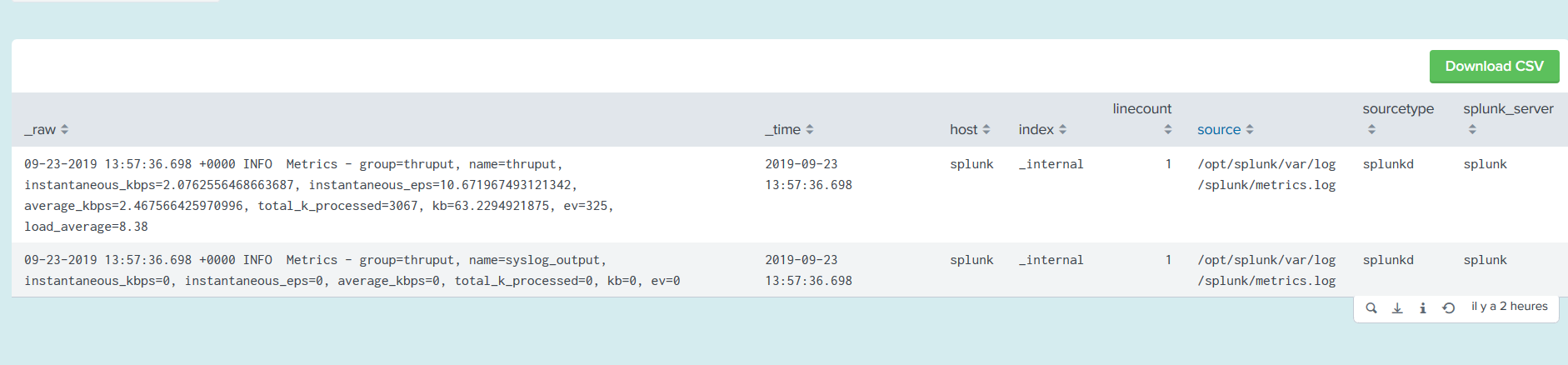
I tried to inspect the javascript code of export button provided by Splunk but it seems complicated
I'm sure there is a better way to do that.
Thanks in advance !
- Mark as New
- Bookmark Message
- Subscribe to Message
- Mute Message
- Subscribe to RSS Feed
- Permalink
- Report Inappropriate Content
I wanted to customize the button, found solution here:
https://answers.splunk.com/answers/755018/export-to-csv-on-click-of-button.html
- Mark as New
- Bookmark Message
- Subscribe to Message
- Mute Message
- Subscribe to RSS Feed
- Permalink
- Report Inappropriate Content

You can also just click the little download icon in the popup as you mouse over the panel. It is shown in your screen shot. Next to the search magnifier icon. Bottom right.
- Mark as New
- Bookmark Message
- Subscribe to Message
- Mute Message
- Subscribe to RSS Feed
- Permalink
- Report Inappropriate Content
i wanted to make a custom search, not the button provided by Splunk
- Mark as New
- Bookmark Message
- Subscribe to Message
- Mute Message
- Subscribe to RSS Feed
- Permalink
- Report Inappropriate Content
I tried to inspect the javascript export button provided by Splunk and found the code that creates the ExportResultDialog in path /opt/splunk/share/splunk/search_mrsparkle/exposed/js/views/dashboard/element/Footer.js
this object is responsible for showing the export Modal and initializing the object.
I created this javascript code but it seems it has a lot of dependencies and js errors
require([
     'splunkjs/mvc',
     'views/shared/jobstatus/buttons/ExportResultsDialog'

 ], function(mvc , ExportResultsDialog) {


    var btn = $('.toto')
    _export = function () {
      console.log(this)

         /* var sid = this.manager.getSid();
          console.log(sid)
          */
          //this.searchJobModel.set("id", sid);
        var exportDialog = new ExportResultsDialog({
            model: {
                //searchJob: this.searchJobModel,
                //application: this.model.application,
                //report: this.model.report
            },
            usePanelType: true,
            onHiddenRemove: true
        });

        exportDialog.render().appendTo($("body"));
        exportDialog.show();

     }

     btn.click( function () {_export()})


 });

Data Management Digest – December 2025
Index This | What is broken 80% of the time by February?
Unlock Faster Time-to-Value on Edge and Ingest Processor with New SPL2 Pipeline ...
