
Turn on suggestions
Auto-suggest helps you quickly narrow down your search results by suggesting possible matches as you type.
Dashboards & Visualizations
×
Join the Conversation
Without signing in, you're just watching from the sidelines. Sign in or Register to connect, share, and be part of the Splunk Community.
Turn on suggestions
Auto-suggest helps you quickly narrow down your search results by suggesting possible matches as you type.
- Find Answers
- :
- Using Splunk
- :
- Dashboards & Visualizations
- :
- How to convert this date in dropdown in dashboard
Options
- Subscribe to RSS Feed
- Mark Topic as New
- Mark Topic as Read
- Float this Topic for Current User
- Bookmark Topic
- Subscribe to Topic
- Mute Topic
- Printer Friendly Page
- Mark as New
- Bookmark Message
- Subscribe to Message
- Mute Message
- Subscribe to RSS Feed
- Permalink
- Report Inappropriate Content
How to convert this date in dropdown in dashboard

supreme_coder
Engager
02-04-2021
08:54 AM
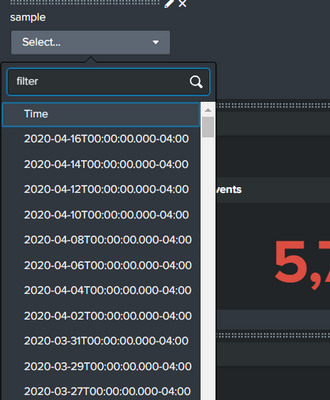
how do I covert the date that is in dropdown to "Y-M-D".
I dont want the other stuff next to it (T00:).
index="main" | eval _time = strptime('close_approach_data{}.close_approach_date', "%Y-%m-%d") | table _time | dedup _time
- Mark as New
- Bookmark Message
- Subscribe to Message
- Mute Message
- Subscribe to RSS Feed
- Permalink
- Report Inappropriate Content

ITWhisperer

SplunkTrust
02-04-2021
09:25 AM
      <input type="dropdown" token="datefilter">
        <label>Select Date</label>
        <search>
          <query>index="main" | eval date = strptime('close_approach_data{}.close_approach_date', "%Y-%m-%d") | table date | dedup date | eval showdate=strftime(date, "%Y-%m-%d")</query>
        </search>
        <fieldForLabel>showdate</fieldForLabel>
        <fieldForValue>date</fieldForValue>
      </input>
Get Updates on the Splunk Community!
Data Management Digest – December 2025
Welcome to the December edition of Data Management Digest!
As we continue our journey of data innovation, the ...
Index This | What is broken 80% of the time by February?
December 2025 Edition
Hayyy Splunk Education Enthusiasts and the Eternally Curious!
We’re back with this ...
Unlock Faster Time-to-Value on Edge and Ingest Processor with New SPL2 Pipeline ...
Hello Splunk Community,
We're thrilled to share an exciting update that will help you manage your data more ...
