
Join the Conversation
- Find Answers
- :
- Using Splunk
- :
- Dashboards & Visualizations
- :
- How to add button to change data history?
- Subscribe to RSS Feed
- Mark Topic as New
- Mark Topic as Read
- Float this Topic for Current User
- Bookmark Topic
- Subscribe to Topic
- Mute Topic
- Printer Friendly Page
- Mark as New
- Bookmark Message
- Subscribe to Message
- Mute Message
- Subscribe to RSS Feed
- Permalink
- Report Inappropriate Content

Hi,
I have 3 reports on a dashboard with history to search last 30 seconds. Can I add a button or a drop down list on the dashboard to control all 3 reports to show history for last 30 mins instead?
- Mark as New
- Bookmark Message
- Subscribe to Message
- Mute Message
- Subscribe to RSS Feed
- Permalink
- Report Inappropriate Content

You need to do EXACTLY this:
Click the `Edit` button.
On the far right, click the `Autorun dashbaord` check box
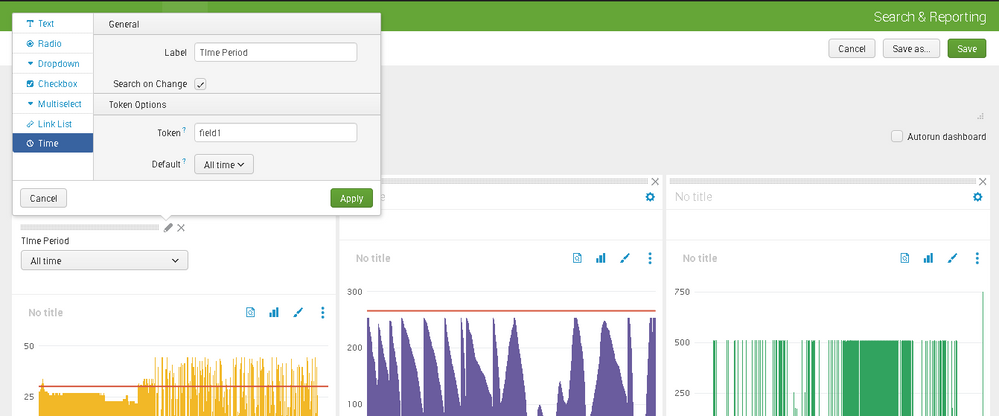
Above the Timepicker control click on the leftmost icon (pen/crayon):
In the `Default` field, select `Relative `and set `30 Minutes ago` for `Earliest` and `Now` for `Latest`.
Click `Apply`.
In each panel:
Click on the leftmost icon (magnifying glass).
Click `Clone to an inline search`.
Click on the leftmost icon (different magnifying glass).
In the `Time range` field, select `Shared Timepicker`.
Click `Apply`.
Click `Save`.
Also probably this after you get the above done and working:
Click the `Edit` button.
In each panel:
Click on the leftmost icon (magnifying glass).
In the `Saved search` field put something like `| savedsearch originalSearchReportNameForMyPanel`
Click `Apply`.
Click `Save`.
- Mark as New
- Bookmark Message
- Subscribe to Message
- Mute Message
- Subscribe to RSS Feed
- Permalink
- Report Inappropriate Content
You need to do EXACTLY this:
Click the `Edit` button.
On the far right, click the `Autorun dashbaord` check box
Above the Timepicker control click on the leftmost icon (pen/crayon):
In the `Default` field, select `Relative `and set `30 Minutes ago` for `Earliest` and `Now` for `Latest`.
Click `Apply`.
In each panel:
Click on the leftmost icon (magnifying glass).
Click `Clone to an inline search`.
Click on the leftmost icon (different magnifying glass).
In the `Time range` field, select `Shared Timepicker`.
Click `Apply`.
Click `Save`.
Also probably this after you get the above done and working:
Click the `Edit` button.
In each panel:
Click on the leftmost icon (magnifying glass).
In the `Saved search` field put something like `| savedsearch originalSearchReportNameForMyPanel`
Click `Apply`.
Click `Save`.
- Mark as New
- Bookmark Message
- Subscribe to Message
- Mute Message
- Subscribe to RSS Feed
- Permalink
- Report Inappropriate Content
Hi woodcock. Thanks. I got it now.
- Mark as New
- Bookmark Message
- Subscribe to Message
- Mute Message
- Subscribe to RSS Feed
- Permalink
- Report Inappropriate Content


Yes, that should be possible.
Are you having only user access or do you have more access permissions (admin / power , etc)?
did you create this dashboard or someone else?
does this dashboard give you edit options(do you see an edit button or no edit option)?
Sekar
PS - If this or any post helped you in any way, pls consider upvoting, thanks for reading !
- Mark as New
- Bookmark Message
- Subscribe to Message
- Mute Message
- Subscribe to RSS Feed
- Permalink
- Report Inappropriate Content
Hi, I'm the admin. I created a dashboard with all 3 reports. There is an add input options and one of them it time. I chose All time and dragged to one of the reports, saved the dashboard and change the time period to last 30 seconds which I expected to show no data. It didn't seems to work. There is a Token field which I did not know how to fill in to control the time period.


Splunk Observability for AI
[Puzzles] Solve, Learn, Repeat: Dereferencing XML to Fixed-length events
Stay Connected: Your Guide to December Tech Talks, Office Hours, and Webinars!
