
Join the Conversation
- Find Answers
- :
- Using Splunk
- :
- Dashboards & Visualizations
- :
- How to add a background or group panels that belon...
- Subscribe to RSS Feed
- Mark Topic as New
- Mark Topic as Read
- Float this Topic for Current User
- Bookmark Topic
- Subscribe to Topic
- Mute Topic
- Printer Friendly Page
- Mark as New
- Bookmark Message
- Subscribe to Message
- Mute Message
- Subscribe to RSS Feed
- Permalink
- Report Inappropriate Content
How to add a background or group panels that belong together on a dashboard in Simple XML?

I am building a dashboard of a cluster of machines, and I am attempting to combine all of these searches into a single panel to make it more intuitive as there will be multiple clusters in a single dashboard.
I have 9 searches populating results in 3 different ways. Is there a way to add a background (simply to group all the panels, or make it intuitive that they belong together) or just add them all to a single grouping and get rid of the space between the panels?
Here is an image, with the space in between highlighted that I am either attempting to remove, or add a big square behind all of the panels so I can visually 'group' them together?
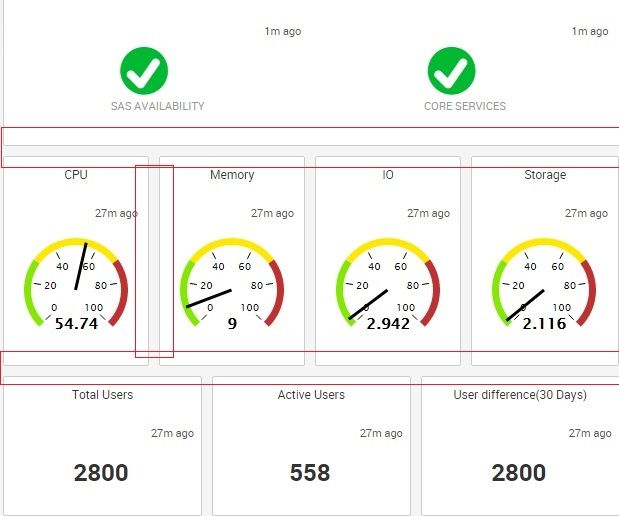
Is there any good way to do this in Simple XML these days?
Thank you guys!!

- Mark as New
- Bookmark Message
- Subscribe to Message
- Mute Message
- Subscribe to RSS Feed
- Permalink
- Report Inappropriate Content

Have a look at the Splunk 6 Dashboard Example app. Look specifically for example for "Layout Elements" which gives different options using which you can customize how visualizations appear in your dashboard.
https://splunkbase.splunk.com/app/1603/
Update
See this https://answers.splunk.com/answers/221370/splunk6-group-visualization-elements-horizontally.html
- Mark as New
- Bookmark Message
- Subscribe to Message
- Mute Message
- Subscribe to RSS Feed
- Permalink
- Report Inappropriate Content
I've looked all through this guy, but I don't see an example of putting mutlitple charts side by side, in the same panel. By default Splunk stacks the charts vertically.
Is there an option to set which way the next module is placed, either horizontal or vertical?

Accelerating Observability as Code with the Splunk AI Assistant
Integrating Splunk Search API and Quarto to Create Reproducible Investigation ...
Congratulations to the 2025-2026 SplunkTrust!
