
Join the Conversation
- Find Answers
- :
- Using Splunk
- :
- Dashboards & Visualizations
- :
- How to achieve this table representation in Splunk...
- Subscribe to RSS Feed
- Mark Topic as New
- Mark Topic as Read
- Float this Topic for Current User
- Bookmark Topic
- Subscribe to Topic
- Mute Topic
- Printer Friendly Page
- Mark as New
- Bookmark Message
- Subscribe to Message
- Mute Message
- Subscribe to RSS Feed
- Permalink
- Report Inappropriate Content

I have used savedsearch query as-
| savedsearch REPORT1
| stats list(COLUMN8) AS COLUMN 8 list(COLUMN 9) AS COLUMN 9 list(COLUMN 10) AS COLUMN 10 BY COLUMN1 COLUMN2 COLUMN3 COLUMN4 COLUMN5 COLUMN6 COLUMN7
and i got something like this,(fig 1)

But I wanted this to be shown in the below format,(fig 2)
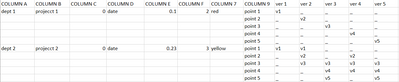
I could only get last 6 columns by using chart command like-
chart values(COLUMN8) AS Status OVER COLUMN 9 BY COLUMN 10
By using this chart command i could get this,(fig 3)
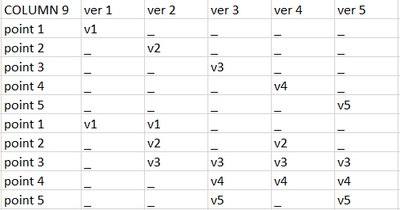
But I want this all together like in (fig 2)
Is there any other way where I can change my search query to get in this format,whether splunk supports combining both chart and stats commands.
- Mark as New
- Bookmark Message
- Subscribe to Message
- Mute Message
- Subscribe to RSS Feed
- Permalink
- Report Inappropriate Content


| eval {COLUMN_10}=COLUMN_8
| fillnull value="_"
| stats list(*) AS * BY COLUMN_1 COLUMN_2 COLUMN_3 COLUMN_4 COLUMN_5 COLUMN_6 COLUMN_7
| fields - COLUMN_8 COLUMN_10- Mark as New
- Bookmark Message
- Subscribe to Message
- Mute Message
- Subscribe to RSS Feed
- Permalink
- Report Inappropriate Content
| eval {COLUMN_10}=COLUMN_8
| fillnull value="_"
| stats list(*) AS * BY COLUMN_1 COLUMN_2 COLUMN_3 COLUMN_4 COLUMN_5 COLUMN_6 COLUMN_7
| fields - COLUMN_8 COLUMN_10- Mark as New
- Bookmark Message
- Subscribe to Message
- Mute Message
- Subscribe to RSS Feed
- Permalink
- Report Inappropriate Content
thank you so much,it worked for me.
- Mark as New
- Bookmark Message
- Subscribe to Message
- Mute Message
- Subscribe to RSS Feed
- Permalink
- Report Inappropriate Content

Ahhh. Can't get used to this {field} construct.
Still, multivalues fields displayed this way is a kind of "cheating" 😉 And it has a great potential of going haywire when you get multilined values in those fields.
- Mark as New
- Bookmark Message
- Subscribe to Message
- Mute Message
- Subscribe to RSS Feed
- Permalink
- Report Inappropriate Content
With some clever tricks you might get the right side to display the "matrix" of ver/point values but there is no "merging" in splunk tables and you'd get repeated values in left columns.
- Mark as New
- Bookmark Message
- Subscribe to Message
- Mute Message
- Subscribe to RSS Feed
- Permalink
- Report Inappropriate Content

Hi @Sss,
it isn't possible to have a report like the one you like: Splunk isn't Excel.
You could ave a report like the one you like having a different row for each COLUMN9 and repeating all the values for all the columns, using something like this:
| savedsearch REPORT1
| stats
   values(eval(if(COLUMN10="ver1",COLUMN8,"-") AS ver1
   values(eval(if(COLUMN10="ver2",COLUMN8,"-") AS ver2
   values(eval(if(COLUMN10="ver3",COLUMN8,"-") AS ver3
   values(eval(if(COLUMN10="ver4",COLUMN8,"-") AS ver4
   values(eval(if(COLUMN10="ver5",COLUMN8,"-") AS ver5
   BY COLUMN1 COLUMN2 COLUMN3 COLUMN4 COLUMN5 COLUMN6 COLUMN7 COLUMN9
Ciao.
Giuseppe
- Mark as New
- Bookmark Message
- Subscribe to Message
- Mute Message
- Subscribe to RSS Feed
- Permalink
- Report Inappropriate Content
how can I display cell with its respective color say if COLUMN 7 has its value as red,how can I fill that particular cell as red in my xml code?
- Mark as New
- Bookmark Message
- Subscribe to Message
- Mute Message
- Subscribe to RSS Feed
- Permalink
- Report Inappropriate Content
https://docs.splunk.com/Documentation/SplunkCloud/9.0.2303/Viz/TableFormatsFormatting
(It's for Cloud but the same applies to Splunk Enterprise).
- Mark as New
- Bookmark Message
- Subscribe to Message
- Mute Message
- Subscribe to RSS Feed
- Permalink
- Report Inappropriate Content
okay thank you,I will try with this.

A Season of Skills: New Splunk Courses to Light Up Your Learning Journey
Announcing the Migration of the Splunk Add-on for Microsoft Azure Inputs to ...
Splunk Observability for AI
