
Join the Conversation
- Find Answers
- :
- Using Splunk
- :
- Dashboards & Visualizations
- :
- Re: Cascading Dynamic dropdowns with CSV data
- Subscribe to RSS Feed
- Mark Topic as New
- Mark Topic as Read
- Float this Topic for Current User
- Bookmark Topic
- Subscribe to Topic
- Mute Topic
- Printer Friendly Page
- Mark as New
- Bookmark Message
- Subscribe to Message
- Mute Message
- Subscribe to RSS Feed
- Permalink
- Report Inappropriate Content
How to achieve cascading dynamic drop downs with CSV data?

Dear Community,
How do I display values from second dropdown values based on first dropdown value.
<input type="dropdown" token="site" searchWhenChanged="true">
| inputlookup regions_instances.csv | fields region region_value
<input type="dropdown" token="instance" searchWhenChanged="true">
| inputlookup regions_instances.csv | search region=$site$ | fields instance instance_value
- Mark as New
- Bookmark Message
- Subscribe to Message
- Mute Message
- Subscribe to RSS Feed
- Permalink
- Report Inappropriate Content


- Mark as New
- Bookmark Message
- Subscribe to Message
- Mute Message
- Subscribe to RSS Feed
- Permalink
- Report Inappropriate Content
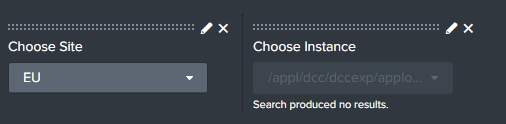
Thanks for looking into this.
First dropdown is ok. No values shown in the second dropdown.
- Mark as New
- Bookmark Message
- Subscribe to Message
- Mute Message
- Subscribe to RSS Feed
- Permalink
- Report Inappropriate Content
Hi @ramana4u,
you should check if the fields in the second lookup is the same of the first and that the value from the first is present in teh second.
Then you don't need to use where, you could use where in the inputlookup command, but thisisn't the issue.
| inputlookup regions_instances.csv WHERE region=$site$
| fields instance instance_value
could you share the full code on both inputs?
Are you using Dashboard Classic or Dashboard Studio?
Ciao.
Giuseppe
- Mark as New
- Bookmark Message
- Subscribe to Message
- Mute Message
- Subscribe to RSS Feed
- Permalink
- Report Inappropriate Content
Hi @gcusello
// Here the full code
<fieldset submitButton="false">
<input type="dropdown" token="dccsite" searchWhenChanged="true">
<label>Choose Site</label>
<fieldForLabel>region</fieldForLabel>
<fieldForValue>region_value</fieldForValue>
<search>
<query>| inputlookup regions_instances.csv | fields region region_value | dedup region region_value</query>
</search>
<default>express:dcceu:applog</default>
<initialValue>express:dcceu:applog</initialValue>
</input>
<input type="dropdown" token="dccinstance" searchWhenChanged="true">
<label>Choose Instance</label>
<fieldForLabel>instance</fieldForLabel>
<fieldForValue>instance_value</fieldForValue>
<search>
<query>|inputlookup regions_instances.csv | WHERE region=$dccsite$ | fields region region_value instance instance_value</query>
</search>
<default>/appl/dcc/dcceuexp/applogs/*</default>
<initialValue>/appl/dcc/dcceuexp/applogs/*</initialValue>
</input>
</fieldset>
// regions_instances.csv
region,region_value,instance,instance_value
APEM,express:dcc:applog,Import,/appl/dcc/dccadm/applogs/*
APEM,express:dcc:applog,Export,/appl/dcc/dccexp/applogs/*
EU,express:dcceu:applog,Import,/appl/dcc/dcceu/applogs/*
EU,express:dcceu:applog,Export,/appl/dcc/dcceuexp/applogs/*
Trans,express:dcc:applog*,Import,/appl/dcc/dcceu/dcc2/applogs/*
Trans,express:dcc:applog*,Export,/appl/dcc/dcceuexp/dcc2/applogs/*
US,*express:dcc:applog,Import,/appl/dcc/dccus/applogs/*
US,*express:dcc:applog,Export,/appl/dcc/dccusexp/applogs/*
- Mark as New
- Bookmark Message
- Subscribe to Message
- Mute Message
- Subscribe to RSS Feed
- Permalink
- Report Inappropriate Content
Hi @ramana4u,
at first try to add quotes to the second input search:
| inputlookup regions_instances.csv | WHERE region="$dccsite$"then please check if there a mistake between region and region_value maybe you have to use for the filter in the second input again region_value.
If it doesn'ìt run again try to add some asterisk at the beginning and the end of the condition.
| inputlookup regions_instances.csv | WHERE region="*$dccsite$*"Ciao.
Giuseppe

Join the Splunk Community Slack to learn, troubleshoot, and make connections with fellow Splunk practitioners in real time!
Join Splunk User Groups to connect and learn in-person by region or remotely by topic or industry.
Announcing Modern Navigation: A New Era of Splunk User Experience
Modernize your Splunk Apps – Introducing Python 3.13 in Splunk
Step into “Hunt the Insider: An Splunk ES Premier Mystery” to catch a cybercriminal ...
