
Join the Conversation
- Find Answers
- :
- Using Splunk
- :
- Dashboards & Visualizations
- :
- How do I set token in d3 js visulization?
- Subscribe to RSS Feed
- Mark Topic as New
- Mark Topic as Read
- Float this Topic for Current User
- Bookmark Topic
- Subscribe to Topic
- Mute Topic
- Printer Friendly Page
- Mark as New
- Bookmark Message
- Subscribe to Message
- Mute Message
- Subscribe to RSS Feed
- Permalink
- Report Inappropriate Content
How do I set token in d3 js visulization?

Experts,
I have below XML Dashboard code. The first panel displays calender heat map using d3 js library as shown below.
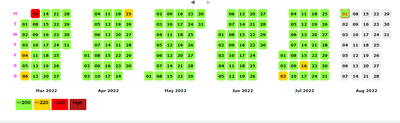
My requirement is, when a day on the calender is clicked, that date value needs to be passed as token to the second panel. I could not get this working. Could you please help me ?
<form script="autodiscover.js" hideChrome="true" >
<label>Monthly Utilization</label>
<row>
<panel>
<title>Rolling Average</title>
<html>
<div id="search1" class="splunk-manager"
align="center"
data-require="splunkjs/mvc/searchmanager"
data-options='{
"search": {
"type": "token_safe",
"value":
"source=...........| timechart span=1d values(AverageVAL) as \"Average VAL\""},
"cancelOnUnload": true,
"preview": true
}'>
</div>
<div id="heat_map" class="splunk-view" align="center" data-require="app/MFDashboard/calendarheatmap/calendarheatmap2" data-options='{
"id" : "fcal",
"managerid" : "search1",
"domain" : "month",
"subDomain" : "day"
}'>
</div>
</html>
<drilldown>
<set token="Selectedday">$click.value$</set>
</drilldown>
</panel>
</row>
<row>
<panel depends="$Selectedday$">
<html>
<p> Testing... </p>
</html>
</panel>
</row>
</form>

.conf25 technical session recap of Observability for Gen AI: Monitoring LLM ...
A Season of Skills: New Splunk Courses to Light Up Your Learning Journey
Announcing the Migration of the Splunk Add-on for Microsoft Azure Inputs to ...
