
Join the Conversation
- Find Answers
- :
- Using Splunk
- :
- Dashboards & Visualizations
- :
- How do I generate a histogram from a comma separat...
- Subscribe to RSS Feed
- Mark Topic as New
- Mark Topic as Read
- Float this Topic for Current User
- Bookmark Topic
- Subscribe to Topic
- Mute Topic
- Printer Friendly Page
- Mark as New
- Bookmark Message
- Subscribe to Message
- Mute Message
- Subscribe to RSS Feed
- Permalink
- Report Inappropriate Content

I have events formatted like this:
09/19/16 07:07:00 | Name=ABC123 Host=MyHost123.com
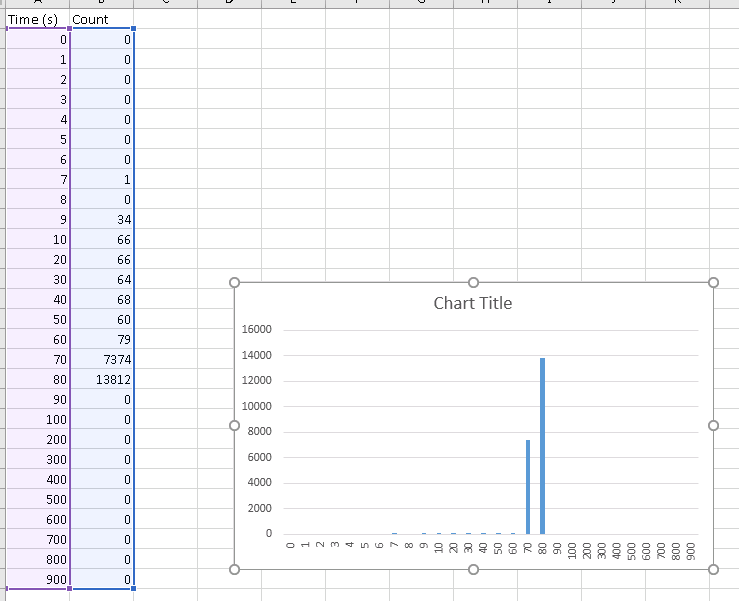
ProcessHistogram2: 0,0,0,0,0,0,0,1,0,34,66,66,64,68,60,79,7374,13812,0,0,0,0,0,0,0,0,0,0
I am trying to generate an aggregate (min,average and max) histogram chart over time where each comma separated value is a bucket.
I have some control over the data format, so I can rearrange the event formatting if it makes the search easier.
Doing it in excel would result in something like this:

- Mark as New
- Bookmark Message
- Subscribe to Message
- Mute Message
- Subscribe to RSS Feed
- Permalink
- Report Inappropriate Content

Try this
Name=123 Host=ABC | rex "ProcessHistogram2\:\s(?<ph>[^\s]+)" | eval times="0,1,2,3,4,5,6,7,8,9,10,20,30,40,50,60,70,80,90,100,200,300,400,500,600,700,800,900" | makemv ph delim="," | makemv times delim="," | eval z=mvzip(times, ph) | mvexpand z | rex field=z "(?<t>[^\,]+)\,(?<ph>.*)" | table _time t ph | chart values(ph) as ph over t by _time
http://docs.splunk.com/Documentation/Splunk/6.4.3/SearchReference/Chart
- Mark as New
- Bookmark Message
- Subscribe to Message
- Mute Message
- Subscribe to RSS Feed
- Permalink
- Report Inappropriate Content
Try this
Name=123 Host=ABC | rex "ProcessHistogram2\:\s(?<ph>[^\s]+)" | eval times="0,1,2,3,4,5,6,7,8,9,10,20,30,40,50,60,70,80,90,100,200,300,400,500,600,700,800,900" | makemv ph delim="," | makemv times delim="," | eval z=mvzip(times, ph) | mvexpand z | rex field=z "(?<t>[^\,]+)\,(?<ph>.*)" | table _time t ph | chart values(ph) as ph over t by _time
http://docs.splunk.com/Documentation/Splunk/6.4.3/SearchReference/Chart
- Mark as New
- Bookmark Message
- Subscribe to Message
- Mute Message
- Subscribe to RSS Feed
- Permalink
- Report Inappropriate Content
When I try this I get an table with only time stamps in it and no data in the ph column. I removed the chart command as it was returning no data for me to inspect.
- Mark as New
- Bookmark Message
- Subscribe to Message
- Mute Message
- Subscribe to RSS Feed
- Permalink
- Report Inappropriate Content
Try this search "as-is". This is a run-anywhere sample. See if this gives you the desired results
| makeresults | eval ph="0,0,0,0,0,0,0,1,0,34,66,66,64,68,60,79,7374,13812,0,0,0,0,0,0,0,0,0,0" | eval times="0,1,2,3,4,5,6,7,8,9,10,20,30,40,50,60,70,80,90,100,200,300,400,500,600,700,800,900" | makemv ph delim="," | makemv times delim="," | eval z=mvzip(times, ph) | mvexpand z | rex field=z "(?<t>[^\,]+)\,(?<ph>.*)" | table _time t ph | chart values(ph) as ph over t by _time

Join the Splunk Community Slack to learn, troubleshoot, and make connections with fellow Splunk practitioners in real time!
Join Splunk User Groups to connect and learn in-person by region or remotely by topic or industry.
[Puzzles] Solve, Learn, Repeat: Matching cron expressions
Design, Compete, Win: Submit Your Best Splunk Dashboards for a .conf26 Pass
May 2026 Splunk Expert Sessions: Security & Observability
